

VIETour Overnights: generating the monthly file for Vienna statistics
How to generate the monthly CSV file of overnights (arrivals and nights by origin) with SmartPMS to be uploaded to the Vienna City VIETour portal: who can use it, how guests and nights are counted, how origin is classified, and what to do with unclassified guests.
You are in the right place if…6 cases
- “How do I prepare the VIETour file for Vienna”
- “Many guests appear as Unknown 4002 in the VIETour file”
- “The Download VIETour CSV button is disabled”
- “The VIETour report says it is only available for Austrian properties”
- “Nächtigungsdaten Wien Export”
- “Are options declared in VIETour?”
Where to find it
The report can be opened from the Report > VIETour Overnights menu. It is visible to users with the view statistics permission and is available for properties located in Austria: for a property in another country, the report displays an error message.
Purpose
Properties in Vienna must report guest arrivals and overnights to the City (via the VIETour portal) every month, broken down by origin. This report prepares the CSV file to be uploaded to the portal.
SmartPMS does not send anything automatically: you download the file and upload it yourself to the VIETour portal by the 5th of the following month.
How it works
Filters
The screenshots in this guide show the interface in German, the language usually used by Vienna properties. The main items are: Unterkunft (Property), Monat (Month), Anwenden (Apply), Ankünfte (Arrivals), Übernachtungen (Overnights), Nicht zuordenbare Gäste (Unclassified guests), Zu vervollständigende Reservierungen (Reservations to be completed), CSV herunterladen (Download CSV).

- Property: one property per file.
- Month: defaults to the previous month; you cannot choose months after the current one.
The report is generated by clicking Apply.
Which stays are declared
- Only confirmed reservations. Cancelled reservations are not considered.
- Options and pending reservations are not declared: they appear in the "Unconfirmed stays excluded from the declaration" box, with the number of stays and overnights they would represent. If the guests actually stayed, confirm the reservation and regenerate the report.
- If a guest changes room during the stay, the stay is not counted twice.
How arrivals and overnights are counted
- People: all guests in the reservation, including infants (the exemption for minors concerns the City tax, not the statistics). If multiple people are registered in the Check-in card, it counts the number of registered people.
- Arrivals: each person counts as 1 in the month of check-in. A stay that started in the previous month does not generate arrivals.
- Overnights: people × nights falling within the month. The check-out night does not count.
Example: a stay from September 30th to October 3rd counts as 1 arrival and 1 night per person in September, and 0 arrivals and 2 nights per person in October.
How origin is classified
The statistics use the guest's main residence (Country and city), not their citizenship. Data is read from the reservation and the Check-in or Self Check-in card.
- For foreign countries, the VIETour country code is used.
- Austria and Germany are declared by region (e.g., Wien, Steiermark, Bayern, Berlin). If the guest chose the region during registration, that value is used; otherwise, the region is derived from the city name.
- Guests who cannot be classified (missing or unrecognized country, missing or unrecognized city, no personal data) are declared with the code 4002 "Unbekannt", so the total still matches the actual occupancy.
Result and checks
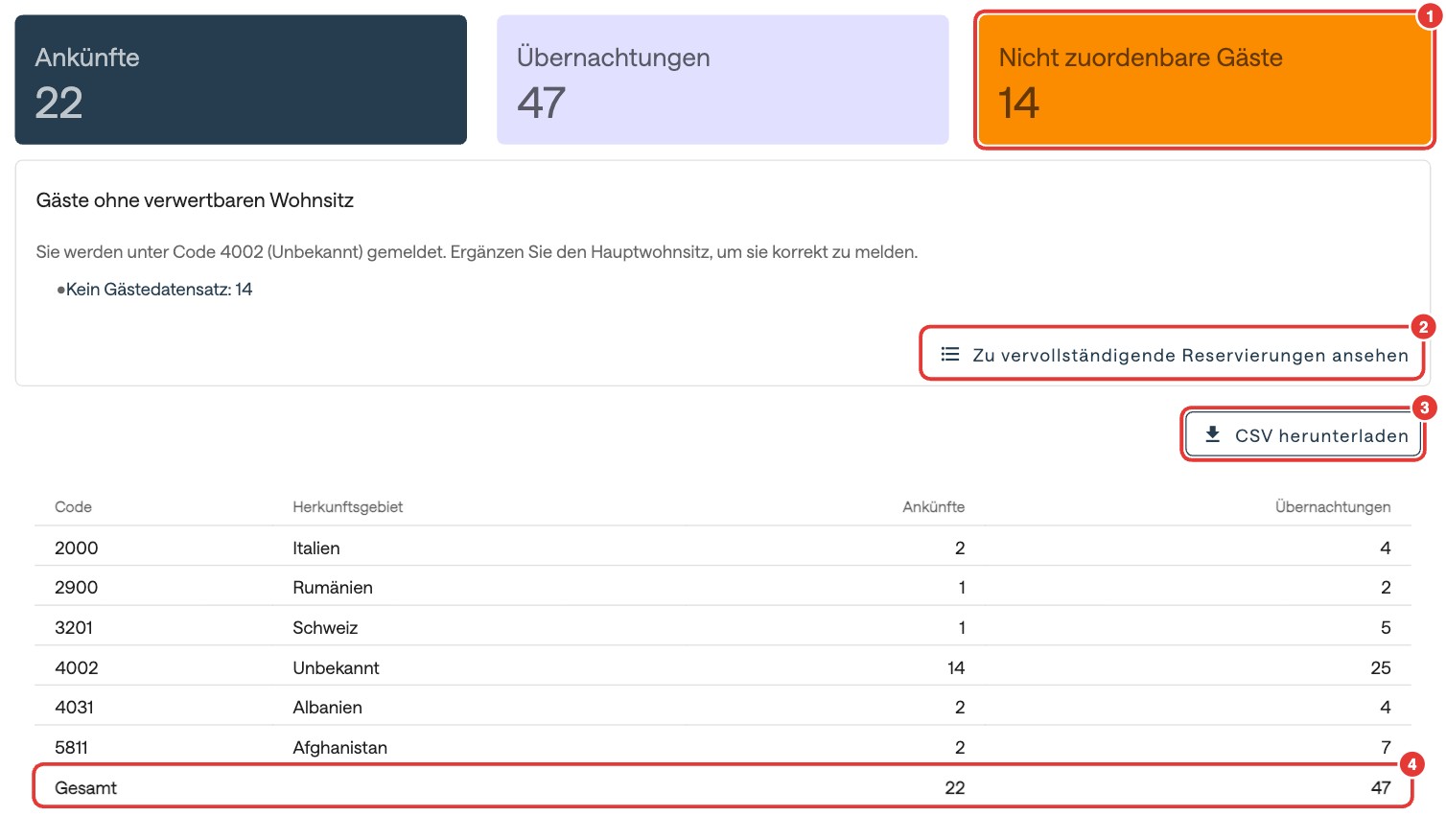
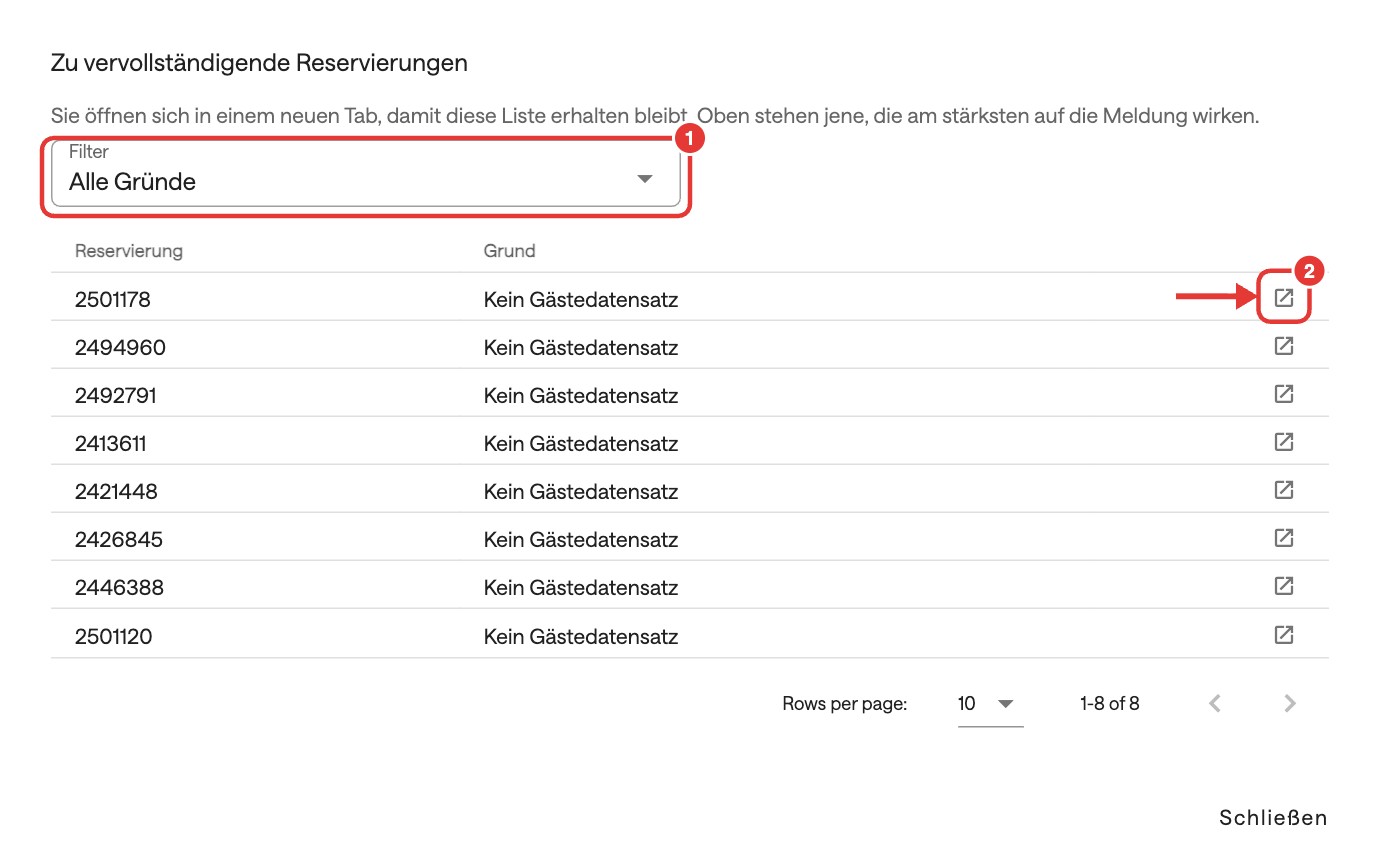

Below the boxes, you will find the table by origin. The "Reservations to be completed" list shows up to 50 reservations with residence data to be completed, sorted by impact and filterable by reason; each one opens in a new tab.
Before downloading, the report verifies that the file is acceptable by the portal. If it finds a problem (e.g., a month without overnights or the region recognition service temporarily unavailable), it displays the "VIETour would reject this file" box and disables the download. Guests in 4002 do not block the download.
The file
The file is named VIETour_Naechtigungsdaten_<property>_<YYYY-MM>.csv and is ready for upload: columns Ländercode, Land, Ankünfte, Übernachtungen, one row for each origin with at least one overnight. The file does not contain amounts.
How to use it
- Open Report > VIETour Overnights.
- Choose the property and the month, then click Apply.
- If Unclassified guests is greater than 0, open Reservations to be completed and complete the guests' country and city of residence.
- If there are unconfirmed stays where guests have stayed, confirm those reservations.
- Regenerate the report and click Download CSV.
- Upload the file to the VIETour portal by the 5th of the month.
Things to know
- Month without overnights: the file cannot be generated; a declaration of an empty month (Leermeldung) must be made on the VIETour portal.
- Guests residing in Vienna: they are declared with the Wien region code, not excluded.
- Austrian or German guest without city: ends up in 4002 even if the country is correct, because the region is required.
- Difference with the Nationality Report: that report uses nationality, this one uses residence, so the numbers do not match.
- To collect residence data directly from guests, configure the required fields in the Self Check-in.
Frequently asked questions
1Is the file sent automatically to the City of Vienna?
No. SmartPMS prepares the CSV file, which you must upload yourself to the VIETour portal by the 5th of the following month.
Related guides
Configuration
How it works
Configuration
Configuration
How it works
How it works