

Management control: profitability by property (revenues, costs, and margin)
How to read the Management control report: for each property, it shows revenues net of VAT, costs (OTA commissions, dynamic costs, housekeeping, property costs with Host competence), and margin. It is the Host's income statement and is distinct from the Management report and Revenue Share, which instead calculate the owner's share.
You are in the right place if…5 cases
- “In management control, dynamic costs are zero”
- “Property costs do not appear in management control”
- “Management control does not match the management report”
- “How does management control calculate the margin”
- “Do management control revenues include cleaning?”
Where to find it
The report is opened from the Report > Management control menu. It is visible to users with the view statistics permission and shows only the properties to which the user has access.
What it is for
Management control provides the profitability of each individual property, comparing revenues and costs over a period. It is a summary income statement from the perspective of the person managing the property and bearing its costs (the Host).
It is not a cash closing and does not calculate what is due to the owner: for this, there are the Management report and the Revenue Share.
How it works
Filters
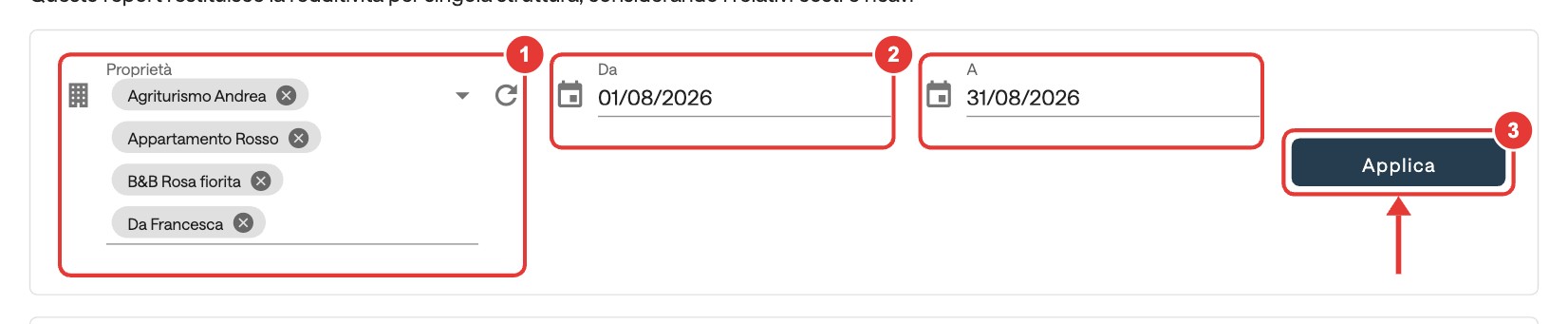
- Property: one or more properties (mandatory).
- From / To: mandatory. When you choose the start date, the end date is set to the last day of that month.
Bookings considered
Only Confirmed bookings that have at least one night in the period are considered. The reference is the nights of stay: a stay spanning two months is divided between the two periods based on the nights.
Columns
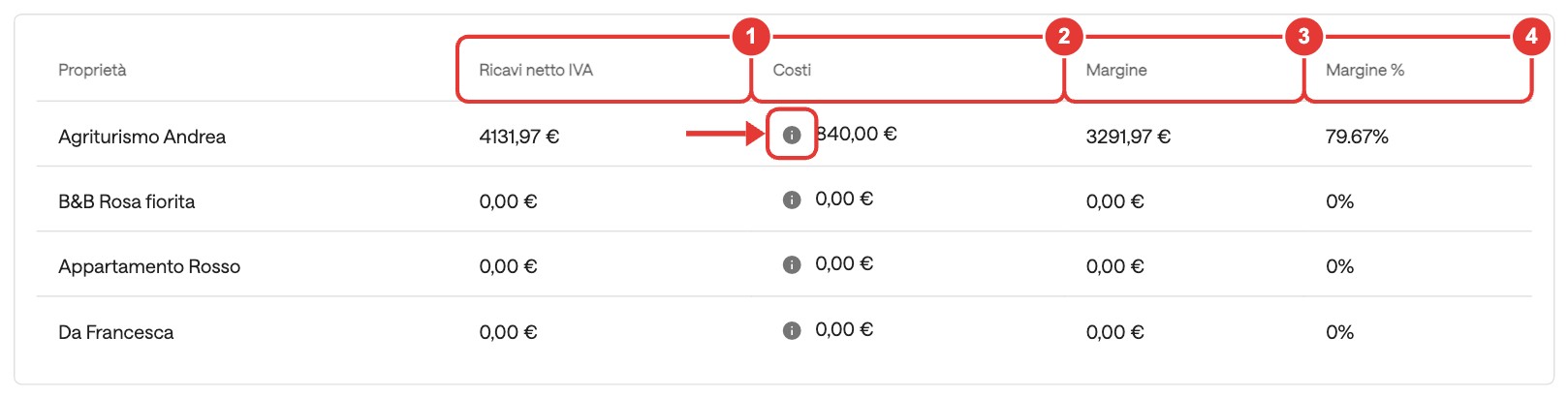
The report shows one row per property, in alphabetical order:
- Revenues net of VAT: stay price of the nights in the period plus the cleaning fee, net of the VAT rate set on the property. Extras and City tax are not included. If the property does not have a VAT rate, the amount remains gross.
- Costs: sum of OTA commissions, dynamic costs, housekeeping costs, and property costs.
- Margin: Revenues net of VAT − Costs.
- Margin %: Margin ÷ Revenues × 100.
Cost breakdown
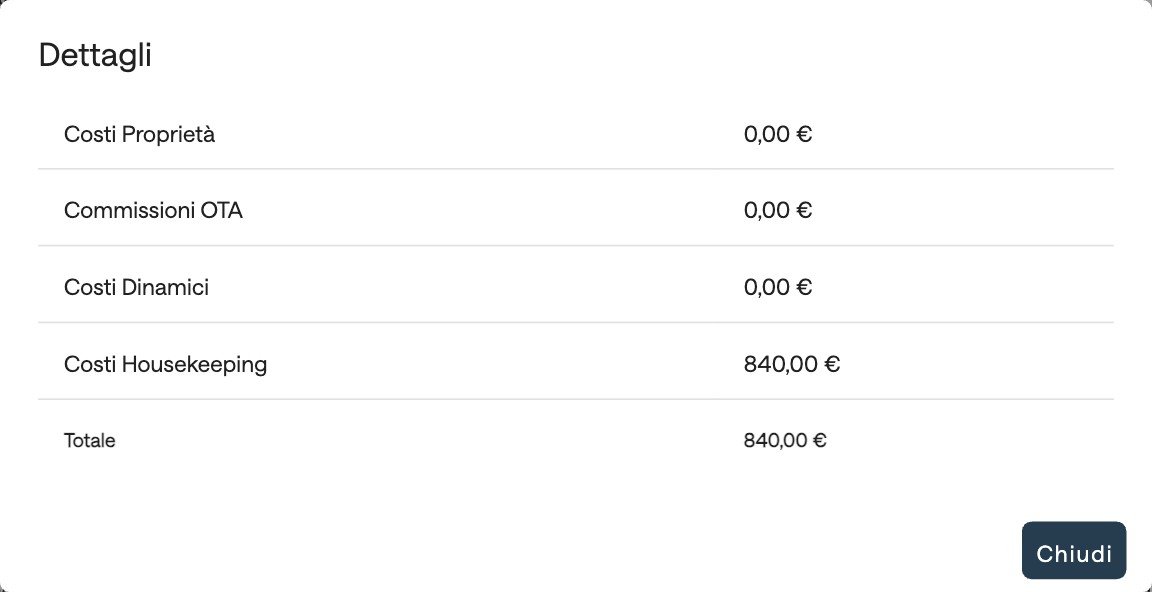
By clicking the icon next to Costs, you can see what they consist of:
- Property Costs: the costs of the property with Host competence whose start date falls within the period. They are counted in full in the period in which they begin.
- OTA Commissions: the booking commission, distributed in proportion to the nights falling within the period.
- Dynamic Costs: the dynamic costs generated on bookings in the period, only with Host competence.
- Housekeeping Costs: the cost of cleaning tasks linked to the bookings considered.
The report has no export or print function.
How to use it
- Open Report > Management control.
- Select one or more properties.
- Set From (the To date is set to the end of the month, you can change it).
- Click Apply.
- Click the icon next to Costs to see the breakdown.
Things to know
- Host or Owner competence: this report only considers costs with Host competence. Costs with Owner competence end up in the Management report or Revenue Share. If you want to see all costs here, set the competence to Host in the property cost settings.
- After a cost change: if you modify a dynamic cost or a cleaning rule, the costs of existing bookings must be recalculated with the Regenerate button in the cost (or housekeeping) settings.
- Net and gross: revenues are net of VAT, while commissions and costs are the amounts as recorded.
- Costs over multiple months: a property cost that covers a year but starts in January weighs entirely on January.
- Unlinked cleaning: cleaning tasks not linked to a confirmed booking are not included in the calculation.
Frequently asked questions
4Why are Dynamic Costs or Property Costs at 0?
Management control only considers costs with Host competence. If your costs have Owner competence, they do not appear here. Change the competence in the property cost settings and then click Regenerate to recalculate the costs on existing bookings.
Do revenues include extras and City tax?
No. Revenues are the stay price of the nights in the period plus the cleaning fee, net of the VAT set on the property. Extras and City tax are excluded.
I modified a dynamic cost but the report does not change: why?
Dynamic costs are generated on bookings at the time of calculation. After changing a rule, click Regenerate in the cost settings to update existing bookings.
Related guides
How it works
Configuration
Configuration
How it works
How it works
How it works