

Booking Report: amounts and bookings by source and creator
How to read the Booking Report: number of bookings, room amount, nights, and No-show grouped by source (channel) and by the user who created the booking, based on the check-in date.
You are in the right place if…6 cases
- “How many bookings have I received from each channel”
- “The amount for OTA does not include cleaning fees”
- “The booking report does not match the Revenues report”
- “I do not see the box by source”
- “I only see totals and not individual bookings”
- “iCal bookings all appear as Direct”
Where to find it
The report is opened from the menu Report > Booking Report. It is visible to users with the permission to view statistics. The By Source box appears only if the user can also see the booking sources.
What it is for
The Booking Report shows how many bookings with check-in in the period arrived from each channel (Source) and from each user who entered them (Creator), with amount, nights, and No-show. It is used to understand the channel mix and staff performance.
How it works
Filters
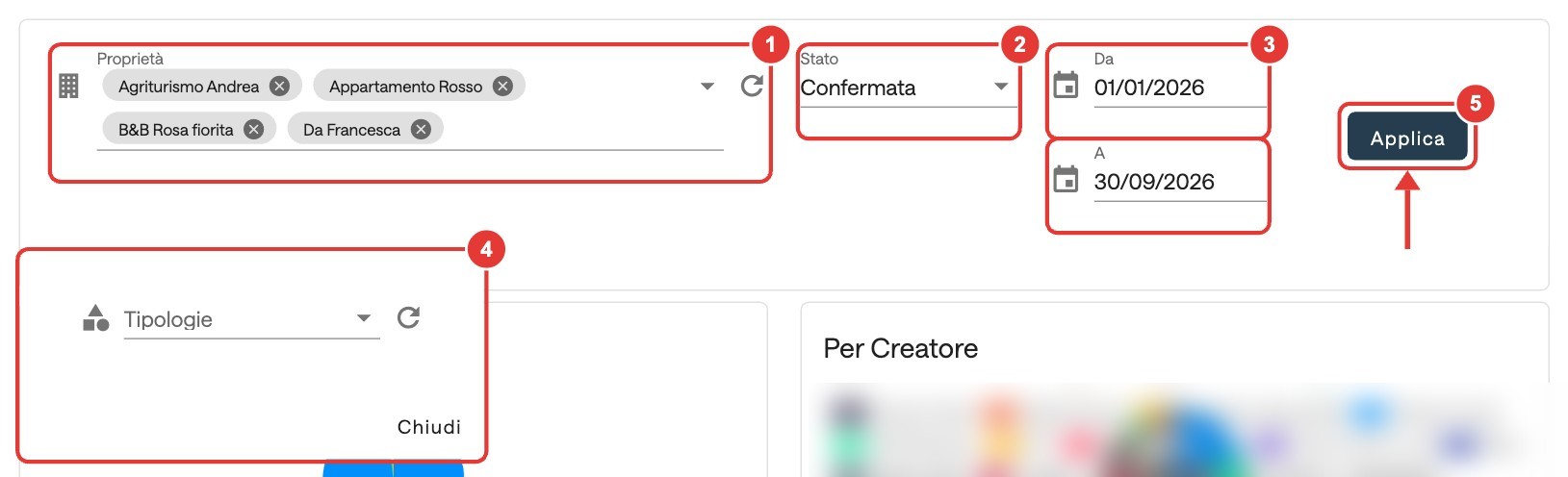
- Property: mandatory, even more than one.
- Status: a single choice between Confirmed, Cancelled, and Pending. Default is Confirmed.
- From / To: mandatory. They refer to the check-in date of the bookings.
- Types (in additional filters): available after choosing the properties.
Which bookings it counts
The bookings with check-in between From and To (inclusive), in the chosen status. Blocks and options are not counted. Bookings split across multiple units are counted only once.
Columns
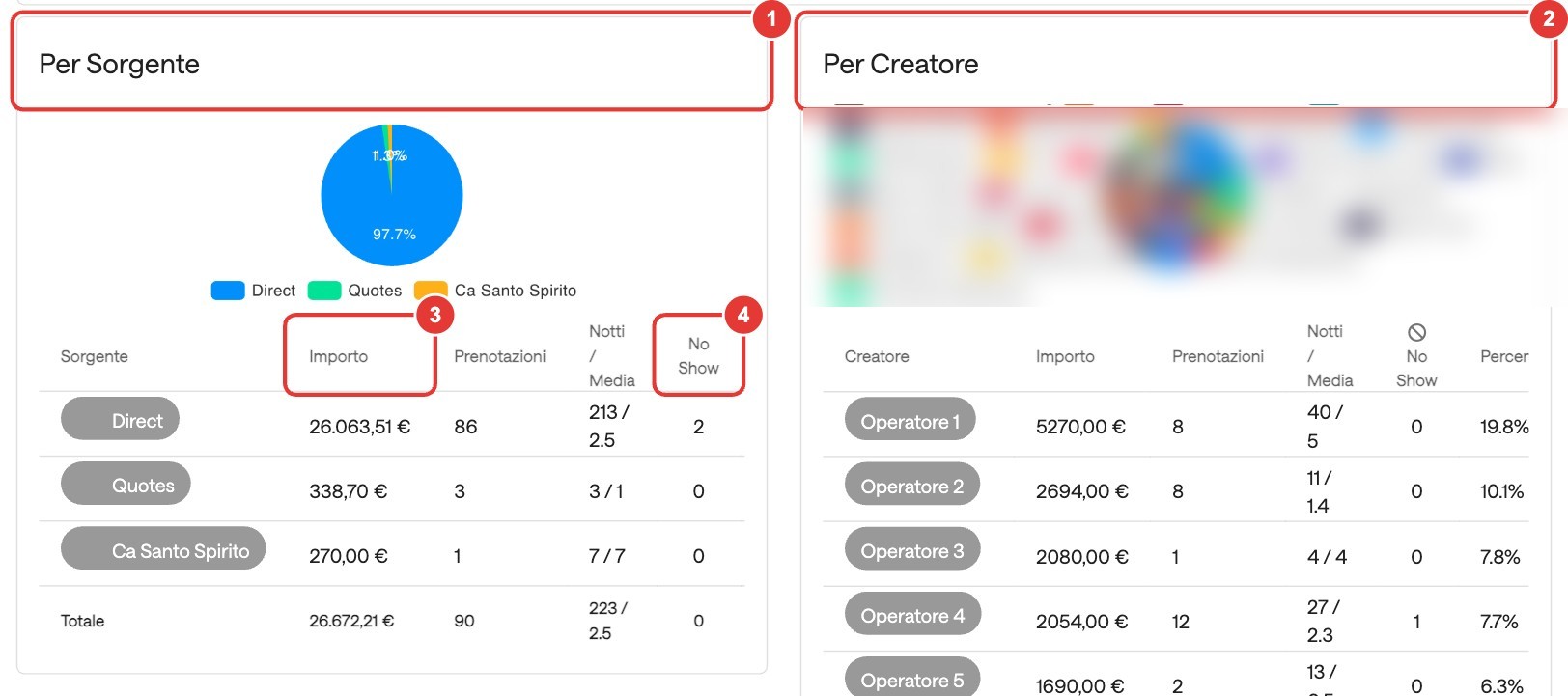
- Source / Creator: the source channel or the user who created the booking.
- Amount: the sum of the Room Price of the bookings. It does not include extras or City tax; OTA commissions are not subtracted.
- Bookings: number of bookings.
- Nights / Average: total nights and average length of stay. All nights of a booking are attributed to the check-in period.
- No Show: bookings cancelled due to No-show with check-in in the period.
- Percentage: share of the row amount on the total.
Each box has a pie chart built on the Amount. The report has no export or print function.
How to use it
- Open Report > Booking Report.
- Select one or more properties with the same currency.
- Choose the Status (usually Confirmed).
- Set From and To remembering that they refer to the check-in.
- If you want, filter by Types.
- Click Apply and read the By Source and By Creator boxes.
Things to know
- Check-in date: a booking from April 30th to May 5th weighs entirely on April. This is why the numbers are different from the Revenues Report, which divides revenues by the month of competence of the night.
- Amount: it is the Room Price, so it is different from the booking total when there are cleaning fees, extras, or City tax.
- Source of manual or iCal bookings: they end up in the source chosen at the time of entry (e.g., Direct). If you want to distinguish them, choose the correct source when you create the booking.
- No Show: they are counted based on the cancellation reason, regardless of the Status selected in the filter.
- Currency: with multiple properties, the report uses the currency of the first one and sums the amounts without conversion.
- Update: the result remains cached for about an hour, so a change just made may appear with a slight delay.
- Detail of individual bookings: this report is only aggregated. For the list of bookings, use the export from the Bookings list.
Frequently asked questions
3What date is the period based on?
On the check-in date. The entire stay, including nights, is attributed to the period in which the arrival falls.
Can I export the report or see individual bookings?
No, the report is only aggregated and has no export. For the list of bookings, use the export from the Bookings list, filtering by arrival date.
Can I create custom sources to distinguish bookings imported from iCal?
It is not possible to create custom sources. Manual or imported bookings end up in the source chosen at the time of entry.
Related guides
How it works
Configuration
How it works
How it works
How it works
How it works