

Split payment invoices
How to issue an electronic invoice in SmartPMS using the split payment regime (art. 17-ter) for Public Administrations, investee companies, or subsidiaries: defining the scope in the customer profile, Split Payment switch, VAT handling, mandatory wording, totals, and the difference between PA recipients and split payment.
You are in the right place if…10 cases
- “How do I create a split payment invoice?”
- “I need to invoice a public entity with split payment”
- “I don't see the Split Payment or VAT exigibility option on the invoice”
- “What does the blue split payment message on invoices mean?”
- “The split payment invoice does not show the mandatory wording in the PDF”
- “Invoicing an investee company with split payment: the SDI requires a 6-character code”
- “For split payment, should I use 0% VAT and N6.9 nature?”
- “The split payment invoice shows as unpaid even if the customer paid the taxable amount”
- “Where do I set that a customer is subject to split payment?”
- “VAT exigibility S split payment electronic invoice”
With split payment (art. 17-ter of DPR 633/1972), the customer pays you only the taxable amount and pays the VAT directly to the Tax Authority. In SmartPMS, the split payment is automatically activated on the invoice when the customer is within the scope of the split payment at the document date.
This guide explains how to register the scope in the customer profile and how the invoice appears. For tax rates and exemption natures, see the guide "VAT in fiscal documents: rates, exemption natures, and City tax". Whether a customer falls within the scope is determined by regulations: verify this with your accountant and the customer.
Before you start
- Split payment applies only to Italian electronic invoices and credit notes.
- The customer must be of type Company: the split payment panel does not appear for Private customers.
- Public Administration and split payment are two different things. The Public Administration Recipient field determines the electronic invoice format (6-character office code for PA, 7-character recipient code for others). The Split payment setting determines if the VAT is in split. An investee or subsidiary company is not a PA but may be within the scope: for them, set PA Recipient = No and Split payment = Within the scope. PA recipient data (IPA office code, CIG, CUP) are explained in the guide "How to issue an electronic invoice and send it to the SDI".
1. Register the split payment scope on the customer
- Go to Customers and click Add, or open an existing customer with the pencil icon.
- Select Company and fill in the Company Name, VAT ID, and Unique Code.
- Open the Split payment panel and choose the status:
- Not declared: initial value. It does not mean "outside": for Public Administrations, split payment applies regardless.
- Within the scope: the customer is subject to split payment.
- Outside the scope: the customer is not subject to split payment.
- With Within the scope, fill in the mandatory fields:
- Inclusion title: Public administration (art. 17-ter c.1); Economic public entity, special company or ASP (c.1-bis lett. 0a); Foundation with public endowment fund ≥ 70% (c.1-bis lett. 0b); De facto controlled company (c.1-bis lett. a); De jure controlled company (c.1-bis lett. b); Investee company ≥ 70% (c.1-bis lett. c); Principal's certification (c.1-quater).
- Evidentiary reference: the document proving inclusion (e.g., MEF list or customer certification), maximum 255 characters.
- Indicate the Effective date and, if the customer leaves the scope, the Termination (first day outside the scope).
- In the Electronic invoicing (SdI) panel, set Public Administration Recipient: Yes, Public Administration for a PA, No for an investee or subsidiary company.
- Click Create (or Edit) at the top right to save.
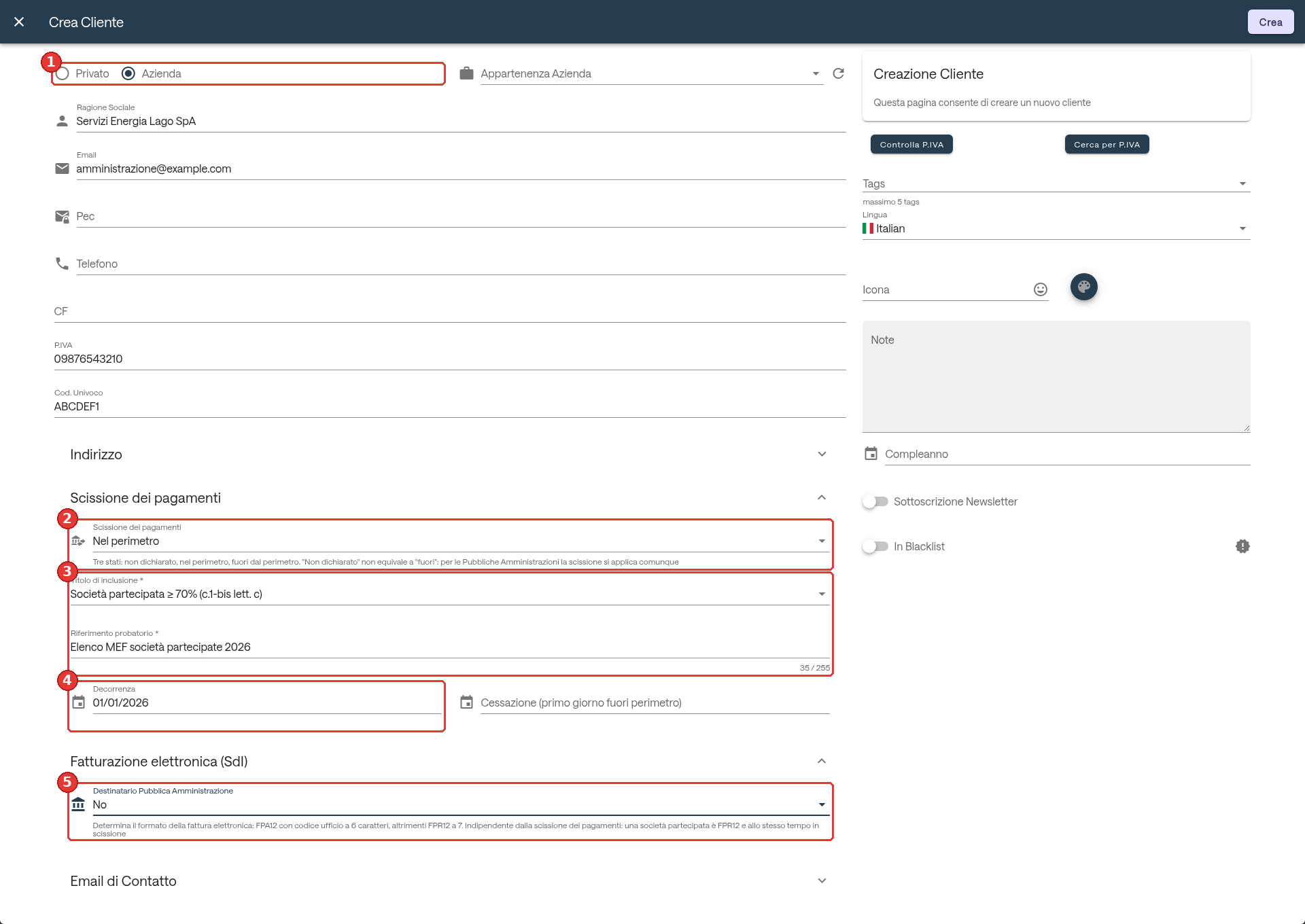
Expected outcome: on invoices with a date between the Effective date and Termination, the customer will be within the scope.
After issuing split payment invoices to a customer, do not change their type (Company/Private) or the scope retroactively: customer data is re-read when the invoice is exported or sent.
2. Create the invoice
- Go to Accounting > Fiscal Documents, click Add and choose Invoice (or create the invoice from the booking account).
- Choose the customer in the Customer field.
- In the Details tab, enter the rows with the normal VAT rate (e.g., 10%) and the VAT-inclusive prices: taxable amount and VAT are calculated automatically. Do not zero out the VAT and do not use exemption natures (e.g., N6.9): with split payment, the VAT remains on the invoice and the SDI rejects split invoices with N6 nature.
- If the customer is within the scope at the document date:
- in the Split payment box, the Recipient within the scope chip appears;
- in the Purchase order panel, the Split Payment switch is already active ("If active, VAT exigibility is set to S on all rows");
- below the rows, the wording "Operazione soggetta a scissione dei pagamenti – art. 17-ter DPR 633/1972" appears;
- the totals become VAT in split (paid to the Tax Authority by the customer), Document total, and Net payable to the supplier.
- If needed, fill in the Date, Order number, and Job code fields in the Purchase order panel (for PAs, also CIG and CUP).
- Click Create and send the invoice to the SDI as usual.
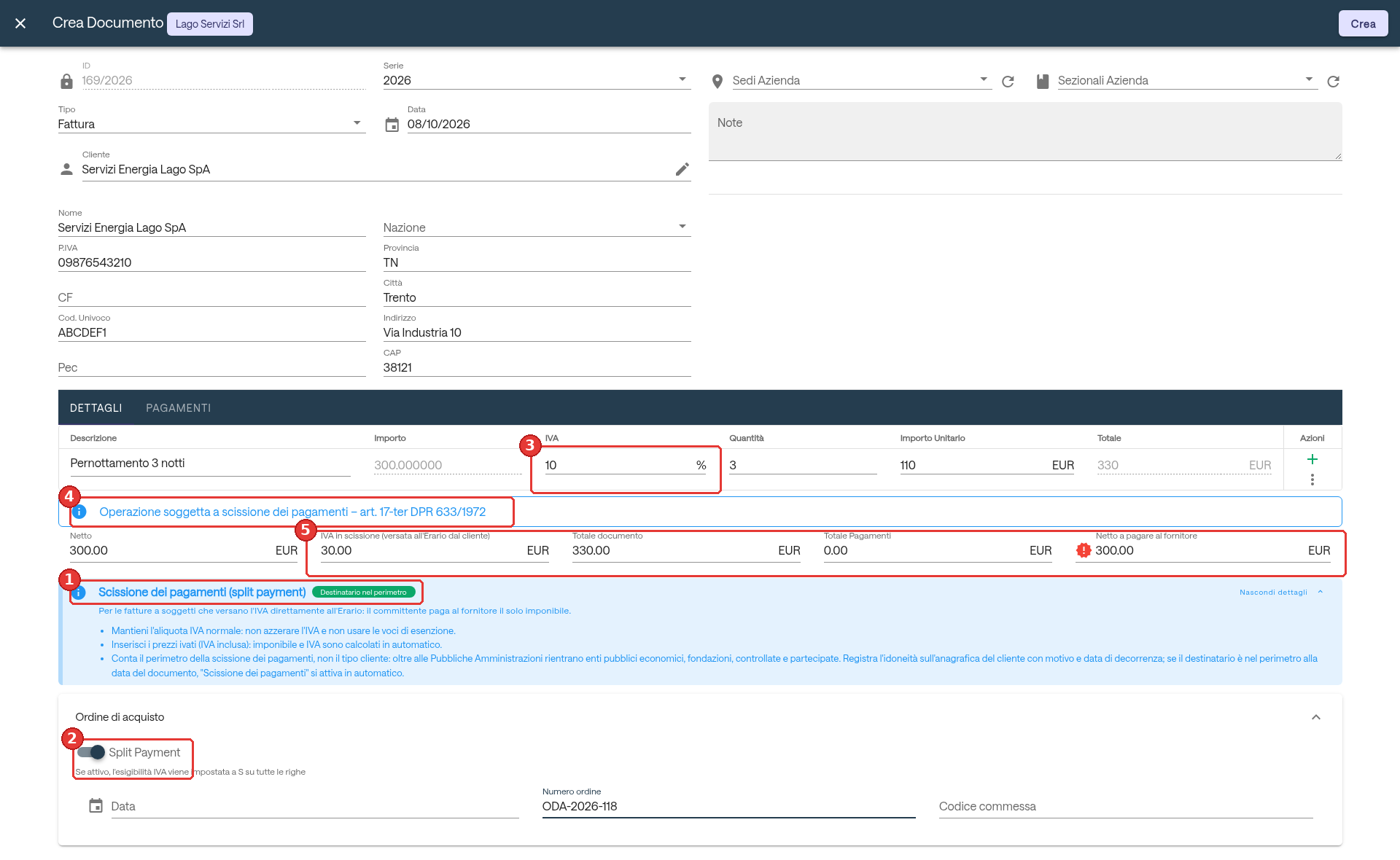
Example: stay of €330 VAT included at 10% → Net €300.00, VAT in split €30.00, Document total €330.00, Net payable to supplier €300.00. The invoice is considered settled when you record the payment of the taxable amount only (€300.00).
In the electronic invoice, VAT exigibility is set to S (split payment) and the format follows the Public Administration Recipient field. In the ⋮ menu of each row, VAT collection appears as "Controlled by the document's split payment".
For documents dated from January 1, 2027, the wording cites the Consolidated VAT Act (Legislative Decree of January 19, 2026, no. 10).
The blue "Split payment" box appears on all invoices
The Split payment box is a reminder and appears on all Italian invoices, even for private customers. With Show details, you can see the rules: keep the normal VAT rate, enter VAT-inclusive prices, register the scope on the customer profile. The invoice is in split payment only if the Split Payment switch is active in the Purchase order panel and the wording about split payment appears below the rows.
Messages you may see
- "The recipient is not within the split payment scope at the document date: register the eligibility on the customer profile to activate split payment": register the scope on the customer (point 1) or check the Effective date and Termination.
- "Split payment is allowed only on Italian electronic invoices and credit notes issued to subjects within the split payment scope: in addition to Public Administrations, also economic public entities, foundations, subsidiaries, and investee companies. Register the eligibility on the customer profile, with reason and effective date".
- "Split payment applies only to Italian electronic invoices and credit notes. Remove it, or change the document type".
For SDI rejections and resending, see the guide "Electronic invoice rejected or not sent to the SDI: statuses, common errors, and how to resend it".
Frequently asked questions
5What does the blue "Split payment" message on my invoices mean?
It is a reminder that appears on all Italian invoices, even for private customers: it does not mean the invoice is in split payment.
The invoice is in split payment only if the Split Payment switch is active in the Purchase order panel and the wording "Operazione soggetta a scissione dei pagamenti – art. 17-ter DPR 633/1972" appears below the rows. If the customer is not within the scope, the switch does not appear and you can ignore the box.
I don't see the Split Payment option on the invoice: how do I activate it?
The Split Payment switch appears only if the customer is within the split payment scope at the invoice date. Check:
- The customer is of type Company (the panel is not there for Private customers).
- In Customers > customer > Split payment panel, the status is Within the scope, with Inclusion title and Evidentiary reference filled in.
- The Effective date is before or equal to the invoice date and there is no past Termination date.
- The document is an Italian electronic invoice or credit note.
Once the customer is saved, create the invoice again: the switch will activate automatically.
For split payment, should I use 0% VAT and N6.9 nature?
No. With split payment, the VAT remains on the invoice: keep the normal rate (e.g., 10%), enter VAT-inclusive prices, and do not use exemption natures. The SDI rejects split payment invoices with N6 nature.
If the customer is within the scope, SmartPMS automatically sets VAT exigibility to S on all rows.
The split payment invoice does not show the wording about split payment in the PDF: is it valid?
Yes. The valid fiscal document is the electronic invoice transmitted to the SDI, which contains the VAT exigibility in split payment. The PDF is a courtesy copy and shows the document Notes and the footer.
If you want the wording on the PDF as well, write it in the Notes field of the invoice before creating it (e.g., "Operazione soggetta a scissione dei pagamenti – art. 17-ter DPR 633/1972"). Do not use the custom footer: it would appear on all property documents.
Do not use Export XML to check the invoice before sending: after exporting, sending to the SDI from SmartPMS is blocked (see the guide on the Accounting Marketplace).
I need to invoice an investee company with split payment: the SDI says the code must be 6 characters. What am I doing wrong?
An investee or subsidiary company is not a Public Administration: it has a 7-character recipient code and the invoice follows the ordinary format. In the customer profile:
- In the Electronic invoicing (SdI) panel, set Public Administration Recipient = No.
- In the Split payment panel, set Within the scope, with Inclusion title (e.g., "Investee company ≥ 70%") and Evidentiary reference.
- Save and create the invoice again.
Related guides
Configuration
Configuration
FAQ
Configuration
Configuration
Activation