

Guest Forecast Report: occupancy, arrivals, and revenue per night
How to read the Guest Forecast Report: for each night of the period (defaulting to the next 30 days), it shows occupied rooms vs. sellable rooms, guests (Pax), occupancy, revenue per night, ADR, and, if requested, lost revenue from cancellations. It is used to plan staff, supplies, and operations.
You are in the right place if…6 cases
- “How many rooms and guests will I have in the coming days”
- “What is lost revenue in the forecast report”
- “The Pax in the forecast is different from the guests present”
- “Are pending bookings included in the forecast?”
- “The total rooms in the forecast exceed my rooms”
- “Occupancy over 100% in the forecast report”
Where to find it
The report is opened from the menu Report > Guest Forecast Report. It is visible to users with the dedicated permission, assigned by default to Manager, Advanced User, and Staff roles.
What it is for
The report shows day by day, for a future period, how many rooms will be occupied, how many people will be in the property, and how much those nights will generate. It is used to plan staff, supplies, and operations. It does not list guest names: for a nominative list of a date, use Guests Present.
How it works
Filters
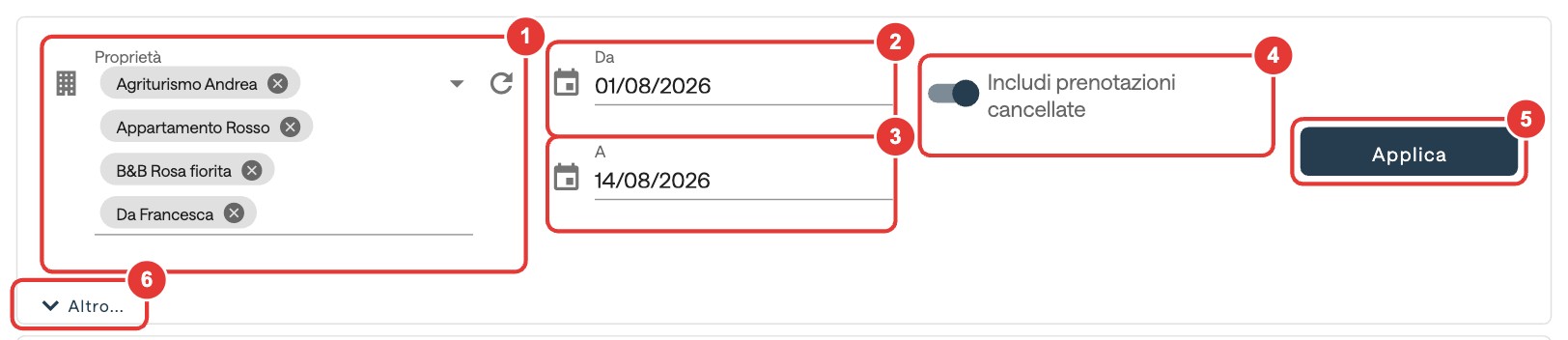
- Properties: one or more (mandatory).
- From / To: default from today to 30 days. If you change From, To resets to 30 days later. You can also choose past dates.
- Include cancelled bookings: adds the Lost Revenue column.
- Types (in extra filters): limits the report to one or more types.
Which bookings it counts
- Confirmed bookings and pending bookings.
- Options are not counted as occupied rooms.
- A booking occupies the nights from the arrival day (included) to the departure day (excluded).
Columns
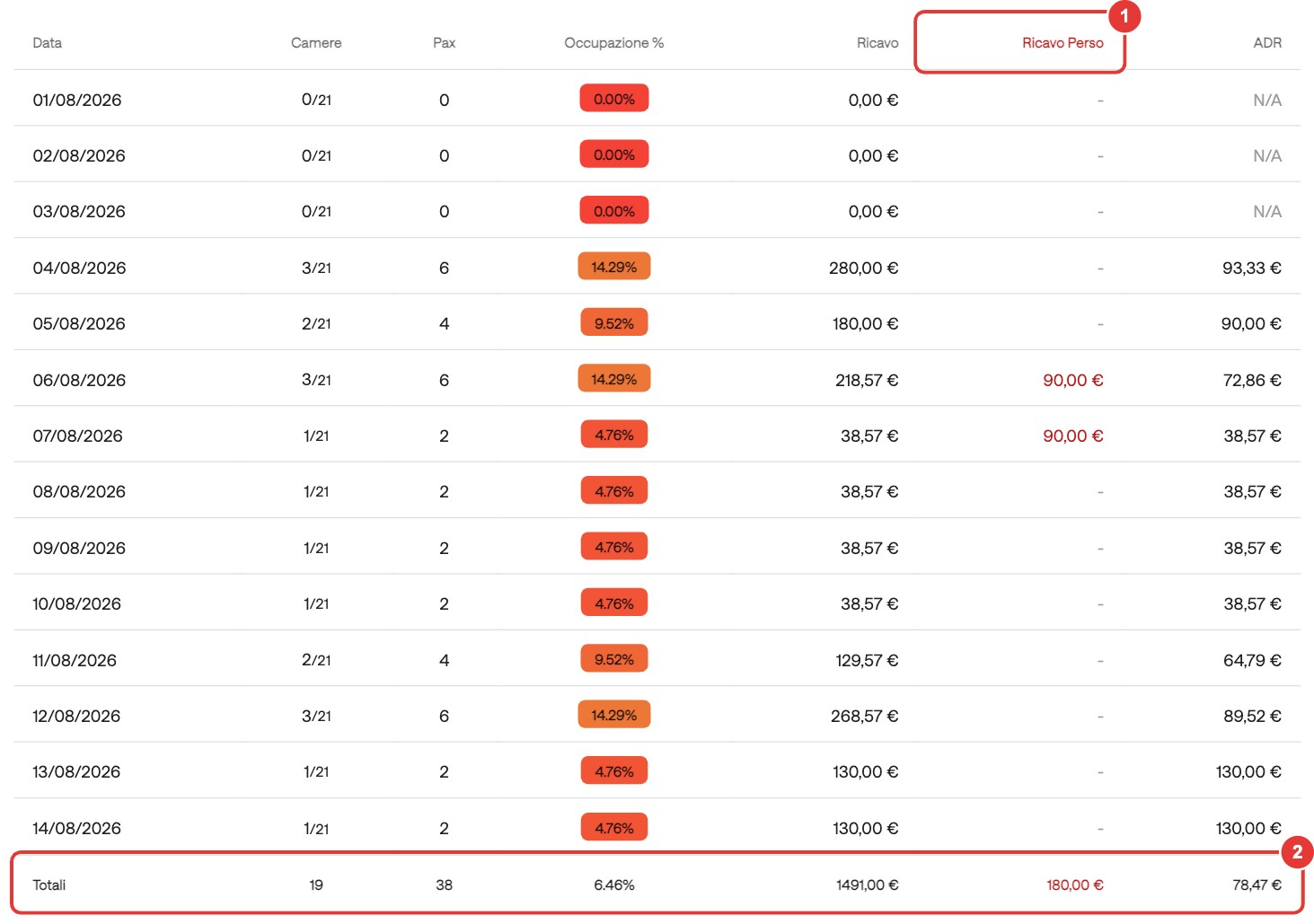
- Date: one row for each night.
- Rooms: "occupied/total". The total is the property's units minus those with a block that night; jolly units are not counted.
- Pax: number of guests indicated in the bookings present that night.
- Occupancy %: occupied rooms ÷ total rooms, with color from red to green.
- Revenue: sum of the price per night of the bookings (from the Daily Detail). It does not include cleaning fees, City tax, and extras; OTA commissions are not subtracted.
- Lost Revenue: visible with the cancelled bookings toggle. It is the value of the nights of cancelled bookings, which are not counted in Rooms and Pax.
- ADR: Revenue ÷ occupied rooms. If there are no occupied rooms, "N/A" appears.
Totals Row
- Rooms and Pax are sums of nights (room-nights and guests), not distinct rooms or guests.
- Occupancy is the simple average of the daily percentages.
- ADR is the total revenue ÷ occupied room-nights.
Export and print
Export downloads an Excel file with one row per night and the totals row. Print opens a landscape preview.
How to use it
- Open Report > Guest Forecast Report.
- Choose one or more properties.
- If you need a period other than the next 30 days, change From and To.
- If you want, open the extra filters and choose the Types.
- Activate Include cancelled bookings to see the Lost Revenue.
- Click Apply, then Export or Print.
Things to know
- Pending bookings: are counted as occupied rooms. If a pending booking is not confirmed, the forecast changes.
- Variable total rooms: units blocked that night are removed from the total.
- Occupancy over 100%: can happen with bookings on jolly units, in overbooking, or on blocked units.
- Total Rooms higher than your rooms: in the Totals row, rooms are room-nights for the period, not distinct rooms.
- Revenue at 0 with occupied rooms: the bookings for those nights do not have the price per night in the Daily Detail, for example after an import of historical data.
- Multiple properties: values are summed into a single table, without subdivision by property and without currency conversion.
- Difference with Guests Present: Guests Present is a nominative list for a single date; the Forecast Report aggregates a period in numbers, without names.
Related guides
How it works
How it works
How it works
How it works
How it works
How it works