

Room Sales by Referral: production and commissions by agency
How to configure agencies and referrals in SmartPMS and how to read the Room Sales by Referral report, which shows month by month and day by day how much each agency has produced, with estimated commission and net amount.
You are in the right place if…7 cases
- “What is the Referral field in the booking for?”
- “I would like to see the production and commissions by agency”
- “In the referral report, an agency has 0% commission”
- “The OTA commission changes by itself when I save the booking”
- “How do I identify bookings from agencies without a channel manager”
- “I cannot choose next year in the referral report”
- “I registered an agency as a customer and all its bookings end up in the same profile”
Where to find it
This report can be opened from the Reports > Room Sales by Referral menu. It is visible to users with the permission to view reservation amounts.
What a referral is
The referral indicates the agency (or partner) that brought you the reservation. It is different from the channel (the Source, such as Booking.com or Airbnb) and is mainly used for external agencies that are not connected via a Channel Manager.
Configuring agencies
Agencies are created once at the company level. The name you choose is the one you will see in the report and use in the Booking Engine link.
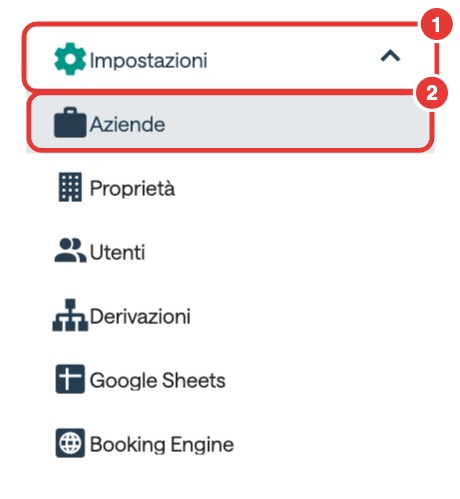
Create an agency for each partner from Settings > Companies > Company Settings > Agencies:
1. In the side menu, open Settings and choose Companies.
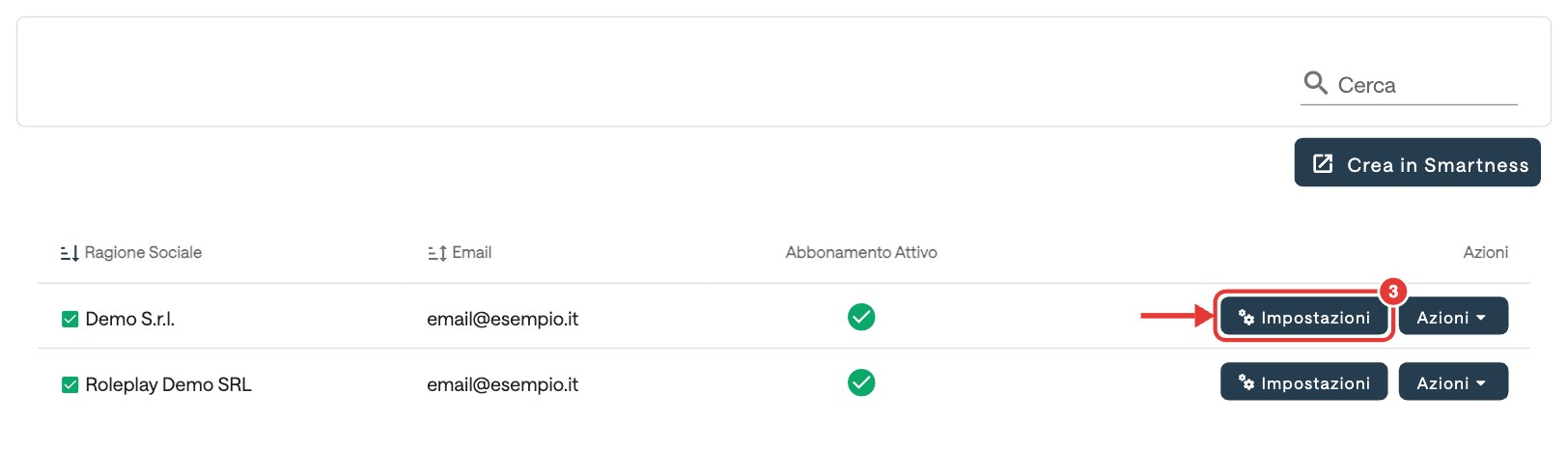
2. In your company's row, click Settings.
3. In the Channel manager section, under Agencies, click Configure.

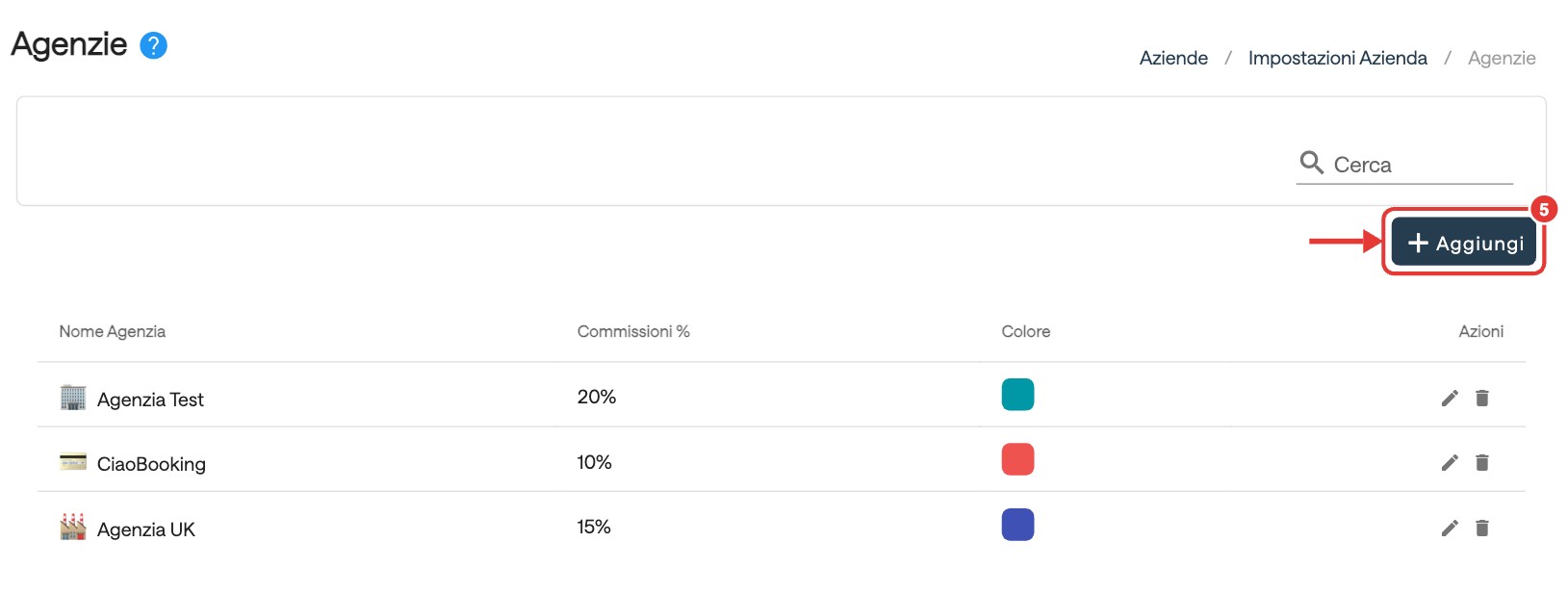
4. In the agency list, click Add.
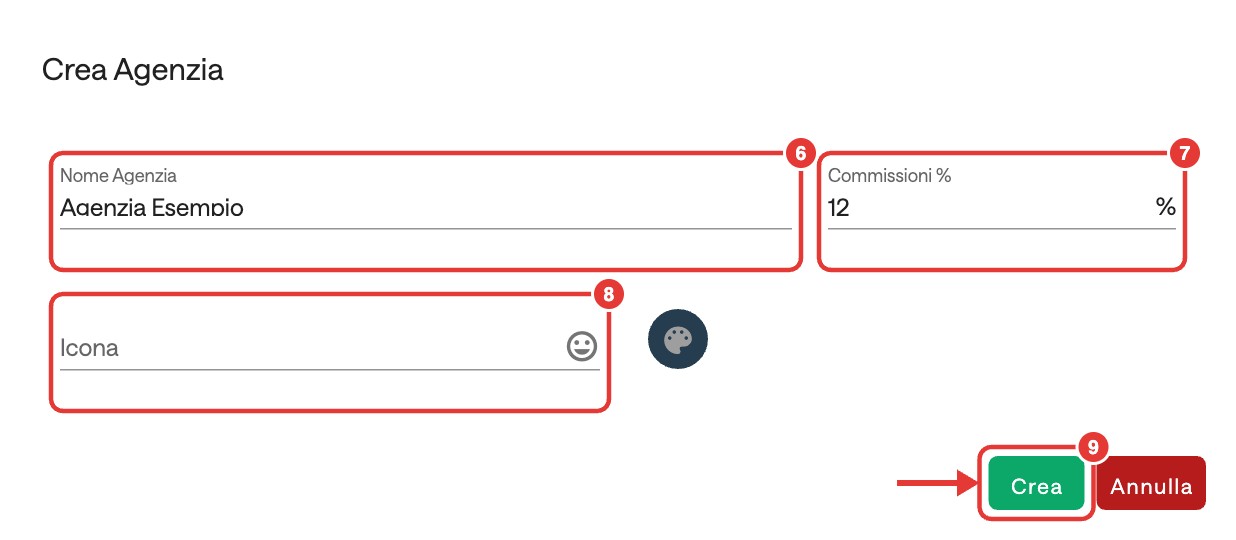
5. Enter the Agency Name and Commission %, choose whether you want an icon and a color, then click Create.
To change an agency's percentage or color, use the pencil icon in the Actions column.
Assigning a referral to a reservation
After creating the agencies, link the reservations they brought you to each respective agency.
A referral can be assigned in three ways:
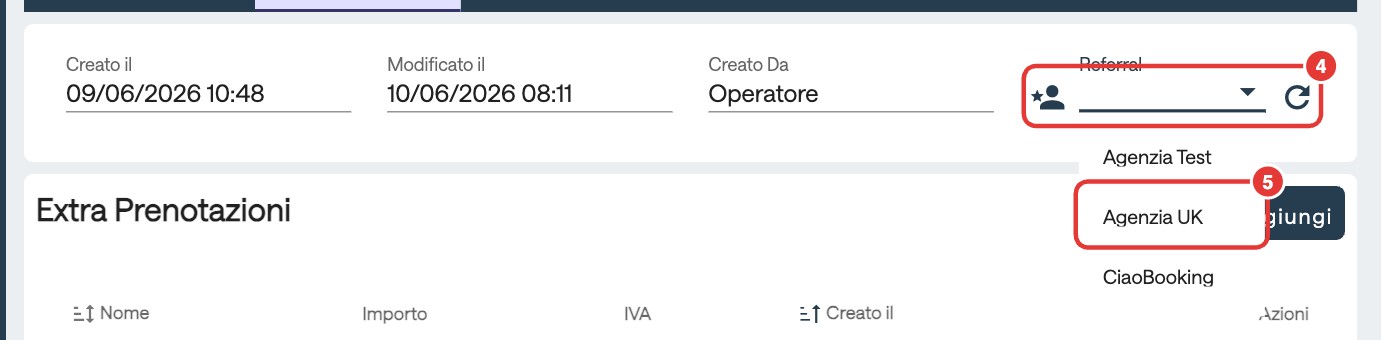
- from the reservation, Details tab, Referral field, by choosing one of the agencies (the field is visible to users with permission to view agencies);
- from the Booking Engine link, using the
refparameter; - via API, in the dedicated field.
The agency is linked to the reservation by name.
Manually associating an agency with a reservation
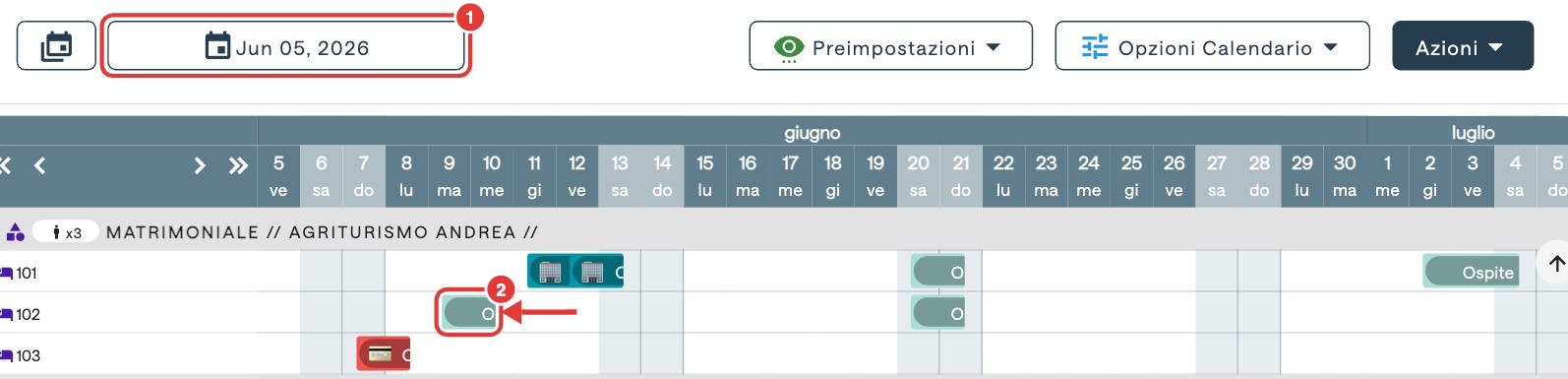
1. Open the Reservation Calendar, move to the reservation period using the date selector, and then click on the reservation.
2. In the reservation card, open the Details tab.

3. In the Referral field, choose the agency from the list.
4. Click Save and close.

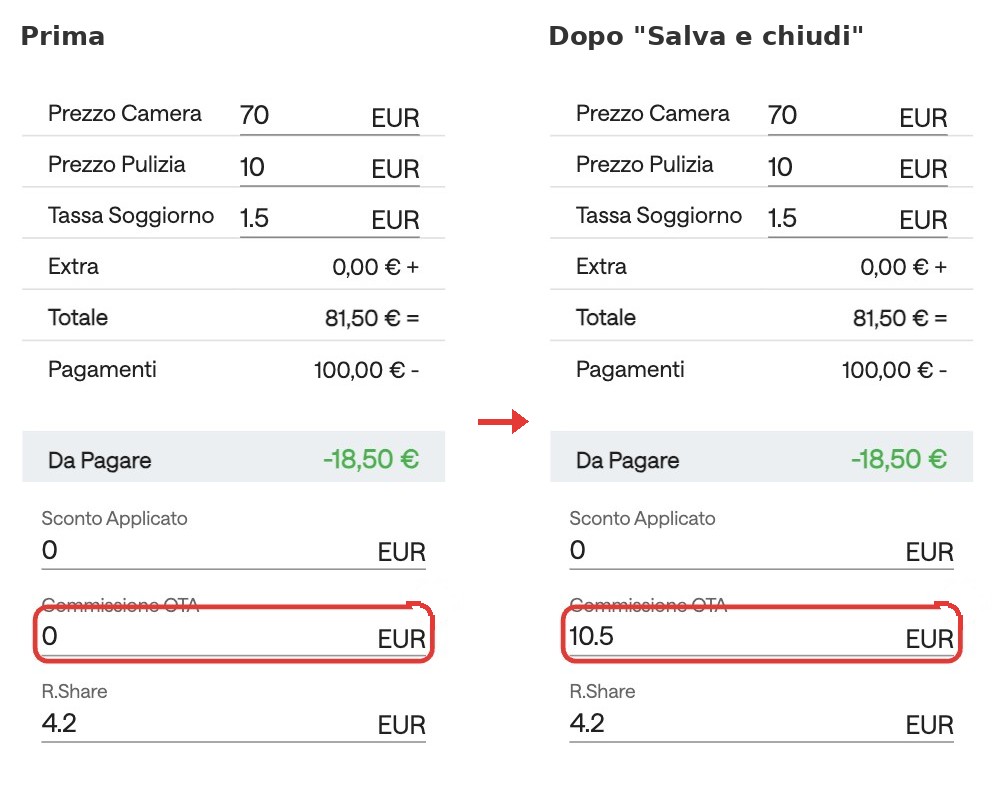
Upon saving, the reservation's OTA Commission automatically updates with the agency's percentage. In the example, the room price is €70 and the agency has 15%: the commission goes from 0 to €10.50.
From this moment on, the reservation appears in the Room Sales by Referral report, under the chosen agency.
Assigning the agency from the Booking Engine link
If the agency books through your Booking Engine, add the ref parameter with the agency name (written exactly as it appears in the agency list) to the link you provide them:
?ref=agencynameReservations made through that link will arrive with the Referral field already filled in.
Effect on the OTA commission
When a reservation has a referral, every time it is saved, its OTA Commission is recalculated as room price × agency commission %: cleaning fees and city tax are not included in the calculation. For this reason, as long as a referral is present, the OTA Commission cannot be edited manually.
How the report works
Filters

- Property: one or more properties.
- Year: from the current year to previous years.
- Date Reference: Check-in (default) or Check-out.
- Status: by default, only Confirmed.
What it calculates
- For each referral, it sums up the room price (excluding cleaning, extras, and city tax) of the reservations with that referral, within the chosen year and statuses.
- The entire amount of a reservation falls on the check-in (or check-out) date. It is not distributed across nights.
- Commission: total × current agency commission %.
- Net: total − commission.
- Reservation type: the report filters by status only. Options and blocks with a referral are counted if their status is among those chosen in the Status filter (Confirmed, Pending, Cancelled).
- Split reservations: each part is counted as a separate reservation, with its own amount.
Views, chart, and export
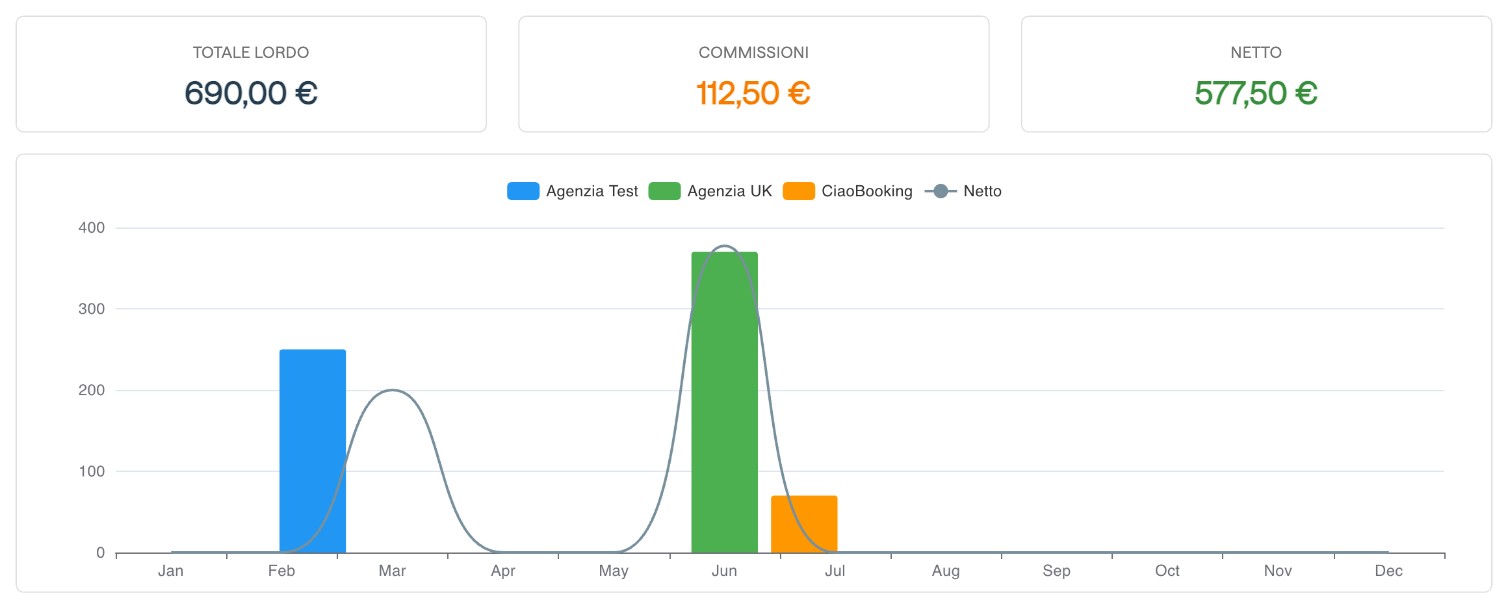

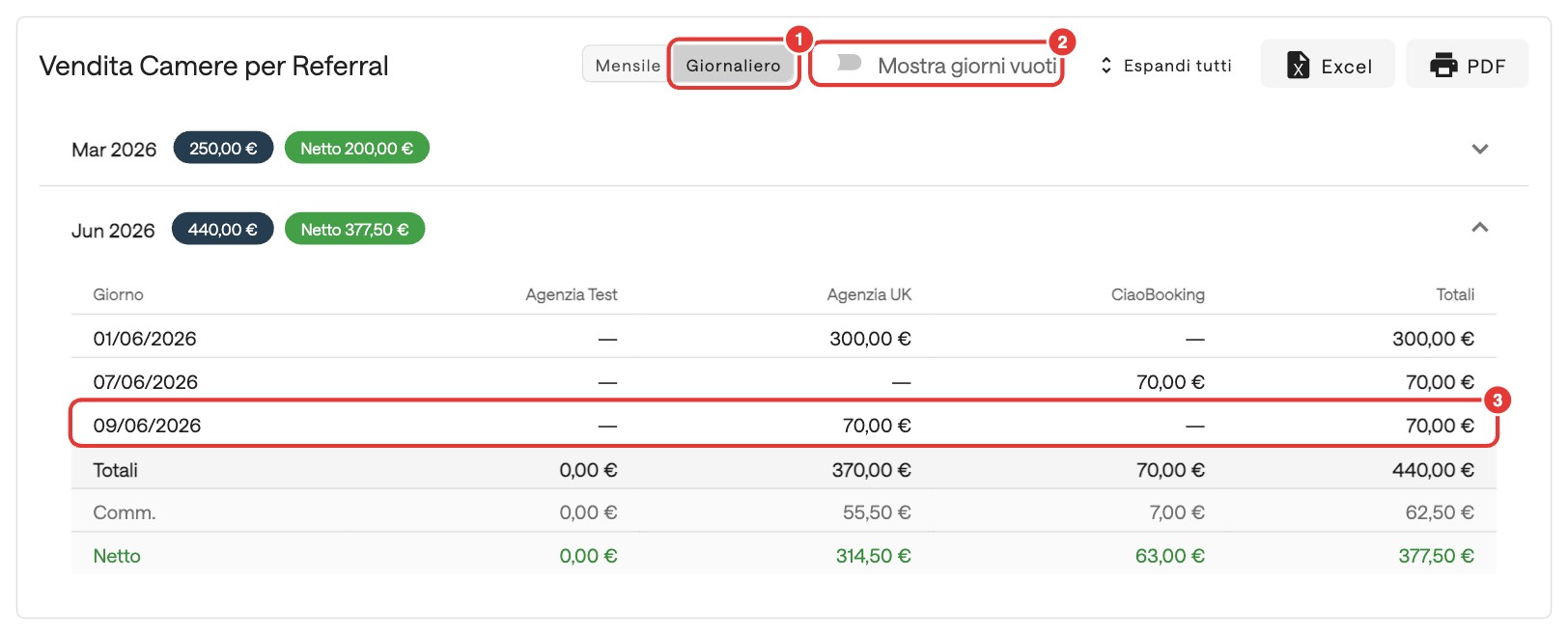
- Cards: Gross Total, Commissions, Net.
- Monthly View: one row per agency with months from January to December, totals, commissions, and net.
- Daily View: one panel per month, one row per day, and one column per agency. The Show empty days toggle adds days without sales.
- Chart: monthly bars of the top 5 agencies by revenue, with the net line.
- Export: Excel of the active view or PDF of the table.
How to use it
- Create agencies with their commission in Settings > Company > Agencies.
- Assign the Referral to agency reservations.
- Open Reports > Room Sales by Referral, choose the property, year, date reference, and statuses.
- Click Apply. Switch from the Monthly to the Daily view if you need details.
- Export to Excel or PDF.
Things to know
- Agency name: the link is established by name. If you rename an agency, already saved reservations retain the old name and appear in the report with a 0% commission.
- Percentage: the report uses the agency's current commission without decimals (for example, 15.8% becomes 15%). Therefore, it may differ from the OTA Commission saved in the reservation if you have changed the percentage in the meantime or if the percentage has decimals.
- Currency: amounts are shown in euros.
- Future years: the Year menu goes up to the current year.
Frequently asked questions
6What is the Referral field in the booking for?
It indicates the agency that brought the booking. It has two effects: it recalculates the booking's OTA Commission with the agency's percentage and feeds the Room Sales by Referral report. It is not just descriptive information.
Why does the OTA Commission change by itself when I save the booking?
If the booking has a referral, every time it is saved, the OTA Commission is recalculated with the agency's commission %. To enter a different commission, update the agency's percentage or remove the referral.
Are referral and channel the same thing?
No. The channel (Source) indicates where the booking comes from, for example, Booking.com or the Booking Engine; the referral indicates the agency or partner. For analysis by channel, use the Bookings Report.
How can I keep track of bookings from agencies without a channel manager?
Create the agency in Settings > Company > Agencies, assign the Referral to its bookings, and use this report or the filter in the Bookings list.
Can I use a customer profile for agency bookings?
No. The customer profile represents the guest (or the person booking) and collects all bookings linked to them: this is the intended behavior. For bookings brought by an agency, create the agency in Settings > Companies > Company settings > Agencies and assign it in the Referral field of the booking. As the customer, indicate the actual guest. For bookings already registered under the agency-customer, change the customer and set the Referral.
Why don't reservations for a room, a course, or an event with a referral appear in the report?
Check two things.
- Jolly units: reservations assigned to a unit with the Jolly option are not counted in any statistics, including this report. If you manage rooms, kitchens, or event spaces as jolly units, their sales will not appear by agency. To view them, use normal units, for example in a property dedicated to those spaces.
- Amount in extras: the report only sums up the room price. If the service is entirely entered as an extra and the room price is zero, the reservation value in the report is zero. Enter the service amount in the reservation price.
Related guides
Configuration
Configuration
Configuration
Configuration
How it works
How it works