

City tax report: how to read and use it for the declaration to the Municipality
How to use the Bureaucracy City tax report: filters, meaning of each column (Tax to be paid, taxable overnight stays, non-taxable and exceeding the maximum period), printing, using data for the declaration to the Municipality, and how to realign the report when a booking changes after check-in, using Regenerate from and Include already registered guests.
You are in the right place if…6 cases
- “The total of the city tax report is not equal to the overnight stays for the rate”
- “I extended the booking after check-in but the tax report does not update”
- “A booking does not appear in the city tax report”
- “Are overnight stays exceeding the maximum period nights or people?”
- “Which numbers from the report should I put in the declaration to the Municipality?”
- “How do I export or print the city tax report?”
The City tax Report summarizes, for the period you choose, how much city tax you need to pay to the Municipality, how many guests and overnight stays are subject to the tax, and how many are excluded. This is the data to be used for the periodic declaration and payment.
To read it correctly, it is useful to know where it gets the data from: the report does not look at bookings, but at registered check-ins, i.e., the guests entered in the Check-in tab of the booking (manually or via Self Check-in).
Where to find it
From the side menu, open Bureaucracy → City tax Report.
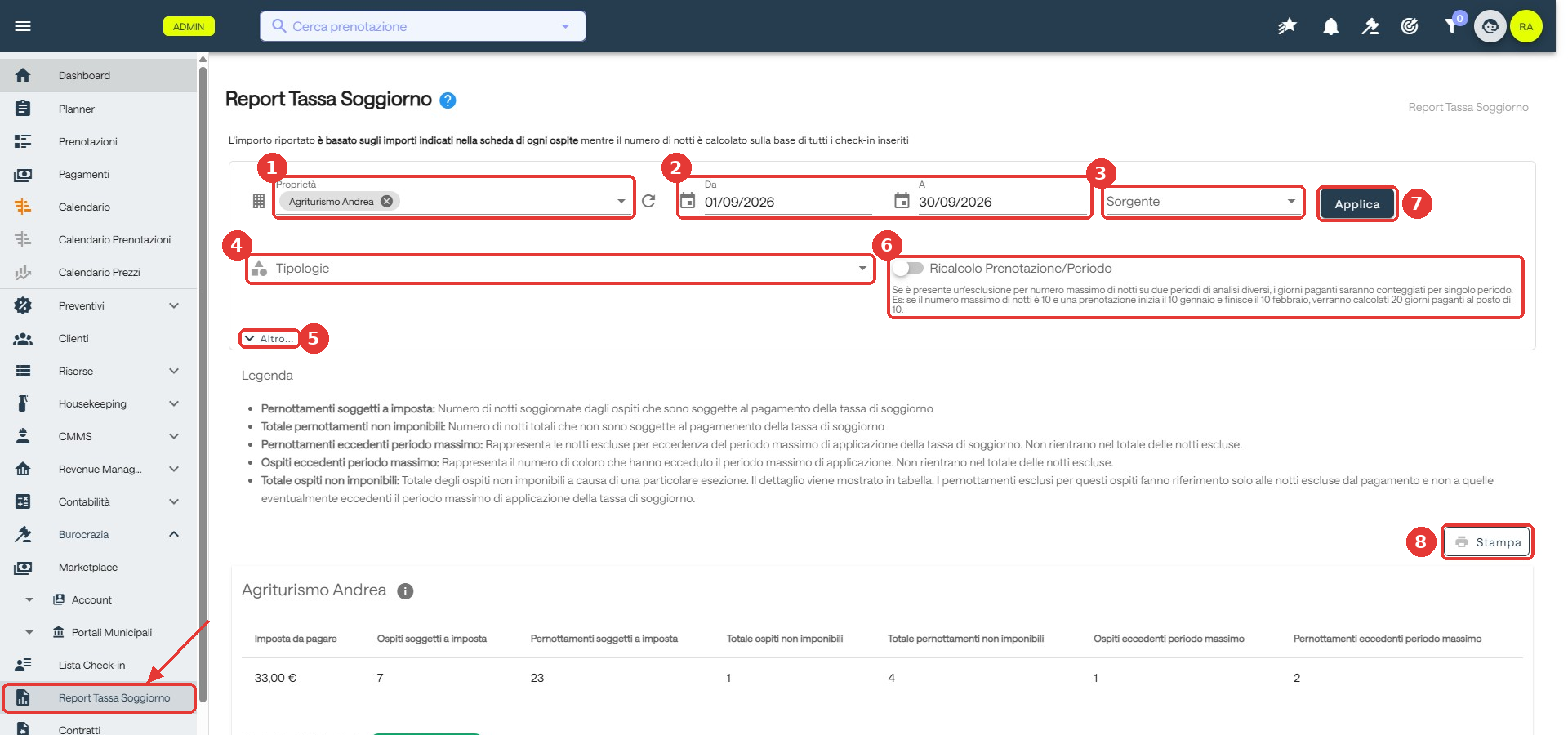
Filters, in the order shown in the image:
- Property: one or more properties. The report shows a separate box for each.
- From / To: the period to analyze, for example, a month.
- Source: limits the report to bookings from a specific channel. For the total to be declared, leave it empty.
- Types: limits the report to one or more unit types.
- Other…: opens the Unit filter, to analyze individual apartments or rooms.
- Booking/Period Recalculation: changes the way the maximum number of taxable nights is counted for stays spanning two periods (see FAQ).
- Apply: generates the report.
- Print: prints the report or saves it as a PDF.
Where it gets the data from
- Which stays: all registered check-ins that have at least one night in the chosen period. A stay that started before or ended after the period is included, but only for the nights that fall within the period.
- How many nights: nights are calculated from the check-in dates (Check-in and Check-out of the registration), not from the booking dates, within the configured Maximum applicable days.
- Which amount: for each guest, the report uses the amount saved in the City tax field of their profile. If a stay falls only partially within the period, the guest's amount is divided by the check-in nights and the report counts only the portion of the nights in the period.
- A booking without registered guests does not appear in the report, even if it has a tax amount in the totals.
How to read the result
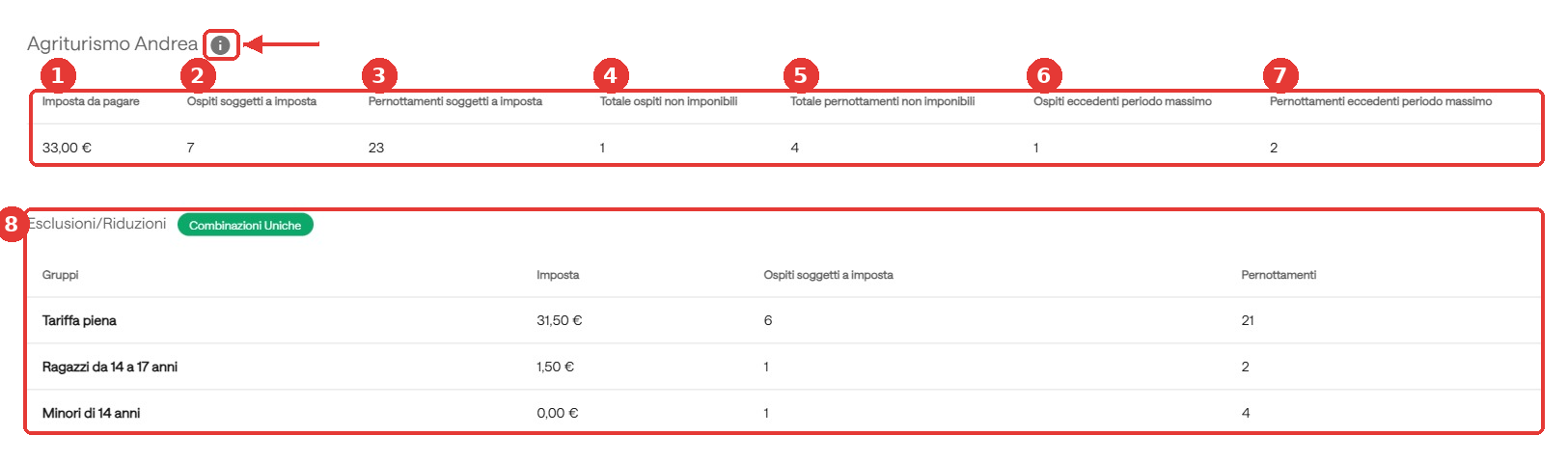
- Tax to pay: the sum of the amounts saved on guests, for the nights of the period. It is not the product of overnight stays × rate: reductions, manually modified amounts, and stays divided between multiple periods make it different.
- Guests subject to tax: guests with a tax amount greater than 0.
- Overnight stays subject to tax: the nights of the period for those guests (nights × guests).
- Total non-taxable guests: guests with an amount of 0 because they are exempt (e.g., minors, residents, tax paid by the portal).
- Total non-taxable overnight stays: the nights of the period for exempt guests.
- Guests exceeding maximum period: how many people exceeded the maximum number of taxable nights. This is a number of people.
- Overnight stays exceeding maximum period: the nights beyond the limit, multiplied by the check-in guests. This is a number of nights and is not included in the total of non-taxable overnight stays.
- Exclusions/Reductions (Unique Combinations): the same total divided by group: full-rate guests, guests with each reduction, and guests with each exclusion, with tax, guests, and overnight stays for each group. Each group takes the name (the Description) you gave to the rule in the tax settings; a guest to whom multiple reductions apply forms a group with the names of all of them. For an exclusion group, the tax is 0.
Example. Tax of €1.50 per guest per night, maximum 5 nights, minors under 14 exempt, and 50% reduction for ages 14 to 17. In September, there are four stays:
- 2 adults for 3 nights: 6 overnight stays, €9.00;
- 2 adults and an 8-year-old child for 4 nights: 8 subject overnight stays, €12.00, and 4 non-taxable overnight stays for the child;
- 1 adult for 7 nights: 5 subject overnight stays, €7.50, and 2 nights exceeding the maximum period;
- 1 adult and a 15-year-old teenager for 2 nights: 4 subject overnight stays, €3.00 + €1.50.
The report shows €33.00 in tax, 7 guests and 23 subject overnight stays, 1 guest and 4 non-taxable overnight stays, 1 guest and 2 exceeding nights. 23 × €1.50 would be €34.50: the difference of €1.50 is the teenager's reduction, visible in the dedicated row of the Exclusions/Reductions table.
Guest details
Click the i icon next to the property name to see the list of counted guests: first name, last name, country, tax amount (1), and status (2), with a checkmark for subject guests and an X for excluded ones.
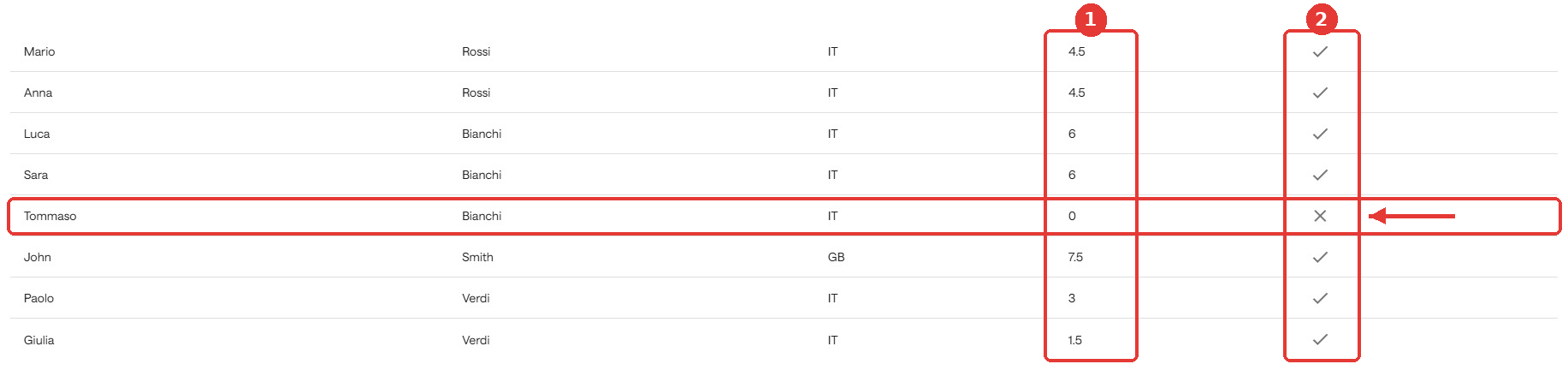
This is the first check to perform when a total does not add up: a guest with an amount different from the expected one, a missing guest, or a guest present twice can be seen immediately here.
Printing or saving the report
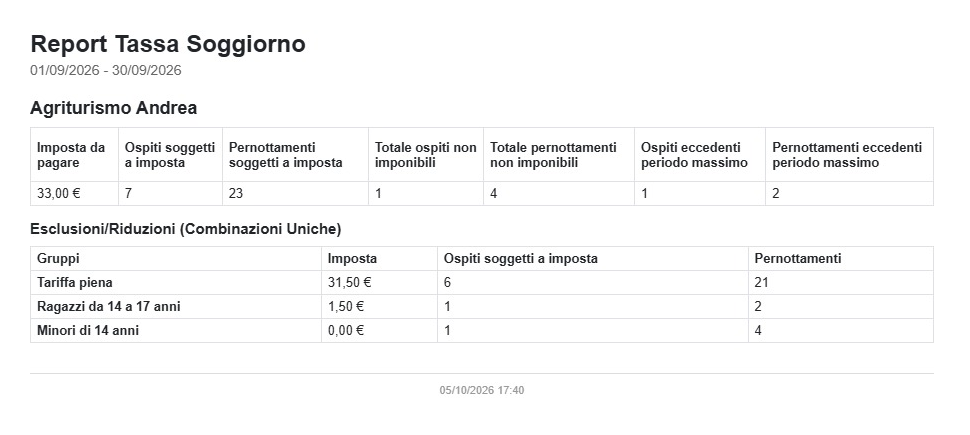
The Print button opens the browser print dialog with the period, the totals table, and the Exclusions/Reductions table for each property. To have a file to attach or archive, choose Save as PDF as the printer.
The report does not have an Excel export. If you need the list of check-ins with individual guests, use Export in Bureaucracy → Check-in List, keeping in mind that the Check-in List selects stays by arrival date and reports the tax for the entire stay (see FAQ).
Using data for the declaration to the Municipality
- Generate the report for the period requested by the Municipality (month, quarter, or year), selecting the property and leaving Source, Types, and Units empty.
- Leave Booking/Period Recalculation disabled, unless your Municipality's regulations require recounting the maximum number of nights in each declared period.
- Use Tax to pay as the amount to be paid.
- Use Overnight stays subject to tax and Guests subject to tax for taxable overnight stays and presences.
- For exemptions and reductions, use the totals of non-taxable items and the detail of the Exclusions/Reductions table, which separates each reason.
- If the form asks for overnight stays beyond the maximum limit, use Overnight stays exceeding maximum period (nights); if it asks for people, use Guests exceeding maximum period.
- Before declaring, open the guest details and verify that no registrations are missing and that the amounts are consistent.
When a booking changes after check-in
Each guest's amount is calculated when the guest is registered in the check-in, with the tax configuration and check-in dates at that moment. If you later modify the booking duration (extend it, shorten it, or move the dates), the check-in dates and the amounts already saved on the guests do not update automatically: the report continues to use the registered dates and amounts.
To realign the data:
- Correct the check-in dates. Open Bureaucracy → Check-in List (or the Check-in tab of the booking), click Actions → Edit, and set Check-in and Check-out to the actual stay dates, then click Save. Correct the dates, not the amount: the report counts nights based on the dates.
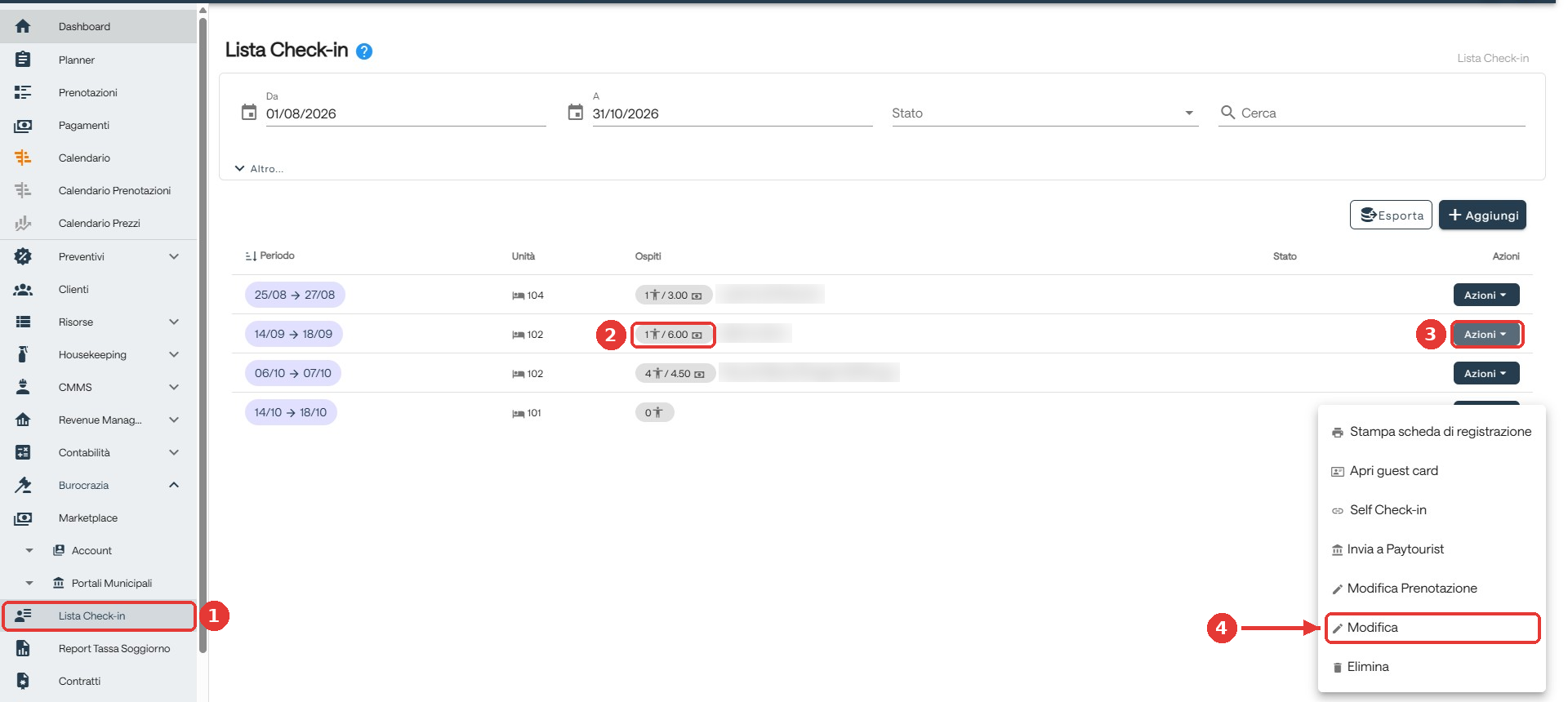
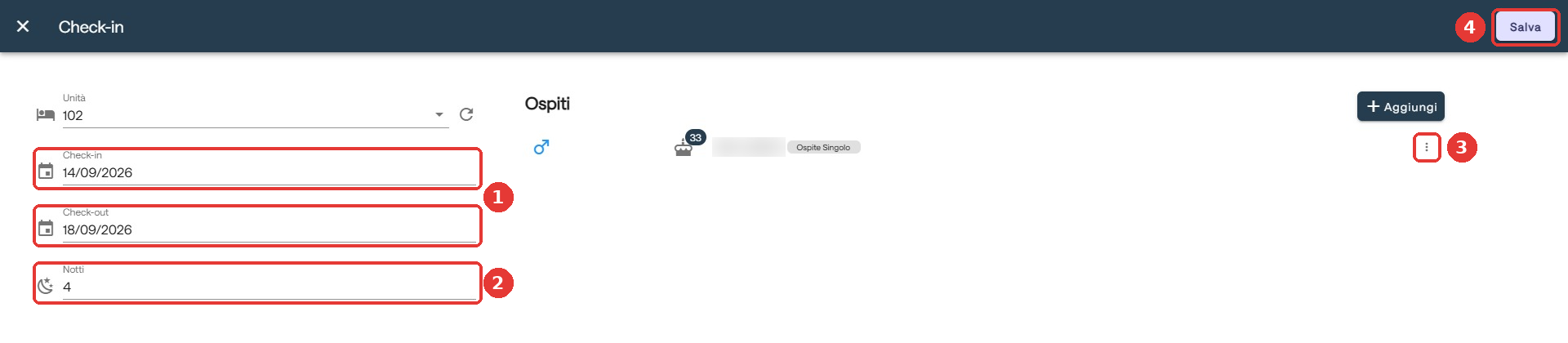
- Recalculate amounts. Go to Settings → Property, click Settings on the property row, and in the PMS section, click Configure on the Bureaucracy / Self Check-in tab.
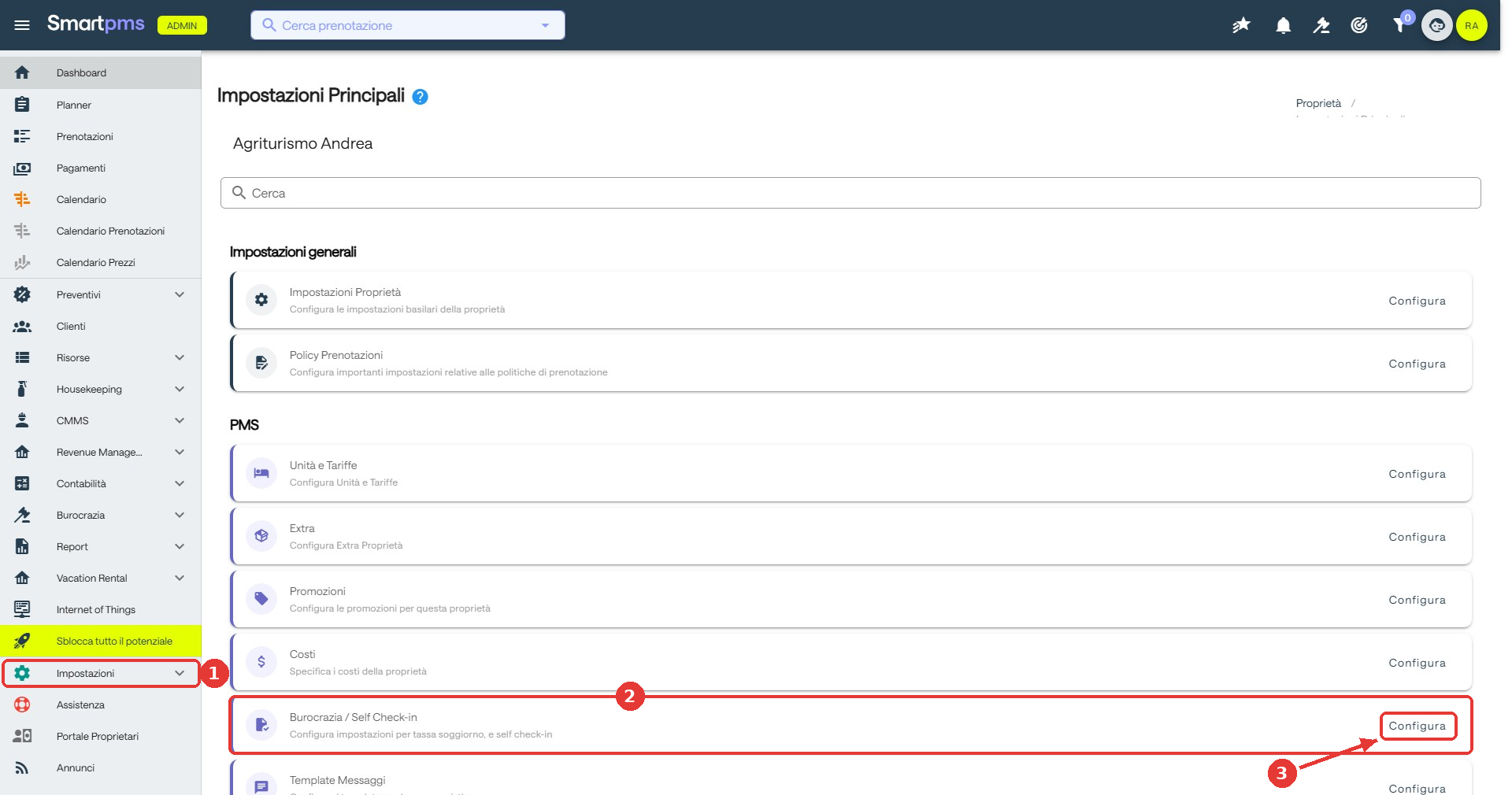
In the box at the bottom of the City tax tab, enter a date equal to or earlier than the arrival of the corrected stay in Regenerate from, activate Include already registered guests, and click Regenerate. If you have just changed the tax configuration, save it before regenerating.

- Generate the report again after a few minutes: the recalculation happens in the background.
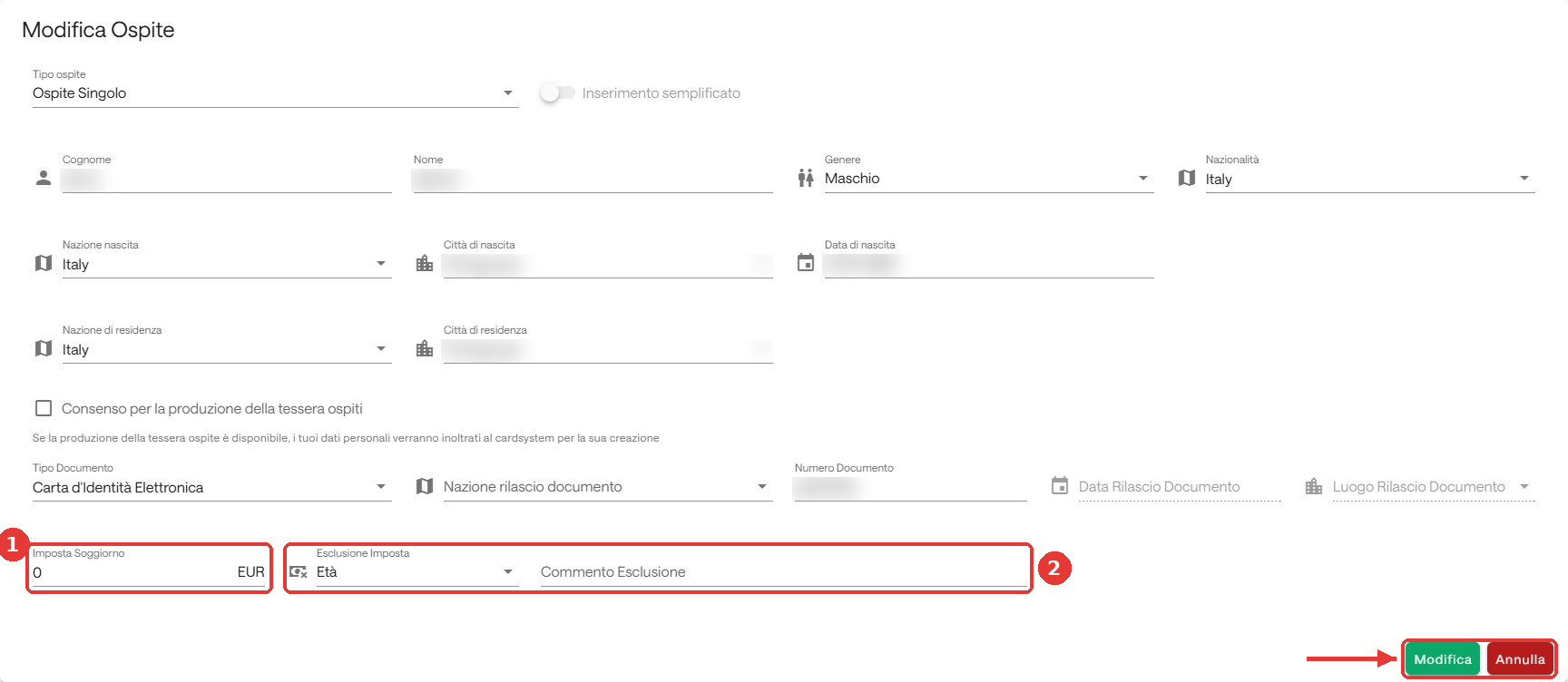
If, instead, you need to correct a single guest (e.g., a forgotten exemption), open the check-in, click ⋮ → Edit on the guest, and set City tax and Tax Exclusion. Remember that a subsequent regeneration with Include already registered guests will also recalculate this guest.
What regeneration does
- Without Include already registered guests: recalculates the tax for confirmed or option bookings arriving from the indicated date onwards that do not yet have registered guests. Already registered check-ins remain unchanged.
- With Include already registered guests: also recalculates the amount for every guest already registered in check-ins starting from the indicated date, with the current configuration and the check-in dates. Manually entered amounts and exclusions are overwritten.
- It applies to all bookings from the indicated date onwards, including future ones: there is no end date.
- After recalculation, the booking's total tax and the payment summary are updated. On an already settled booking, an amount still to be collected or an overpaid amount may therefore appear, to be managed with the guest.
For tax settings (calculation method, maximum days, exclusions, and reductions), see the linked guide on city tax configuration.
Frequently asked questions
7Why is the Tax to be paid different from Taxable overnight stays × rate?
Because the report does not multiply nights by the rate: it sums the amounts saved on each guest (City tax field), for the nights that fall within the period.
The most common differences:
- Reductions: a guest with a reduction (e.g., 50% for age) has taxable nights but pays less than the full rate. You can see this in the Exclusions/Reductions table.
- Manually modified amounts: the report uses the entered amount, whatever it is.
- Dates changed after check-in: the amount was calculated on a number of nights different from the current check-in, so the rate per night no longer corresponds to the rate, and cents may appear.
- Percentage, bracket, or period-based methods: the amount per night is not the same for everyone.
To find the cause, open the guest details with the i icon and compare each amount with check-in nights × rate. If the data is not aligned, correct the check-in dates and use Regenerate from with Include already registered guests.
I extended or shortened a booking after check-in: does the report update itself?
No. The check-in dates and guest amounts remain as registered, so the report continues to count the nights and tax of the original registration.
To align it:
- In Bureaucracy → Check-in List (or in the booking's Check-in tab), click Actions → Edit and correct Check-in and Check-out, then Save.
- In Settings → Property → Settings (on the property row) → Bureaucracy / Self Check-in → Configure, enter a date equal to or earlier than the arrival in Regenerate from, activate Include already registered guests, and click Regenerate.
- After a few minutes, generate the report again.
How are bookings spanning the selected period counted?
The report includes every check-in that has at least one night in the period and counts only the nights that fall within the period. Each night belongs to the day it is spent: the night of September 30th belongs to September even if the check-out is on October 2nd.
The amount is also divided: the guest's tax is distributed over the check-in nights, and only the portion of the nights in the period enters the report. No amount is lost or counted twice between one month and another.
The Booking/Period Recalculation option only affects the maximum number of taxable nights: if active, the maximum count restarts at the beginning of each analyzed period.
Are "Overnight stays exceeding maximum period" nights or people? Which data do I enter in the Municipality form?
They are nights: the nights beyond the maximum number of taxable nights, multiplied by the check-in guests. The number of people who exceeded the limit is in the Guests exceeding maximum period column.
Example: limit of 5 nights, 2 guests for 7 nights. Overnight stays exceeding maximum period = 4 (2 nights × 2 guests), Guests exceeding maximum period = 2.
These nights are not included in the Total non-taxable overnight stays. In the form, use the column that corresponds to what the Municipality asks for: overnight stays (nights) or presences (people).
How are exempt minors and other exclusions treated?
Exempt guests have an amount of 0 and a reason in Tax Exclusion (e.g., Age, Resident, Paid by OTA, Disabled, Disabled Companion, Law Enforcement, Property Worker, Long Stay). The reason is set automatically by the configured exclusions when the guest registers, or manually from the guest card.
In the report, these guests do not enter the taxable guests and overnight stays: they are counted in Total non-taxable guests and Total non-taxable overnight stays, and the Exclusions/Reductions table shows them separated by reason. Guests with a reduction remain among those subject to tax, with a lower amount.
If a guest results in 0 without a reason, open their card and indicate the correct exclusion, so the detail by reason you present to the Municipality is complete.
What are non-taxable guests and how do I calculate guests who paid the full rate?
In the report, every guest registered in the check-in is counted in only one of two groups, based on the amount saved in the City tax field of their guest card:
- Taxable guests: all guests with an amount greater than 0, whether at full rate or with a reduction (for example, 20% due to age).
- Total non-taxable guests: all guests with an amount of 0.
For this reason, the total number of guests is always the sum of the two values. The same applies to Taxable overnight stays and Total non-taxable overnight stays.
A guest is non-taxable because their amount is 0, regardless of the reason: a configured exemption (for example, minimum age), an exclusion chosen in the guest card, or an amount manually set to 0. If unexpected non-taxable guests appear in the report, open the details with the i icon: these are the ones with an X and an amount of 0. If the guest was supposed to pay, open the check-in, click ⋮ → Edit on the guest, enter the correct amount in City tax, and remove the Tax exclusion.
To obtain the guests at full rate, subtract those with a reduction from the taxable guests:
Full rate guests=Taxable guests−Guests with reduction
Example: 19 taxable guests, of which 4 with Youth reduction
19−4=15 full rate guests
The calculation is the same for overnight stays. Guests with a reduction, divided by type, are in the Exclusions/Reductions table. Non-taxable guests should not be added, because their amount is 0. Guests exceeding maximum period are already included in the taxable guests.
I excluded Airbnb from the City tax: why do all overnight stays appear as non-taxable in the report and I don't see a row for the portal in the Exclusions/Reductions table?
With the portal-based exclusion, guests from bookings on that channel are registered with a City tax of 0, without a reason in the Tax exclusion field. For the report, they are therefore non-taxable guests just like others: they end up in Total non-taxable guests and Total non-taxable overnight stays, but they do not form a separate group in the Exclusions/Reductions table.
To find out how many overnight stays belong to the excluded portal, generate the report with the Source filter set to that portal: its non-taxable overnight stays are those handled by the portal. The total to be paid remains that of the report without filters.
The exclusion applies to guests registered after activating it. Guests registered before keep the calculated amount, so previous months may show tax on bookings from the same portal. To align them, use Regenerate from with Include already registered guests, keeping in mind that it overwrites manually modified amounts.
Related guides
Configuration
Activation
Activation
Activation
Configuration