

EASY SPOT Puglia
How to submit tourist flow data for tourist rentals to the Puglia Region's EASY SPOT portal: download the TXT file from SmartPMS via the Police guest registration (Schedine Alloggiati) configuration (disabling "Include apartment identifier") and upload it as a PS file. It also covers the "line 1" error and the case of multiple apartments with different IDs. It does not cover SPOT Puglia (XML file).
You are in the right place if…5 cases
- “I have a tourist rental in Puglia, how do I upload data to EASY SPOT?”
- “EASY SPOT gives me an error in the file at line 1”
- “How do I download the TXT file for EASY SPOT Puglia?”
- “Where do I upload the PS file on the DMS Puglia portal?”
- “My apartments have different IDs on EASY SPOT”
This guide explains how to correctly upload tourist flow data to the EASY SPOT portal of the Puglia Region, dedicated to tourist rentals, using the TXT format file generated by SmartPMS.
📒 If you do not manage a tourist rental, it is likely that the Region requires you to use SPOT Puglia (and not EASY SPOT). In that case, follow the guide dedicated to SPOT Puglia, which you can find among the related guides.
Part 1: Generating the TXT file from SmartPMS
Before accessing the regional portal, export the correct file from SmartPMS.
1. Access SmartPMS
Log in to your SmartPMS account.
2. Open the Account section
Go to Bureaucracy → Account.
3. Locate the Police guest registration (Schedine Alloggiati) configuration
Find the Police guest registration (Schedine Alloggiati) configuration for the property of interest.
4. Download the file
- On that account, use the option to download the file
- Select the period you want to download
- Important: deactivate the "Include apartment identifier" option BEFORE clicking DOWNLOAD
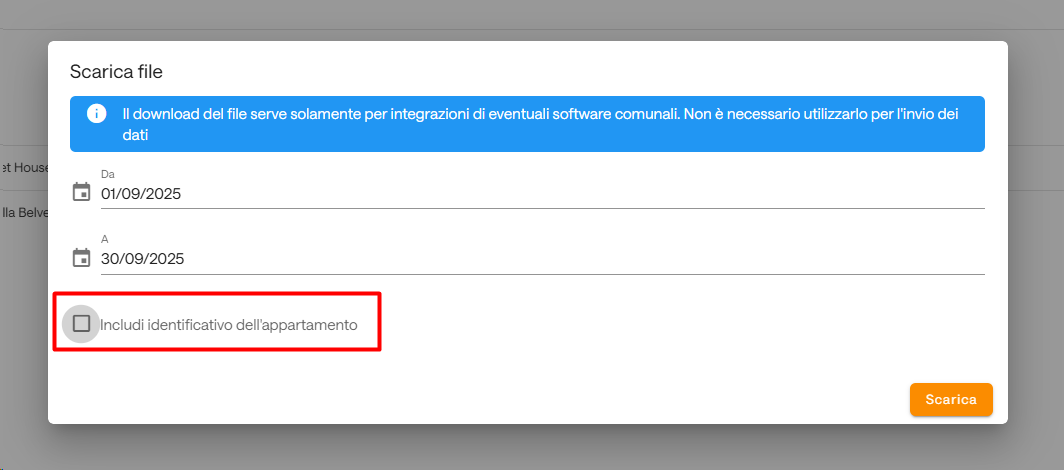
A file in TXT format will be generated, ready for upload.
Part 2: Uploading to EASY SPOT Puglia
Once you have obtained the TXT file, upload it to the DMS Puglia portal by following these steps, as indicated in the official user manual.
1. Access the DMS portal
- Connect to http://dms.puglia.it/
- Click on Access the reserved area, at the top right
- Log in with your SPID credentials
2. Open your personal area
- Once logged in, you will be in your personal area
- In the Workspace section, click on the icon of your tourist rental
3. Select the SPOT EASY service
- On the property page, you will find the Digital services at your disposal
- Click on the SPOT EASY icon to access the service
4. Upload the file
- In the SPOT EASY dashboard, locate the function to upload files generated by your management software
- Click on Upload PS file
- Select the TXT file previously downloaded from SmartPMS
- Confirm the operation to complete the data transmission
Frequently asked questions
4When uploading the file, I receive "Error in file at line 1!": how do I solve it?
Download the file again from SmartPMS (Bureaucracy → Account, Police guest registration (Schedine Alloggiati) configuration) and, before clicking DOWNLOAD, deactivate the "Include apartment identifier" option. Then upload the new TXT file to EASY SPOT.
I have a single Police guest registration (Schedine Alloggiati) account with multiple apartments, but they have different IDs on EASY SPOT Puglia: what should I do?
You must separate the Police guest registration (Schedine Alloggiati) configuration: create multiple configurations of the same Police guest registration (Schedine Alloggiati) account in SmartPMS, one for each guest registration ID. This way, you will be able to download TXT files that contain only the guest data for the apartment associated with each configuration.
Should I use EASY SPOT or SPOT Puglia?
EASY SPOT Puglia is dedicated to tourist rentals. If you do not manage a tourist rental, it is likely that the Region requires you to use SPOT Puglia, which involves a dedicated ISTAT configuration and an XML file.
Where do I download the TXT file to upload to EASY SPOT?
From the Police guest registration (Schedine Alloggiati) configuration of the property, in Bureaucracy → Account. Use the option to download the file, select the period, and deactivate "Include apartment identifier" before clicking DOWNLOAD.
Related guides
Activation
Activation
Activation
Activation
Activation
Activation