

ISTAT Puglia SPOT
How to connect SmartPMS to SPOT Puglia for accommodation facilities: retrieving the DMS Identifier, beds and rooms on the DMS Puglia portal, configuring the ISTAT Puglia SPOT account, associating units, and uploading the XML file. It does not cover EASY SPOT Puglia (tourist rentals).
You are in the right place if…5 cases
- “How do I send ISTAT data to the Puglia Region?”
- “Where can I find the DMS Identifier of my facility on SPOT Puglia?”
- “How do I download the XML file to upload to SPOT Puglia?”
- “How do I configure ISTAT Puglia SPOT on SmartPMS?”
- “Where do I upload the XML file on the DMS Puglia portal?”
This guide explains how to connect SmartPMS to the SPOT Puglia system of the Puglia Region, in order to correctly generate the XML file with tourist flows and upload it to the DMS Puglia portal.
📒 The procedure applies only to SPOT Puglia, not to EASY SPOT Puglia. If you manage a tourist rental, the procedure is different: SmartPMS generates a TXT (PS) file for EASY SPOT.
Part 1: Collecting data on SPOT Puglia
Before configuring SmartPMS, retrieve the essential information of the facility directly from the DMS Puglia portal.
1. Access the DMS Puglia portal
Access the DMS Puglia portal (https://dms.puglia.it/) with SPID, CIE, or CNS.
2. Locate the facility and note the key data
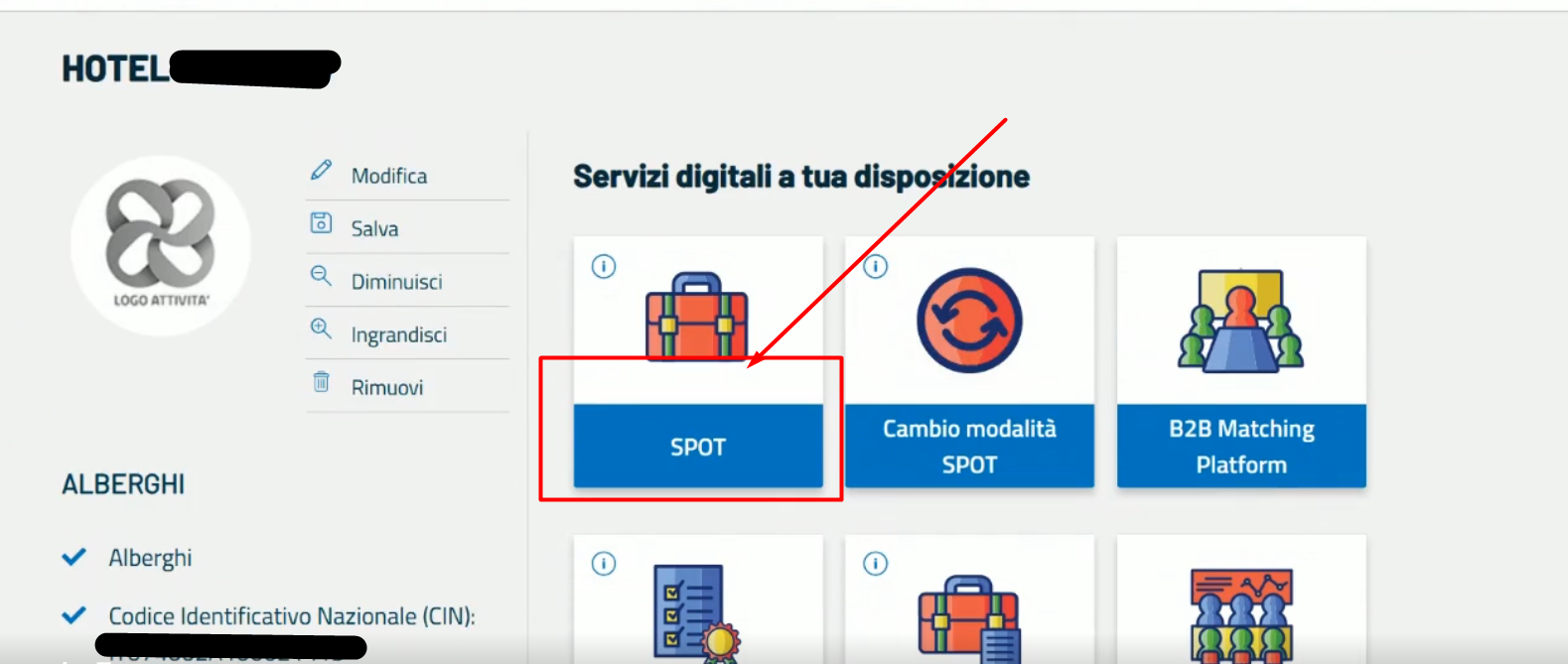
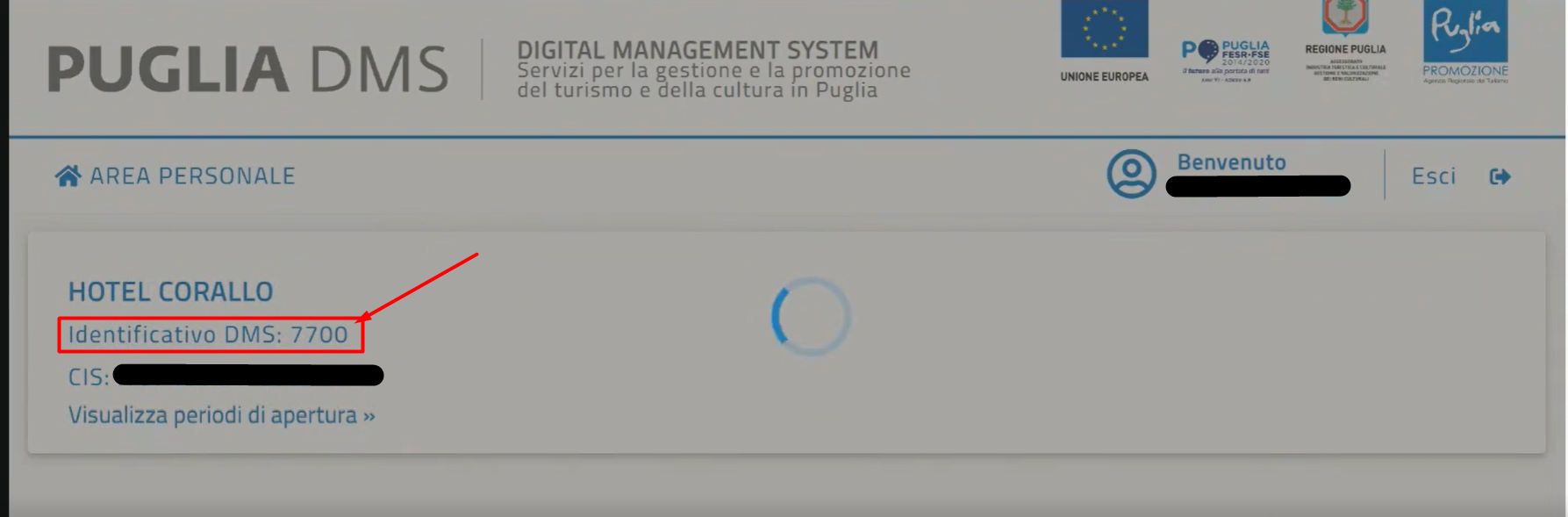
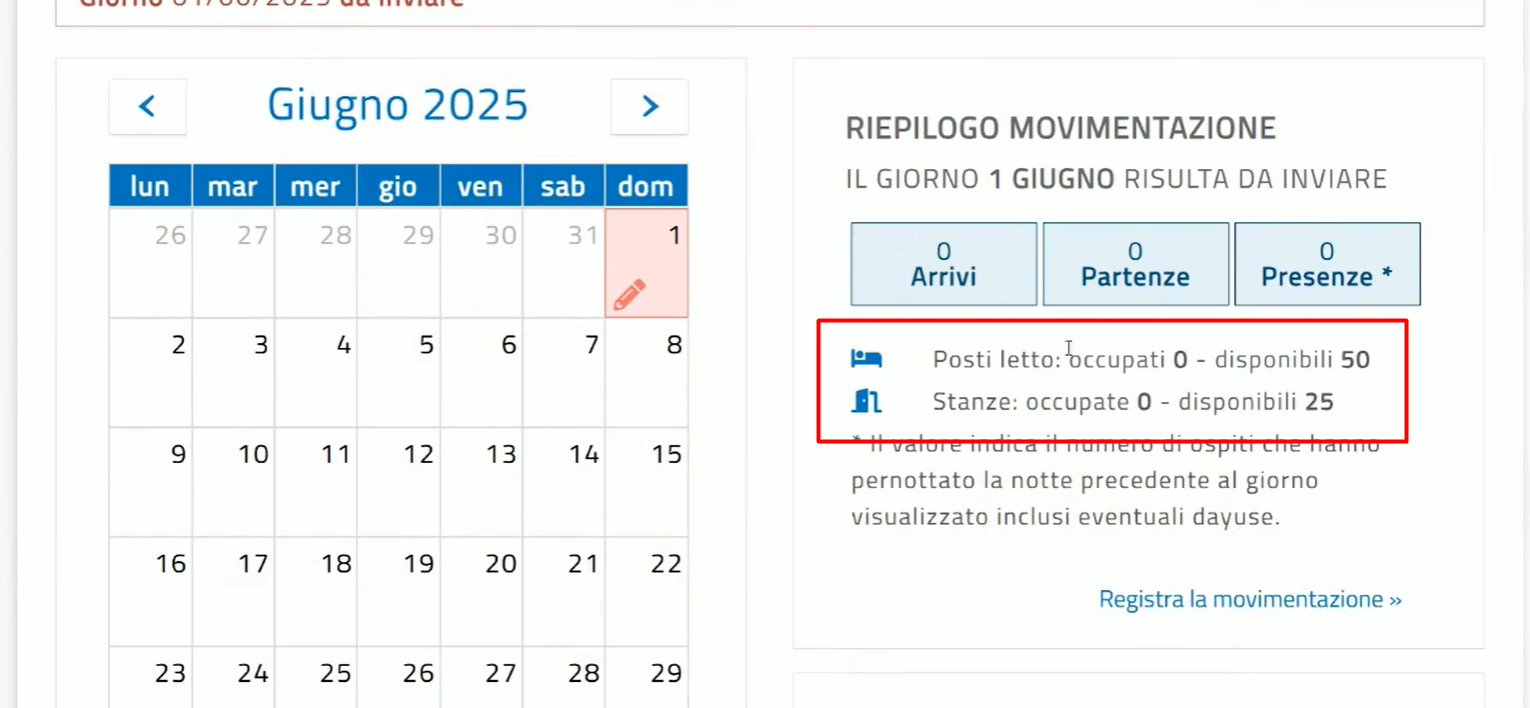
From your personal area, open the section dedicated to the management of accommodation facilities. For each facility you want to connect to SmartPMS, carefully note:
- DMS Identifier: the numeric code that identifies the facility in the SPOT system
- Total beds
- Total rooms
Part 2: Configuration in SmartPMS
You must create a configuration in SmartPMS for each DMS Identifier present on SPOT Puglia.
1. Open the ISTAT configuration area
- Go to Bureaucracy → Account → ISTAT
- Click on + Add, on the right
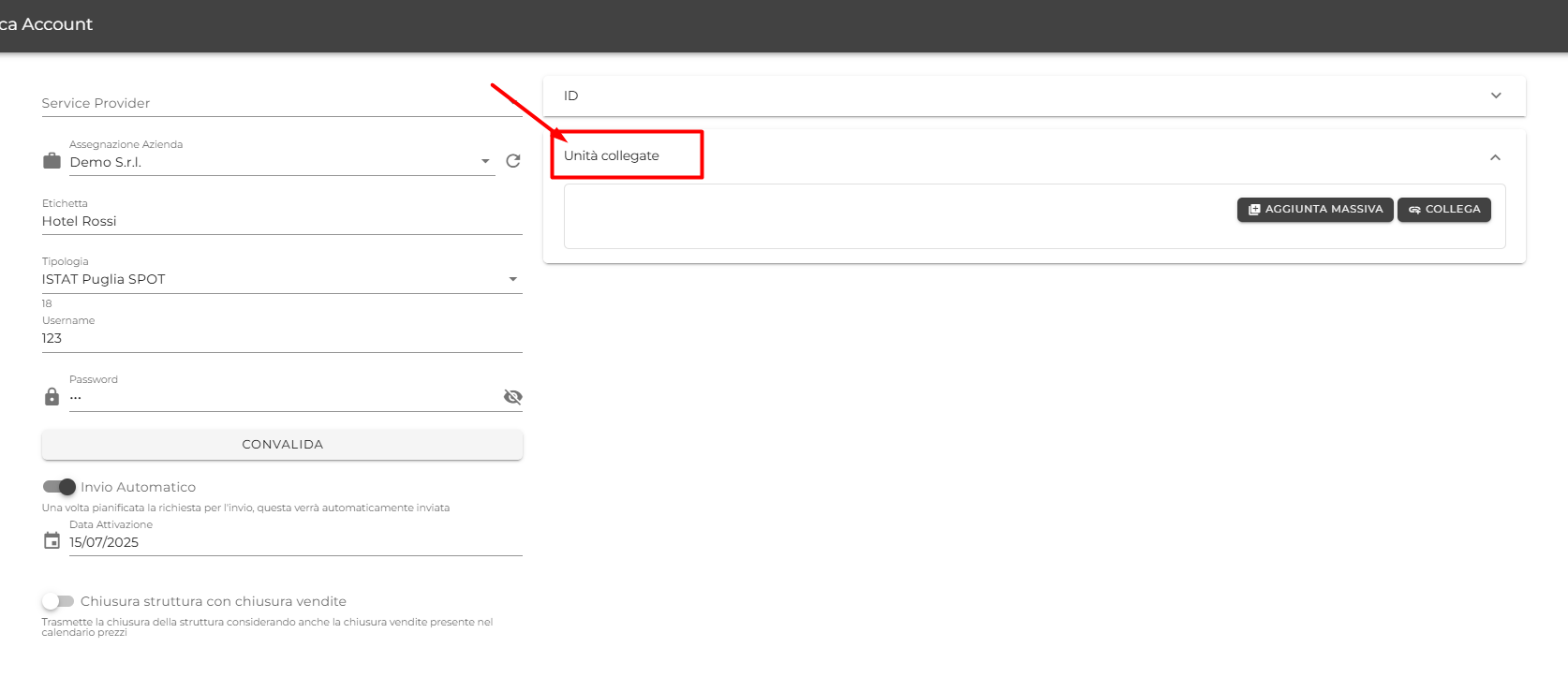
2. Enter the basic data
- Company: select the company linked to the rooms/accommodations you want to connect
- Label: indicate a clear name consistent with the name of the facility on SPOT Puglia; it will be useful when you generate the XML file
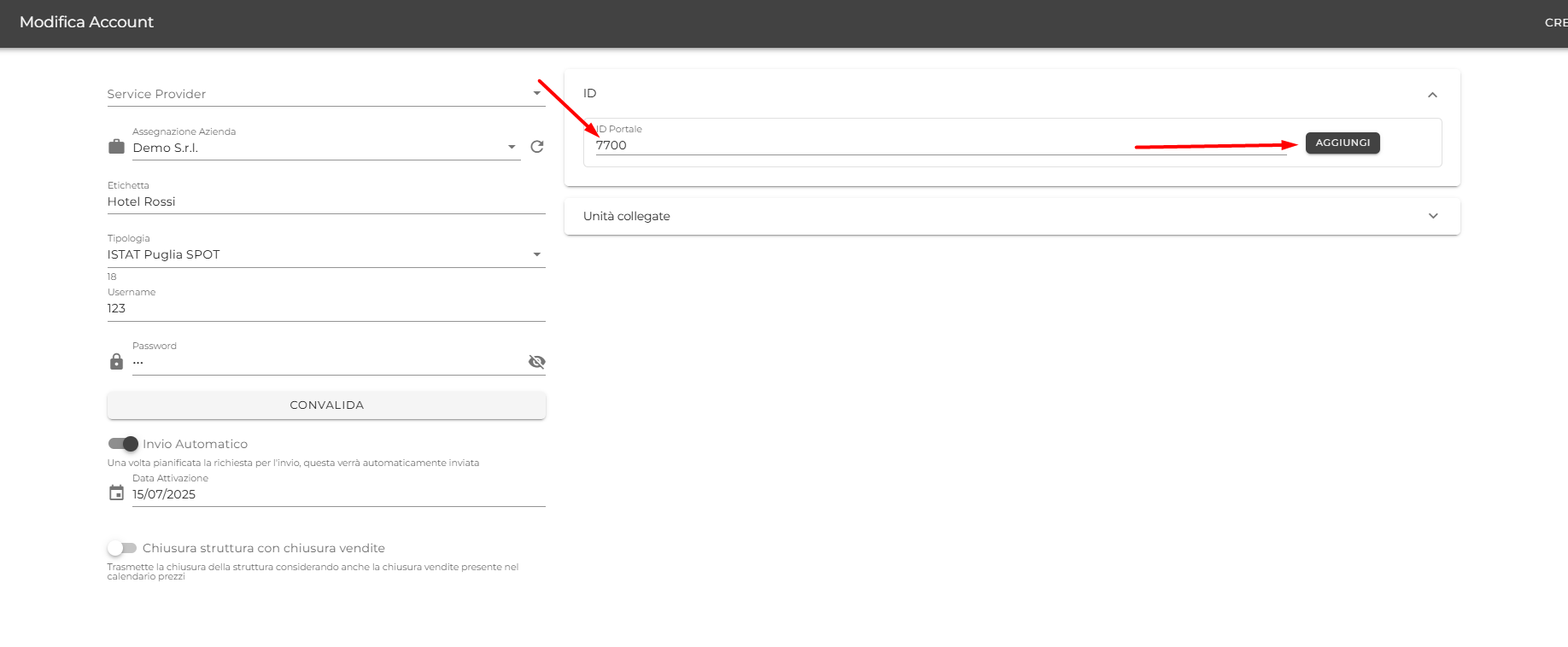
- Type: from the drop-down menu, select ISTAT Puglia SPOT
- Username: enter any value, for example "123"
- Password: enter any value, for example "123"
3. Enter the facility data retrieved on SPOT Puglia
- In the right column, ID section, enter the previously retrieved DMS Identifier in the Portal ID field, then click ADD
- The code will move just below, and you will be able to indicate Available rooms and Available beds
4. Associate the SmartPMS units to the added ID
- Open the Linked units section
- Click on BULK ADD or on ADD
- Select the property (or the unit, if you clicked Add) and the relative DMS ID just entered, then click CREATE
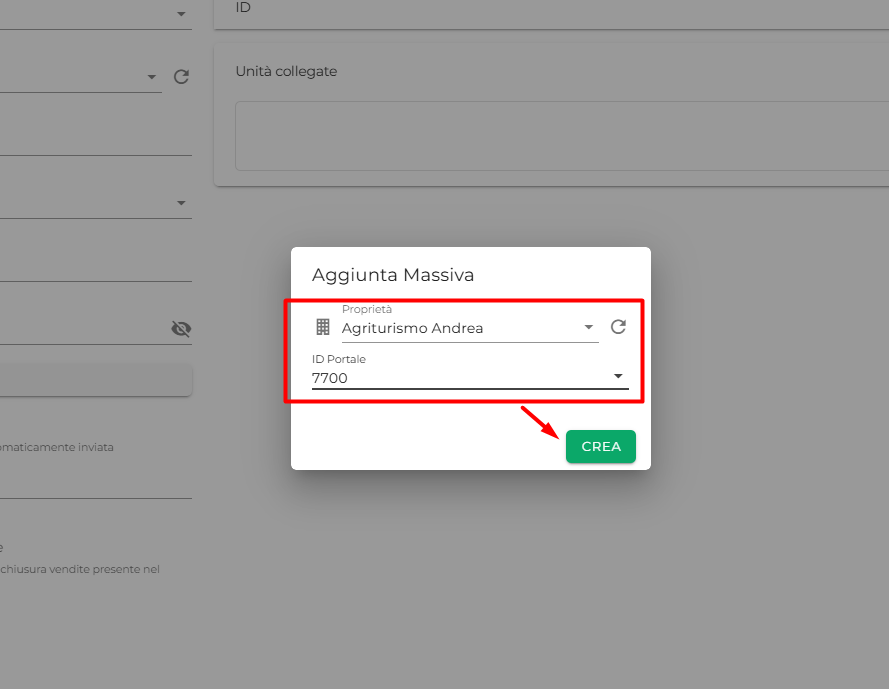
⚠️ Attention: add only the units that are part of the corresponding SPOT facility ID. If the DMS Puglia code changes between one unit/property and another, you must create an additional SPOT Puglia configuration.
5. Save the configuration
Click on CREATE at the top right to save the configuration.
Part 3: Downloading and sending the XML file
Once the integration is configured and the movements are recorded in SmartPMS, export the data in XML format and upload them to the DMS Puglia portal.
1. Download the XML file from SmartPMS
- Go to Bureaucracy → Account → ISTAT
- On the correct facility configuration, click on Actions → Download file
2. Upload the XML file to SPOT Puglia
- Access the SPOT Puglia portal again with your credentials
- From the main dashboard, select the same facility for which you just downloaded the XML file from SmartPMS
- Click on the SPOT icon
- Scroll down the page to the UPLOAD XML section and click on CHOOSE FILE
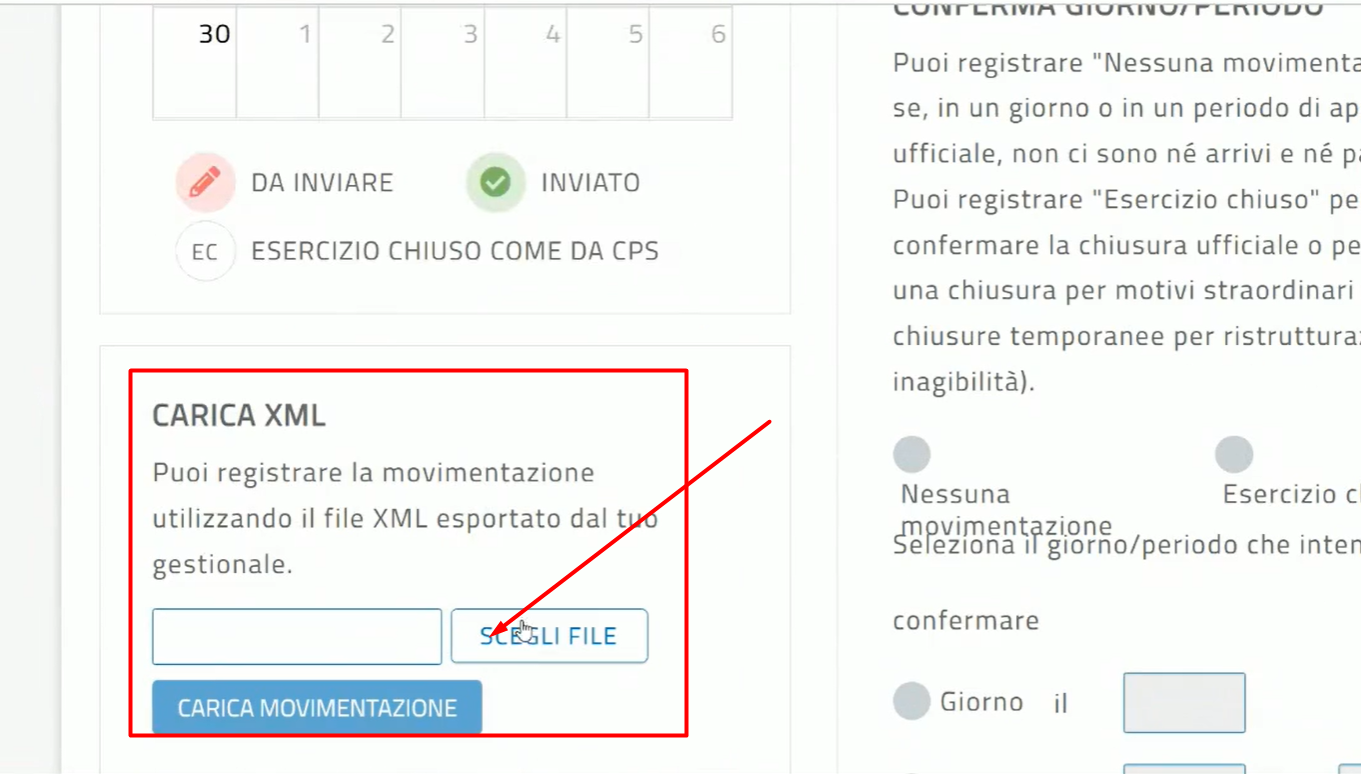
- Select the .xml file previously downloaded from SmartPMS
- Click on the Upload Movement button to start the upload
- Confirm the data entry or verify the result returned by the portal
Frequently asked questions
5I manage a tourist rental: can I use this procedure?
No. This guide applies only to SPOT Puglia. For tourist rentals, the Region uses EASY SPOT Puglia, for which SmartPMS generates a TXT (PS) file with a different procedure.
Where can I find the DMS Identifier of my facility?
On the DMS Puglia portal: access with SPID, CIE, or CNS, open the section dedicated to the management of accommodation facilities, and select the facility. The DMS Identifier is the numeric code that identifies the facility in the SPOT system.
Which username and password should I enter in the ISTAT Puglia SPOT configuration?
Any value, for example "123", for both username and password. For SPOT Puglia, SmartPMS does not connect to the portal using credentials: it generates the XML file, which you then upload to the DMS Puglia portal. The two fields are mandatory in the form, so you just need to fill them in.
The data that matters is the DMS Identifier, to be entered in the Portal ID field.
My units have different DMS Identifiers: is one configuration enough?
No. In SmartPMS, you need an ISTAT Puglia SPOT configuration for each DMS Identifier. In each configuration, link only the units that belong to that facility ID: if the DMS code changes between one unit/property and another, create an additional configuration.
Where do I upload the XML file downloaded from SmartPMS?
On the DMS Puglia portal: select the same facility for which you downloaded the file, click on the SPOT icon, scroll to the UPLOAD XML section, click on CHOOSE FILE, select the .xml file, and then click on Upload Movement.
Related guides
Activation
Activation
Activation
Activation
Activation
Activation