

ISTAT Sicily (Turistat): how to connect SmartPMS to the regional Tourism Observatory
How to connect SmartPMS to the Turistat portal of the Sicily Region Tourism Observatory using GESTIONALE credentials (TRS-IT-SIC-…): initial portal alignment, ISTAT account configuration, Portal ID and unit linking, automatic nightly transmission of the previous day, manual transmission, and log reading. The FAQs explain the most common errors (401, Existing StayId, StayId invalid, cURL, invalid guest data).
You are in the right place if…7 cases
- “How do I connect ISTAT Sicily / Turistat to SmartPMS”
- “Turistat does not receive check-ins and check-outs from SmartPMS”
- “ISTAT Sicily credential validation returns an error”
- “401 Unauthorized error when sending to the Sicily Tourism Observatory”
- “StayId error: Existing StayId or The following stay id are invalid”
- “ISTAT icons are red but the data is present on the regional portal”
- “How do I resend missing days to the Sicily Tourism Observatory”
ISTAT Sicily (Turistat): how to connect SmartPMS to the regional Tourism Observatory
This guide explains how to connect SmartPMS to the Turistat portal of the Tourism Observatory of the Sicily Region, so that arrivals, departures, and daily closures are transmitted automatically every day instead of being filled out manually.
📌 Before you start: you need MANAGEMENT credentials
Automatic submission to Turistat works only with MANAGEMENT credentials (also known as PMS credentials), issued by the Observatory specifically for management software. The standard credentials used to access the portal via browser only allow manual submission of declarations and are not accepted by SmartPMS.
- The username for management credentials follows the format
TRS-IT-SIC-*****. - Do not use your email, SPID, or the "manual" user credentials: validation or submissions will result in an error.
How to obtain them: the Observatory's FAQ indicates that those using a management system must request the credentials (username) from Service 2 "Tourism Observatory" of the Regional Department of Tourism, Sport and Entertainment. Normally, the Region issues two distinct accounts: one for manual access to the portal and one for the management system connection. It is the latter that must be entered in SmartPMS.
🗓️ Initial portal alignment
The Sicily Observatory is very strict about the sequence of days: each day must be declared and closed with the daily closure before moving on to the next. Therefore, before activating automatic submission:
- complete all declarations on Turistat up to the day before the date from which automatic submission will start, including the daily closure.
Example: if automatic submission starts from January 2nd, the regional portal must be complete and closed up to December 31st inclusive.
⚠️ Seasonal closures and suspension of automatic submission
Many Sicilian properties suspend automatic submission during closing periods. Upon reopening:
- realign the Observatory up to the day before the reactivation of automatic submission;
- perform the alignment a little in advance, especially if there are already guests present, to avoid errors during the first transmission.
⚙️ Configuration in SmartPMS
Step 1: create the ISTAT account
- In SmartPMS, go to Bureaucracy > Account > ISTAT and click Add.
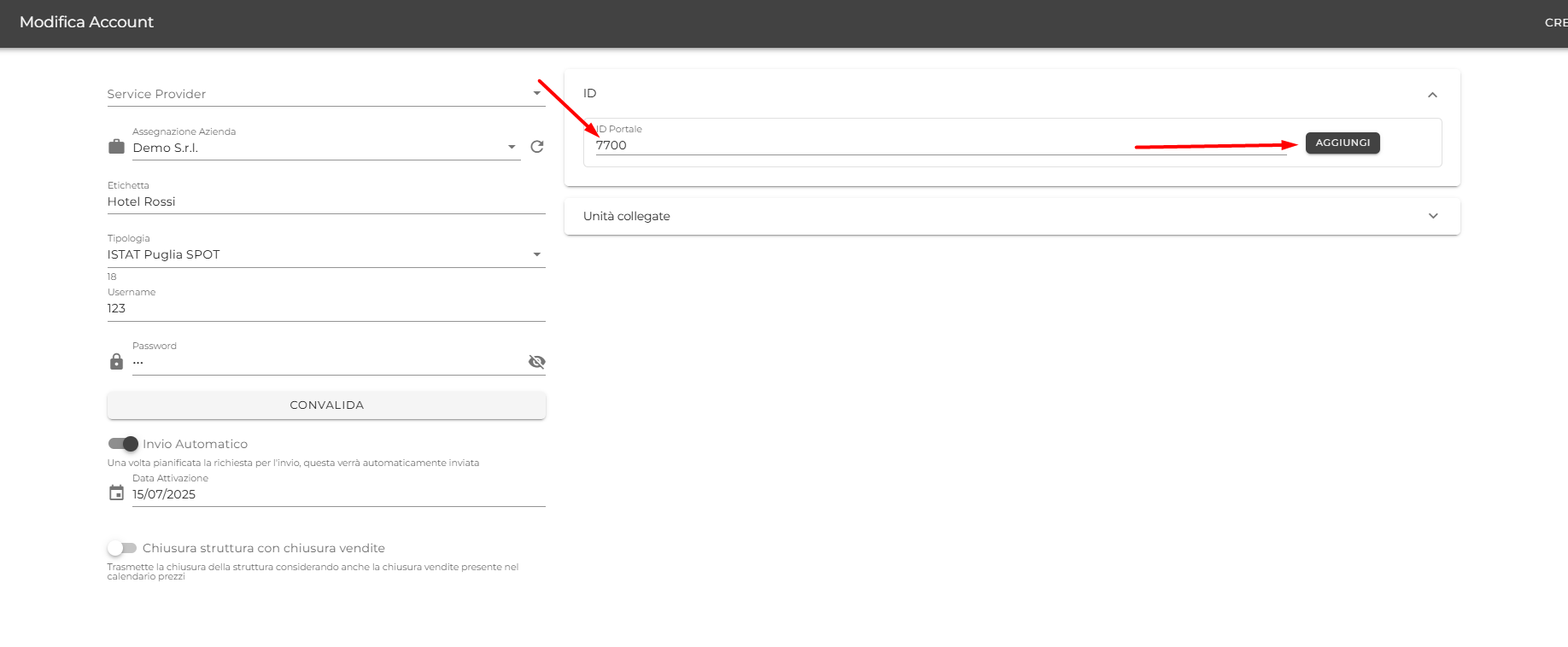
- In the left column, fill in the fields:
- Company Assignment: select the company responsible for data submission.
- Label: optional, useful for identifying the account (e.g., Turistat - Property Name).
- Type: select ISTAT Sicily.
- Username: the username of the MANAGEMENT credentials (format
TRS-IT-SIC-*****). - Password: the password of the MANAGEMENT credentials.
- Click Validate and wait for the confirmation message.
Validation is a preliminary check: it verifies that the username and password are recognized, but it does not guarantee by itself that subsequent submissions will be successful. If submissions result in an error after a successful validation, check that you have entered the correct MANAGEMENT credentials and Portal ID.
Step 2: enter the Portal ID
In the ID box, enter the property code on the Observatory in the Portal ID field, in the format TRS-IT-SIC-*****, and click Add. If you manage multiple properties with different codes, add a Portal ID for each one.
Step 3: link the units
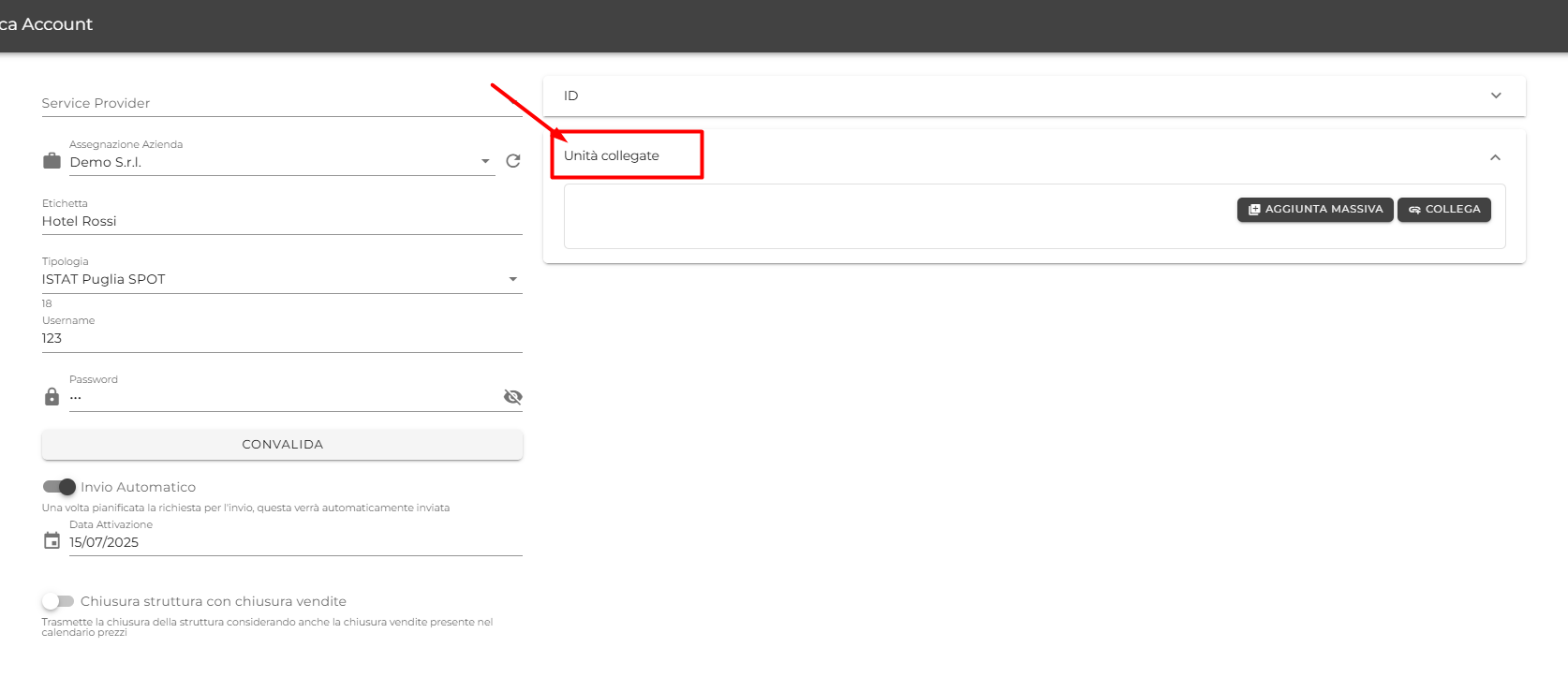
Linking units determines which Portal ID the guests of each unit are sent to: this is the most important step, check it carefully.
- Link: in the Linked units section, select a unit and the corresponding Portal ID, then confirm. Repeat for all units.
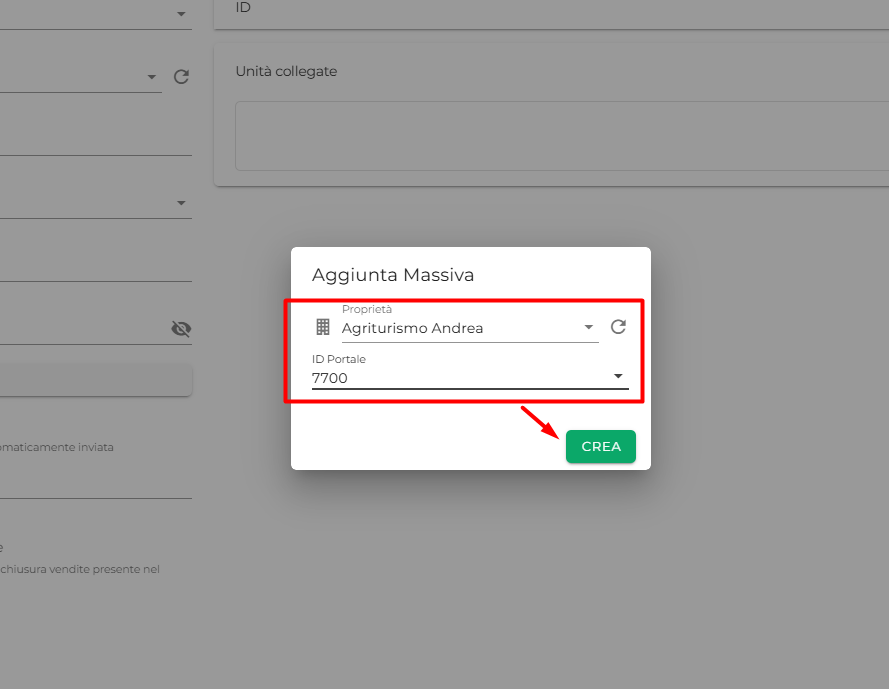
- Bulk Add: if all units of a property belong to the same Portal ID, click Bulk Add, select the property and the Portal ID, and click Create.
Step 4: activate automatic submission and save
- In the left column, activate Automatic submission.
- Set the Activation Date: the first day from which SmartPMS will transmit. Stays with an arrival date prior to this date are not sent, so choose a date consistent with the alignment performed on the portal.
- Click CREATE in the top right bar to save the configuration.
🎉 Done! From this moment on, SmartPMS transmits data to the Observatory every day.
🔄 How automatic submission works
- When: every evening at 10:30 PM (Italian time), SmartPMS transmits the previous day.
- What: for each Portal ID, it sends the day's arrivals, the day's departures, and the daily closure, even when there are no movements. The departure of a stay is not transmitted if the arrival of the same stay resulted in an error: in that case, the arrival day must be re-sent first.
- Which guests: those registered in the bookings of the units linked to that Portal ID, with their personal data filled out.
- Multiple Portal IDs: you can configure multiple Portal IDs in the same account, or multiple ISTAT accounts on different units: SmartPMS automatically chooses the correct ID based on the booking's unit.
🚀 Manual submission and log verification
You can re-send a day (for example, after correcting a guest's data, or to recover days that were not transmitted):
- Go to Bureaucracy > Account > ISTAT.
- On the Sicily account row, click Actions > Manual submission.
- Select the date to transmit and confirm. If you need to recover multiple days, proceed in chronological order, starting from the first day in error: the Observatory only accepts days in sequence.
- After a few moments, open Actions > Logs to see the outcome of each date and Portal ID, with any error message returned by the regional portal.
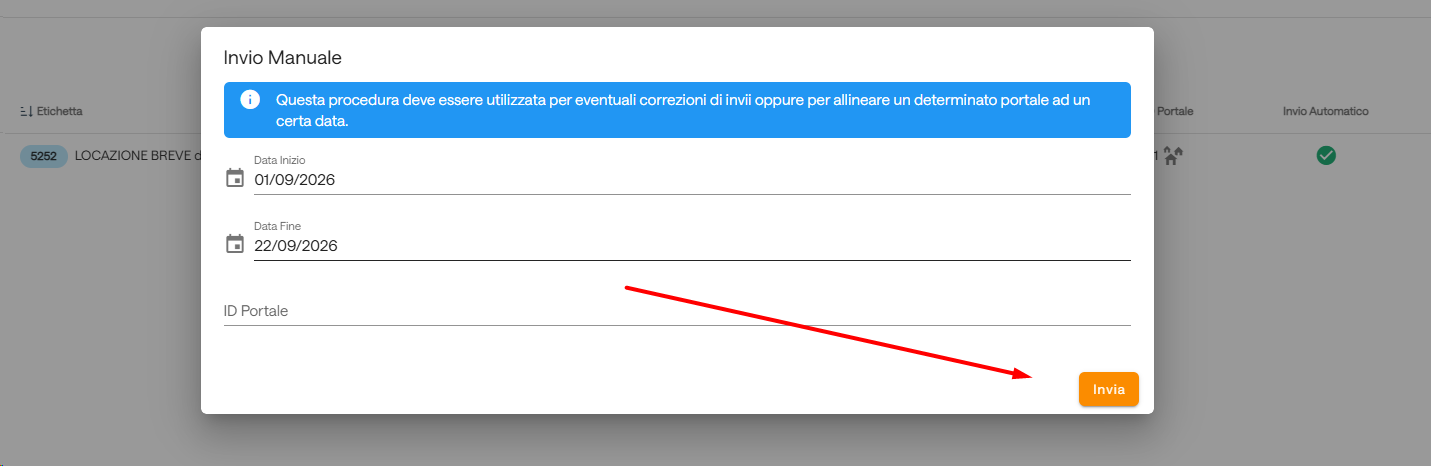
If a submission fails, you will also receive a notification email inviting you to retry the submission manually from Bureaucracy > Account > ISTAT.
Frequently asked questions
12Which credentials should I enter in SmartPMS for Turistat Sicily?
The GESTIONALE credentials issued by the Tourism Observatory for management software, with a username in the format TRS-IT-SIC-*****. Your email, SPID, or the user account you use to access the portal manually will not work: with these, validation or transmissions will result in an error. If you do not have GESTIONALE credentials, request them from Service 2 "Tourism Observatory" of the Regional Department of Tourism; then enter them in Bureaucracy > Account > ISTAT > Edit and click Validate again.
Validation was successful, but transmissions still result in an error: why?
The Validate button only performs a preliminary check of the credentials and does not guarantee that the portal will accept the transmissions. The most frequent causes are:
- manual user credentials instead of GESTIONALE ones;
- incorrect Portal ID (it must be the
TRS-IT-SIC-*****code, not the property name); - units not linked to the correct Portal ID;
- regional portal not closed up to the day before the activation date.
Open Actions > Logs to read the exact message returned by the portal.
At what time is the data sent and which day is transmitted?
Automatic transmission starts every evening at 10:30 PM (Italian time) and transmits the previous day: arrivals, departures, and daily closing. For example, arrivals on the 10th are transmitted on the evening of the 11th. The time cannot be changed: if you need to transmit earlier, you can use Actions > Manual transmission on a day that has already concluded.
Why do rooms appear on the regional portal with a numeric code instead of the room number?
To identify the room, SmartPMS sends the internal unit code to the portal, not the name or number you use in the property. This is the data required by the integration with the Region and cannot be changed: it does not indicate a connection error.
The ISTAT icons are red or "StayId: Existing StayId" appears, but the data is present on the regional portal: what should I do?
The Existing StayId message means that the stay is already present on the portal: this happens when a day has been entered manually or re-sent after a realignment. The stays indicated in the message have therefore already been received.
However, when the submission of arrivals for a day is rejected, even with this message, SmartPMS does not transmit either the departures or the end of day in the same submission. Therefore, check on Turistat that the departures and the end of day are also recorded for that date: if they are missing, complete them directly on the portal.
To get an overview of the dates involved, open Bureaucracy > Account > ISTAT > Actions > Logs and compare them with the Observatory planning. Use Actions > Manual submission only for dates that are truly missing on the portal.
What does the error "StayId: The following stay id are invalid" mean?
The portal does not recognize the stay to which the departure refers: usually, the arrival of that guest was not registered on the Observatory (for example, because the arrival day was in error or was declared manually in a different way). Resend the arrival day first with Actions > Manual transmission, then the departure day. If the arrival day is already closed on the portal and no longer accepts changes, contact support for a realignment.
What do the errors "cURL error 6: Could not resolve host" or "cURL error 52: Empty reply from server" mean?
They indicate that, at the time of transmission, the Tourism Observatory portal was unreachable or did not respond. It does not depend on your configuration. When the portal becomes available again, resend the days in error with Bureaucracy > Account > ISTAT > Actions > Manual transmission, in chronological order, and check the outcome in Actions > Logs.
Transmission fails with an error on a guest field (e.g., ResidencePlaceCode, BirthPlaceCode, Age): how do I correct it?
The portal has rejected a guest's personal data. The message in the Logs indicates the field: ResidencePlaceCode is the place of residence, BirthPlaceCode is the place of birth, Age is the age (calculated from the date of birth). For guests born or residing in Italy, the municipality must be selected from the list, not written by hand; for foreigners, the Country is sufficient. Open the booking, correct the guest's data in the check-in card, and resend the day with Actions > Manual transmission.
How do I recover multiple untransmitted days?
Go to Bureaucracy > Account > ISTAT > Actions > Manual transmission and resend the days one at a time, in chronological order, starting from the first one in error: the portal accepts days only in sequence. After each transmission, check the outcome in Actions > Logs. If manual transmission continues to fail or the days to be recovered are very far back in time, contact support for a realignment.
I received an email "Error during daily data transmission": what should I do?
The email notifies you that the transmission of a day was not successful. Open Bureaucracy > Account > ISTAT > Actions > Logs, read the message returned by the portal for that date, and check the causes described in the other FAQs (credentials, Portal ID, guest data, portal unreachable). Once the problem is corrected, resend the day with Actions > Manual transmission.
ISTAT submission errors: how to read logs and what to check before contacting support?
Where to read logs
- Go to Bureaucracy > Account > ISTAT.
- On the account row, click Actions > Logs.
- For each day, you will find Date, Property ID (the Portal ID), Outcome (green checkmark if the portal received the data, red icon if there was an error), Message and Errors returned by the portal, and Submission Date. If a day was submitted multiple times, count the most recent row.
- Identify the last successful submission and the days in error, copy the exact message, and note the dates.
For Sicily, the automatic submission transmits the previous day every evening: today's day without logs is not an error.
Then check, in this order
- Retry submission: Actions > Manual submission, one day at a time and in chronological order, starting from the first one in error. If the message indicates that the portal was unreachable, the error is temporary: just resend when the portal becomes available again.
- Credentials: Actions > Edit > Validate. The Validation only checks access: if it succeeds but submissions fail, the cause lies in the Portal ID, the linked units, or the authorizations on the portal.
- Portal access and authorizations: try to access the regional portal. If you cannot even access it there, the problem is with the portal (expired credentials, user or authorization revoked) and not with SmartPMS. If the error only concerns some Portal IDs and the others work, verify that the management user is still authorized for those properties.
- Portal ID and units: in Actions > Edit, each unit must be linked to a Portal ID present in the ID section and active on the portal. If no unit is linked, the submission does not start and no log appears.
What to send to support if the problem persists
- the error message copied exactly from the logs;
- the affected dates;
- the outcome of the Validation;
- whether or not you can access the regional portal directly;
- whether manual submission fails or works.
Related guides
Activation
Activation
Activation
Activation
Activation