

ISTAT Trento STU: how to connect SmartPMS and send the C59 model
How to connect SmartPMS to the STU system of the Province of Trento from the Bureaucracy Marketplace to send the C59 model every day: STU credentials, validation, first day of submission, unit-structure association, automatic submission at 05:30, manual submission, diagnostics of deposited days, and most common errors.
You are in the right place if…15 cases
- “How do I connect SmartPMS to the STU of the Province of Trento”
- “How do I send the C59 automatically from the PMS”
- “Where do I find Trento STU in the Bureaucracy Marketplace”
- “I validate the STU credentials but no structure appears”
- “STU has deleted some days and asks me to resend them manually”
- “C59 error: missing province or unrecognized country for a guest”
- “I registered the guests the next morning and the day shows up without them on STU”
- “I redid the manual submission but the missing guests do not appear on STU”
- “On the STU portal I cannot modify or delete the day: movements inserted by Web Service”
- “The STU password has expired and submissions are not starting”
- “Accessing STU asks me to change the password: what do I put in Old password?”
- “I changed the STU password, where do I update it in SmartPMS?”
- “STU credential validation failed after password change”
- “Manual submission to STU: "Validation error" appears and nothing starts”
- “How many days can I send to STU with a single manual submission?”
ISTAT Trento STU: connection and submission of the C59 model
In the Province of Trento, accommodation facilities report the C59 model (arrivals, departures, and presences) every day to the Tourism Administrative System (STU). SmartPMS connects directly to the STU service: it compiles the C59 starting from reservations and registered guests and sends it one day at a time, in order, without you having to enter anything on the portal.
⚠️ Only one submission channel. When the integration is active, the C59 must be sent only from SmartPMS. If you upload or modify days on the STU portal as well, SmartPMS and STU may no longer be aligned on the last deposited day. If you already have an ISTAT Trento STU account in Bureaucracy > Account > ISTAT (the old integration), deactivate its automatic submission before activating the new one: otherwise, the same days would be sent by two channels.
📌 Before you begin
- STU credentials. SmartPMS uses the same credentials (username and password) with which the facility accesses STU. Before configuring the account, access the STU portal with the same credentials: if the password has expired, STU will ask you to set a new one (see the FAQ on expired STU password) and the new one must be entered in SmartPMS.
- Initial alignment. Before activation, complete the C59 on the STU portal up to the day before the one from which you want SmartPMS to start: SmartPMS continues exactly from the day after the last one already deposited.
- Units already created in SmartPMS. The number of units linked to each STU structure is used as the number of available housing units in the C59: link all the units of the structure.
- Complete guest data. The C59 counts guests by origin, so for every guest, the Country of residence is required and, for residents in Italy, the province of residence. A reservation is counted only if it has the guest group registered in the Check-in tab, and the group must be set correctly: a single guest must be registered as a single guest; multiple guests must be registered as a head of family with their family members or as a group leader with the group members, without mixing family and group in the same reservation.
⚙️ Account configuration
Trento STU has a dedicated integration in the Marketplace.
- In the left menu, open Bureaucracy > Marketplace and, on the Trento STU integration card, click Configure (or Manage, if an account already exists).
- On the integration account page, click Add: the Create account window opens, divided into two steps.
- In the first step (Integration) fill in:
- Company: the company responsible for the submission.
- Status: Active.
- Auto Submission: leave it active if you want SmartPMS to send the C59 every day autonomously. If you turn it off, you will have to use manual submission.
- Username and Password STU.
- Click Validate. SmartPMS connects to STU and downloads the list of structures associated with your credentials. If there is only one structure, it is selected automatically. As long as the validation is not successful, the Next button remains disabled.
- Set the First day of submission (mandatory): it is the first day of the C59 that SmartPMS will manage. From there, submissions continue in order, one day at a time. Usually, it is the day after the last C59 already present on STU.
- Click Next. The Linked units step unlocks only after a successful validation and with the first day of submission filled in. If you change username or password after validation, you must validate again.
- Associate the units to the corresponding STU Structure:
- Mass Addition — recommended for hotels and structures with many units, as in the old integration: click Mass Addition at the top right and in the window choose the property (Property identifier field) and the STU Structure, then click Create: all units of the property not yet linked are added with that structure.
- Link: to link a single unit, search for it in the Link field: a row is added, in which you choose from the Structure drop-down menu one of the structures automatically retrieved from the STU portal with the validation (if there is only one, it is already pre-selected). Repeat for each unit. With the unlink icon at the end of the row, you remove a unit.
If you manage multiple STU structures with the same credentials, assign each unit the structure it belongs to: the C59 is calculated separately for each structure.
⚠️ Only one account per username. Create only one Trento STU account for each STU username. If you manage multiple structures with the same credentials, all appear in the list after Validation: link them in the same account, assigning each unit its structure. Do not create an account for each structure with the same username. Multiple accounts for the same company are only needed if the structures have different STU credentials.
- Click Create at the top right to save the account. In the account tab, you see the status (Active/Inactive) and the Auto Submission indicator.
To modify the account later use Edit and then Save. Reopening the account, in the Structure column the numeric code of the structure appears: click Validate to reload the list with the names before changing the associations.
🔄 How submission works
- One C59 for every day. STU wants the model for every calendar day, even without movements. SmartPMS generates it automatically, with arrivals and departures at zero on days without movements.
- Automatic submission at 05:30. Every morning SmartPMS sends the days up to yesterday. The current day and future days are never sent. Yesterday's C59 contains only guests registered in SmartPMS by 05:30: for this reason, register arrivals in the Check-in tab on the same day (see the FAQs on guests registered after submission).
- Always in order. Every day sent must be the one immediately following the last C59 present on STU. If a day is missing on STU, the following days remain on hold until the gap is filled.
- Verification after submission. After every accepted day, SmartPMS reads back from STU the last deposited C59: if the day does not appear, the submission is marked as failed.
- Days already present. If a day is already deposited on STU, SmartPMS does not resend it and marks it as completed in the logs. A deposited day cannot be corrected: STU does not accept a second C59 for the same day and on the portal that day appears as inserted by Web Service, therefore it is not modifiable or deletable by the facility. Guests added or corrected in SmartPMS after submission do not reach STU for that day. If all requested days have already been sent previously by SmartPMS, the submission closes immediately without querying STU (see the FAQ on days deleted by STU).
What the C59 contains
- Arrivals and departures by origin: guests residing in Italy are grouped by province code of residence, those residing abroad by Country of residence, with the name required by STU.
- Present: guests staying overnight on the night of the day (arrived that day or before and not yet departed).
- Available units: the number of SmartPMS units linked to that structure.
- Occupied units: units with at least one guest present that night.
- Business open: always indicated as open.
Stays started before the first day of submission are still considered: their departures and presences are included in the first C59s sent by SmartPMS, because the arrival is already declared with the previous system.
📤 Manual submission, logs, and diagnostics
⛔ Manual submission: in the To field never select today's date, at most yesterday. STU does not accept the C59 of the current day. If the interval reaches today, SmartPMS blocks the entire submission with the error "Trento STU accepts only dates before today": no day starts, not even past ones included in the interval. Today's day is sent tomorrow morning by the automatic submission at 05:30 (if Auto Submission is active) or with a new manual submission from tomorrow.
From the Actions menu (⋮) at the top right in the account tab:
- Manual submission: for Trento STU you can indicate an interval with the From and To fields, then click Send. Use it when automatic submission is off or to recover days not yet present on STU (for example after the Province has deleted some days). It is not used to correct an already deposited day. Days are sent in order, starting from From, which must be the day after the last C59 present on STU. In To indicate at most yesterday: with today's date the entire submission goes into error (see the warning above). If you leave From empty, the submission starts from the first day of the month indicated in To: to recover days of a previous month always fill in From. Days prior to the First day of submission are never sent, and manual submission only works with the account in Active status. For Trento STU, submission of a single reservation is not available, because the C59 is a daily summary of the structure.
If you need to recover many days (for example an entire season after a deletion by the Province), first check that in all reservations of the period the guest groups are set correctly and the residence is complete, then send in consecutive blocks of maximum 31 days, the limit of each manual submission (with a longer interval the submission does not start and "Validation error" appears): From = next expected day, To = last day of the block. Move to the next block only when in the Log the days of the previous block are completed and the diagnostics have advanced. If a submission is rejected with "The provided data is invalid", in the period there is at least one reservation with invalid guest data: correct it and repeat the submission of that block, without relaunching the same interval multiple times.
- Log: the outcome of each submission. Rows without reservations are the C59s of days without movements: this is normal.
- Account diagnostics: read-only check that shows for each structure if the credentials and structures are correct and the days deposited on the portal: last deposited day, if it has been validated, next expected day and missing days compared to yesterday. The next expected day is the date from which a manual submission must start. If STU is unreachable, the diagnostics show the last day sent by SmartPMS, flagging it.
- Edit / Delete: to change credentials, first day of submission, units or Auto Submission, or to remove the account.
Frequently asked questions
3STU has deleted some days and asks me to resend them from a certain date: how do I do it?
STU accepts the C59 only in order: after the deletion, it waits for the day after the last one remaining on the portal and rejects all subsequent ones until that day arrives.
Example. Today is September 27th. On the STU portal, the last C59 present is August 25th, because STU has deleted the subsequent days and asks to resend them from August 26th.
- Deactivate the automatic submission of the old account, if there is still an ISTAT Trento STU account in Bureaucracy > Account > ISTAT.
- Check the linked units in ⋮ > Edit: all units of the structure must be linked. The number must correspond to the available housing units you see on the STU portal.
- Read the diagnostics in ⋮ > Account diagnostics: the next expected day will be 08/26.
- Send the missing days from ⋮ > Manual submission:
- From = 08/26, the next expected day. Always fill it in: if it remains empty, the submission starts from September 1st and STU rejects it.
- To = 09/24: each manual submission covers at most 31 days, so the remaining days until yesterday (09/25 and 09/26) are sent with a second manual submission, after the first one is completed. In To never put today's date. With today's date, the entire submission is blocked with "Trento STU accepts only dates before today" and nothing starts.
- Then click Send.
- Verify the outcome in ⋮ > Log, filtering by Completed status. Each day must report the message "C59 [date] submitted successfully to Trento STU". Then redo the diagnostics: the last deposited day must be yesterday and the missing days 0. You can also check on the STU portal that the days show arrivals, departures, and present guests.
If the Log says Completed but the diagnostics do not advance. SmartPMS considers those days already sent previously and does not re-propose them to STU. Wait for the automatic submission of the next morning, then repeat the manual submission from the next expected day to yesterday: at that point, the days are resent in order. If the problem remains, contact support.
In the meantime, do not upload the same days manually to the STU portal.
Error "Trento STU accepts only dates before today": can I send today's C59?
No. The C59 of a day is sent at the end of the day: STU does not accept the current day or future days. The error appears if in the Manual submission you indicated today's date in To. In this case, SmartPMS blocks the entire submission before contacting STU: the message appears on all reservations of the interval, even on those of past days, and nothing reaches STU. Repeat the submission with To = yesterday. The automatic submission at 05:30 always sends days up to yesterday.
I registered guests after the 05:30 submission with the arrival date of the day before: how do I report them to STU?
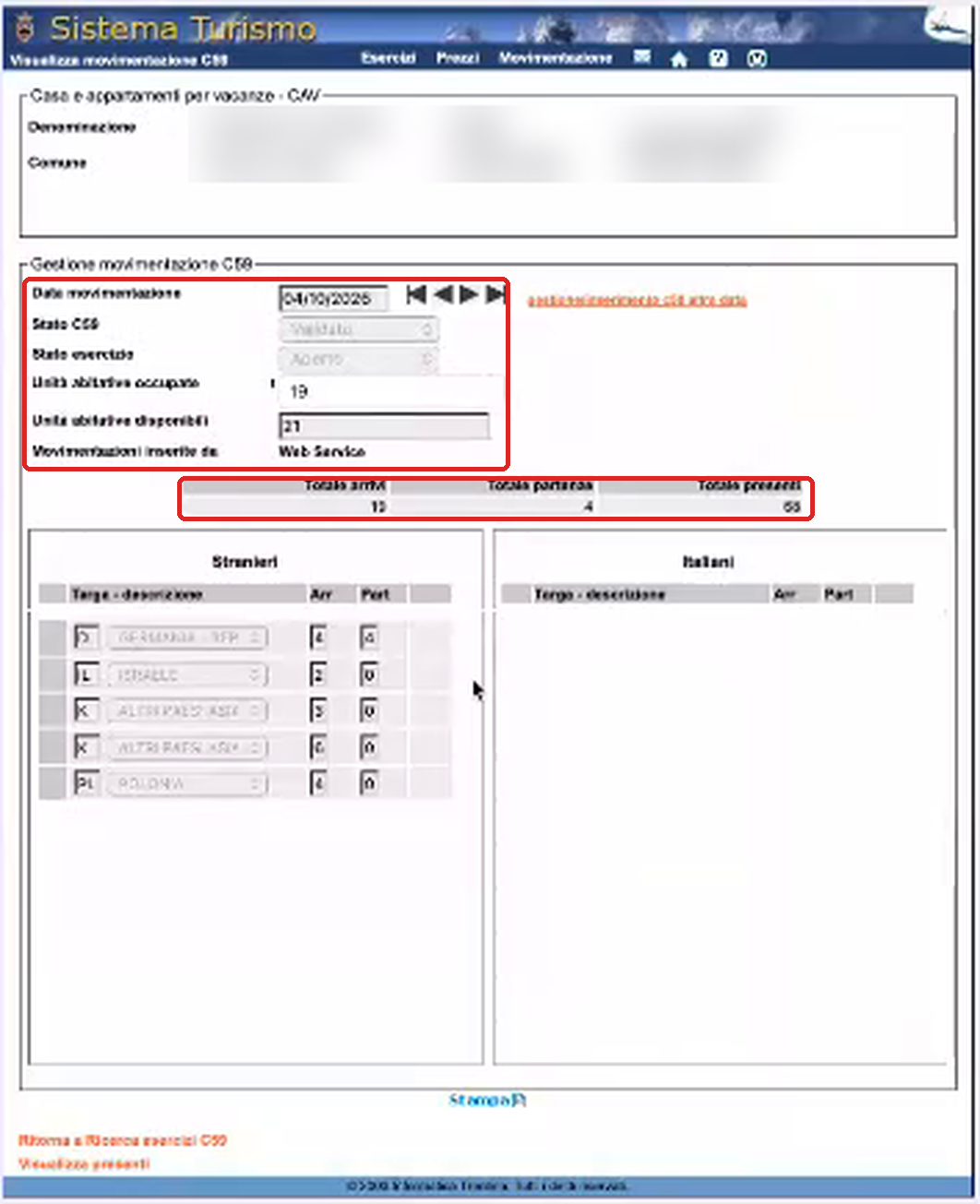
When you register guests, the C59 of that day has already been deposited on STU at 05:30 without them. SmartPMS cannot add them at a later time:
- a new Manual submission on that day changes nothing: in the Log the day appears completed with the message "C59 [date] was already present in Trento STU";
- on the STU portal, days sent by the PMS appear with Movements inserted by: Web Service and cannot be modified or deleted, neither from the portal nor from SmartPMS.
How to correct the day
- Contact the Province office that manages STU and ask to delete the C59s starting from the first day to be corrected (also all subsequent days: STU accepts days only in order).
- When the Province confirms, open ⋮ > Account diagnostics and check the next expected day: it must be the first deleted day.
- Perform a Manual submission with From = next expected day and To = yesterday (never today).
- Verify in ⋮ > Log and again in the diagnostics that the days appear deposited.
Before resending, ensure that in SmartPMS all guests of those days are registered in the Check-in tab with complete residence.
Related guides
Activation
Activation
Activation
Activation
Activation
Activation