

"To be assigned" reservation: is it an overbooking?
A reservation in the "To be assigned" row of the Calendar is not automatically an overbooking. This explains the difference between sold category and physical unit, why availability is daily, and the practical method to understand if you can free up a unit for the entire stay by moving other reservations or if it is a true overbooking.
You are in the right place if…10 cases
- “I have a reservation to be assigned: is it an overbooking?”
- “The reservation ended up in the orange 'To be assigned' row of the calendar”
- “Why didn't the system assign a room to the reservation?”
- “There are free rooms but the reservation remains to be assigned”
- “How do I know if it is a real overbooking?”
- “The portal sold a room that appears to be occupied”
- “I cannot find an apartment free for all nights of the stay”
- “How do I assign a reservation that has no unit?”
- “Reservation in 'to be assigned' status, is it an overbooking?”
- “Yellow/orange row on the calendar and reservation to be assigned. What does it mean?”
In short
A To be assigned reservation does not automatically mean overbooking. It is an intermediate state: the reservation is valid and confirmed, but SmartPMS did not find a single unit free for all the nights of the stay on its own. Often, it is enough to move a few reservations to assign it. It is only an overbooking if there is no free unit on at least one night of the stay.
Category and unit: what the portal sells
SmartPMS distinguishes between two things:
- the category, for example "Standard Double Room" or "Two-room apartment with sea view": this is what the guest purchases through the rate plan;
- the unit, i.e., the physical room or apartment (Room 101, Room 102, Apartment A): this is where the guest will sleep.
When a reservation arrives, the guest has bought a category for certain dates, not a specific room. Choosing the unit is a subsequent step.
Availability is daily
The availability that SmartPMS sends to the portals is calculated night by night and by category: for each night, it indicates how many units of that category are still free. The portal can therefore sell a stay of multiple nights if on every night there is at least one free unit, even if the free units are not always the same.
Example with two rooms of the same category:
| Mon | Tue | Wed |
|---|---|---|---|
Room 101 | free | occupied | free |
Room 102 | occupied | free | occupied |
Every night there is a free room, so the category appears available and a stay from Monday to Thursday can be sold. However, neither of the two rooms is free for all three nights.
Why a reservation ends up in "To be assigned"
When a reservation arrives without a unit, SmartPMS (with the property option Auto-assign reservations active) scans the units of the category and chooses the first one free for the entire stay. If no unit is free for all nights, as in the example, the reservation remains To be assigned: SmartPMS does not split the stay across multiple units on its own and does not move other reservations.
The reservation remains valid: it occupies the availability of the category, but not yet a specific unit.
Other cases in which a reservation may be found in "To be assigned":
- the property's Auto-assign reservations option is turned off;
- someone used Reset to be assigned from the reservation card;
- the reservation was restored after a cancellation and its unit was occupied in the meantime.
Where to find the "To be assigned" row
In the Calendar, the To be assigned row appears at the bottom of the category, below its unit rows, and is highlighted in orange. It only appears when that category has at least one reservation to be assigned.
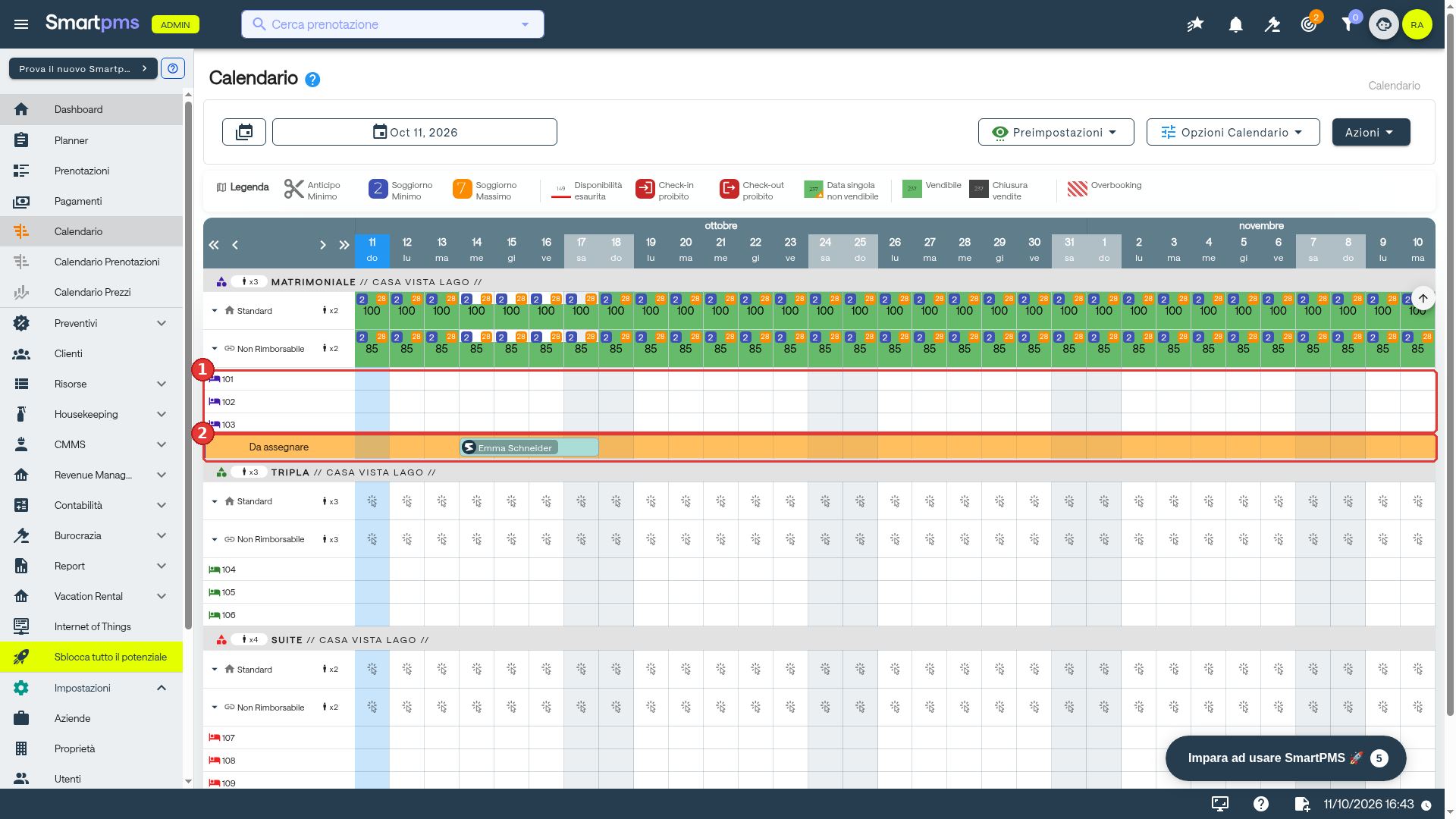
In the image: 1 the rows of the category's units; 2 the orange To be assigned row with the reservation not yet linked to a unit.
In the Reservations list, the same reservations have the To be assigned label.
The practical method: is it overbooking or not?
Look at the Calendar on the nights of the "To be assigned" reservation's stay, in the rows of the units of the same category:
- If on every night of the stay there is at least one free cell, even on different rows, it is not an overbooking: there is a combination of moves for the other already assigned reservations that frees up a unit for the entire period. Move the reservations and then assign the "To be assigned" one.
- If even on a single night there is no free cell, it is an overbooking: the nights sold are more than the available units. In this case, follow the guide Managing reservations: best practices and what to do in case of overbooking.
Returning to the example: Monday room 101 is free, Tuesday room 102, Wednesday room 101. If you move the reservation occupying 101 on Tuesday to 102 (free that night), 101 remains free for all three nights and you can assign the reservation to it.
How to assign the reservation
- If necessary, free up a unit by moving other reservations: drag each one vertically onto the row of a free unit on the same dates and confirm with Yes. Before releasing, check that the destination unit is free for all nights: SmartPMS does not block the move to an occupied unit and in that case, it signals the overbooking with red stripes.
- Drag the reservation from the To be assigned row onto the row of the now-free unit, or open it and choose the Unit in the Main tab, then save.
If you do not want to move other reservations, you can also split the stay: assign the reservation to a unit for the first few nights and use Split Reservation for the subsequent nights on another unit. In this case, the guest changes rooms during the stay: notify them.
How to drag, what the Do not move option does, and how the split works is explained in the guide Calendar: reading, opening, and moving reservations.
Frequently asked questions
5Does a 'To be assigned' reservation occupy availability?
Yes. A 'To be assigned' reservation is confirmed and reduces the availability of its room type, even if it does not yet occupy a specific unit. For this reason, it is not resold on portals.
There are free rooms but the reservation remains 'To be assigned': why?
Because no unit is free for all nights of the stay: the free cells are on different rows. SmartPMS automatically assigns only a unit that is free from arrival to departure and does not move other reservations. Use the practical method in this guide: if every night has at least one free cell, you can assign it by moving the other reservations.
Can SmartPMS move other reservations on its own to assign a 'To be assigned' reservation?
No. Automatic assignment only chooses a unit that is already free for the entire stay. You decide on the movements of other reservations, also because some reservations may have the Do not move option (for example, when the guest has specifically requested that room).
Where is the 'To be assigned' row located in the Calendar?
At the bottom of the room type, below its units, highlighted in orange. It only appears when there is at least one reservation to be assigned in that room type.
If there is no free cell on a night, what should I do?
It is an overbooking: first check on the portal that both reservations are actually active, then follow the steps in the guide Managing reservations: best practices and what to do in case of overbooking.
Related guides
Configuration
How it works
Configuration
How it works
Configuration
Configuration