

Configuring Housekeeping: how cleanings are created, calculated, and assigned
How to configure the Housekeeping Settings for a property: for which unit categories cleanings are created, who they are assigned to, how standard cleanings and linen changes are calculated, costs, durations, checklists, and Default Sets. It also explains how to use Regenerate, Update Costs, and Ical Link, and how to grant a collaborator visibility of the cleanings.
You are in the right place if…11 cases
- “The system assigns some cleanings to a user who should not receive them”
- “In the housekeeping settings I can select only one cleaner”
- “I would like a collaborator to see the cleaning calendar without being assigned to cleanings”
- “I have linked an accommodation to housekeeping but the cleanings do not appear in the calendar”
- “An apartment no longer has scheduled cleanings”
- “Cleanings alternate between two cleaners”
- “I don't know how often the refresh cleaning services are scheduled”
- “I changed the cleaning cost but the already created cleaning services still have the old amount”
- “How do I add the list of tasks to be performed for each cleaning service”
- “I would like to see the cleaning services in my Google Calendar”
- “Cleaning services are also created for options”
Where to find Housekeeping Settings
Housekeeping Settings are configured for each property. To open them, go to Property, open the General settings of the property, and choose the Housekeeping Settings card. If you manage multiple properties, each one has its own settings. For the same property, you can create more than one, for example with different agents for different unit categories.
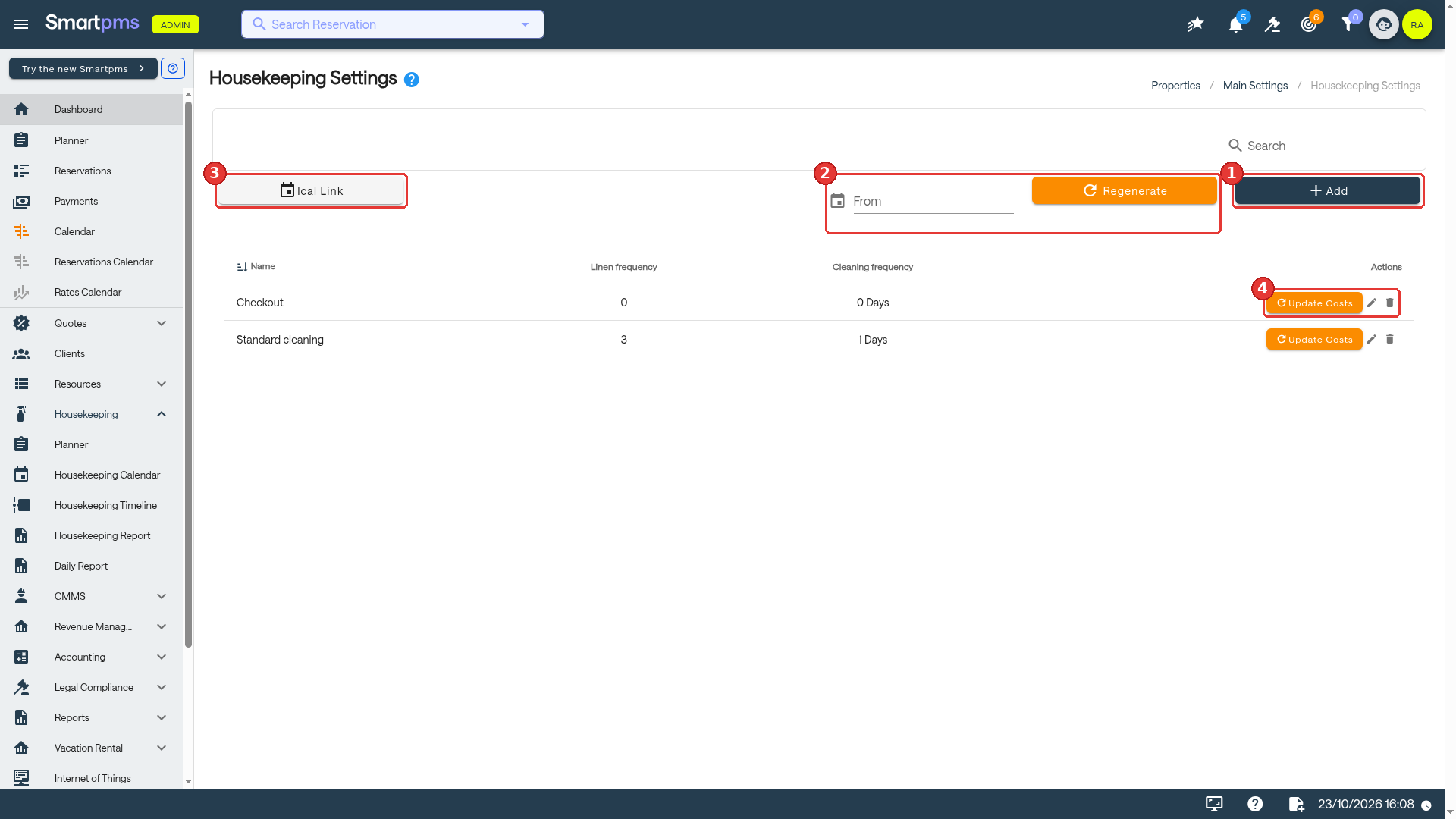
- Add creates a new setting.
- The From field and the Regenerate button apply the settings to existing bookings (see below).
- Ical Link provides the link to the cleaning calendar to add to your personal calendar.
- For each setting, you will find Update Costs and the icons to edit or delete it.
How Housekeeping Settings work
Cleanings are created automatically for every booking that has an assigned unit, based on the setting associated with the unit's unit category. This includes confirmed bookings, options, and pending bookings.
- If the unit category is not associated with any setting, no cleaning is created for its bookings.
- Each unit category can be associated with only one setting. If you add it to another setting, it will be moved there.
- Cleanings are recalculated when the booking dates or unit change. A change in the number of guests does not recreate the cleanings.
- If you cancel a booking, all its cleanings are deleted, including those already completed.
Setting fields
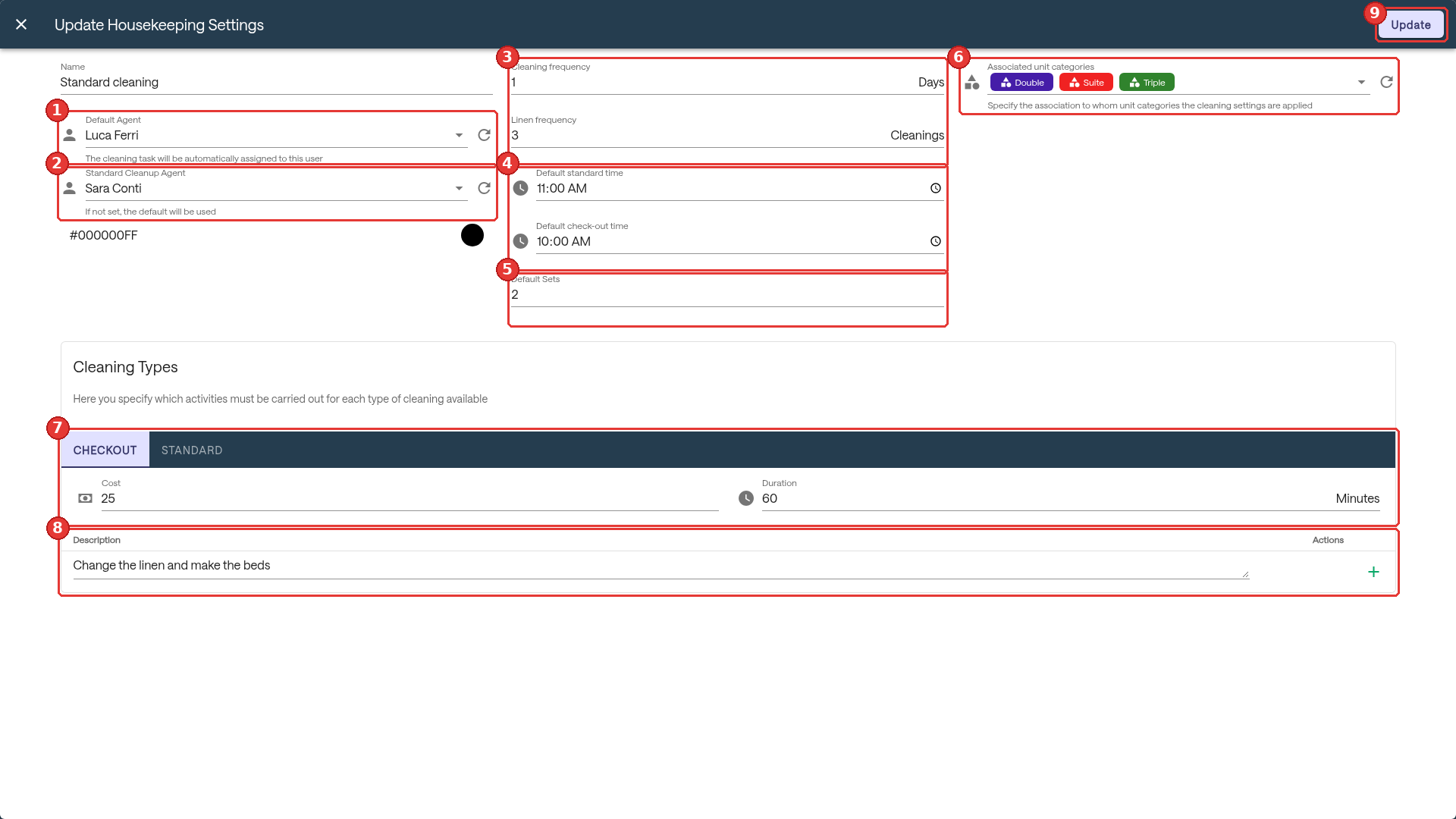
The Name and Color are used to identify the setting. The other fields, with the numbers from the screenshot:
- Default Agent: the user to whom the check-out cleaning is assigned.
- Standard Cleanup Agent: the user to whom standard cleanings (mid-stay cleanings) are assigned. If you leave it blank, standard cleanings also go to the Default Agent.
- Cleaning frequency indicates every how many days a standard cleaning is scheduled. Linen frequency indicates after how many standard cleanings the linen is changed. The calculation is explained in the next paragraph.
- Default standard time and Default check-out time are the times assigned to the cleanings. If the booking has its own check-out time, the check-out cleaning uses that.
- Default Sets: the sets of linen and towels to prepare for the check-out cleaning when no arrival is scheduled on the same day.
- Associated unit categories: the unit categories for which cleanings are created.
- Cleaning Types: for Checkout and Standard, you indicate the Cost and the Duration in minutes. The cost ends up in the Housekeeping Report, and the duration is used to estimate the time for each cleaning.
- Description: the list of tasks to perform. Add a row with the green +: agents see it as a checklist of the cleaning phases.
- Save with Create or Update.
For each agent field, you can indicate only one user: cleanings are not distributed in turns among multiple people. If you see cleanings "alternating" between two agents, usually one user is indicated as Default Agent and another as Standard Cleanup Agent, or the unit categories are associated with settings with different agents.
How standard cleanings and linen changes are calculated
Check-out cleaning. It is scheduled on the day of check-out and always includes a linen change.
Standard cleanings.
- They are scheduled every N days counting from check-in, where N is the Cleaning frequency.
- They never fall on the check-in day or the check-out day.
- With a frequency of 0, no standard cleaning is scheduled.
Examples with frequency 3:
- 7-night stay: standard cleanings on the 3rd and 6th day;
- 6-night stay: only one standard cleaning, on the 3rd day, because the 6th is the check-out day.
Linen change during standard cleanings. It happens every N standard cleanings, where N is the Linen frequency. With 2, for example, the linen is changed at the 2nd, 4th and 6th standard cleaning. With 0, standard cleanings never include a linen change.
Default Sets and next arrival
For the check-out cleaning, the system looks for an arrival on the same unit and on the same day.
- If it finds one, the cleaning card shows the number of arriving guests.
- Otherwise, it shows the Default Sets.
The connection with the arrival is updated automatically several times a day, for today's cleanings and those of the following two days. For more distant cleanings, it is normal to still see the Default Sets: the number updates as the date approaches.
Giving visibility of the cleaning calendar without assigning cleanings
Agent fields decide who is assigned a cleaning, not who can see it. To let a collaborator view the cleanings without assigning any to them (for example, someone managing the linen stock):
- Create the user from Settings → Users with the key role Cleaning Service User and tick the properties they need to see in Assigned Properties.
- Do not indicate them as Default Agent or Standard Cleanup Agent in any Housekeeping Setting.
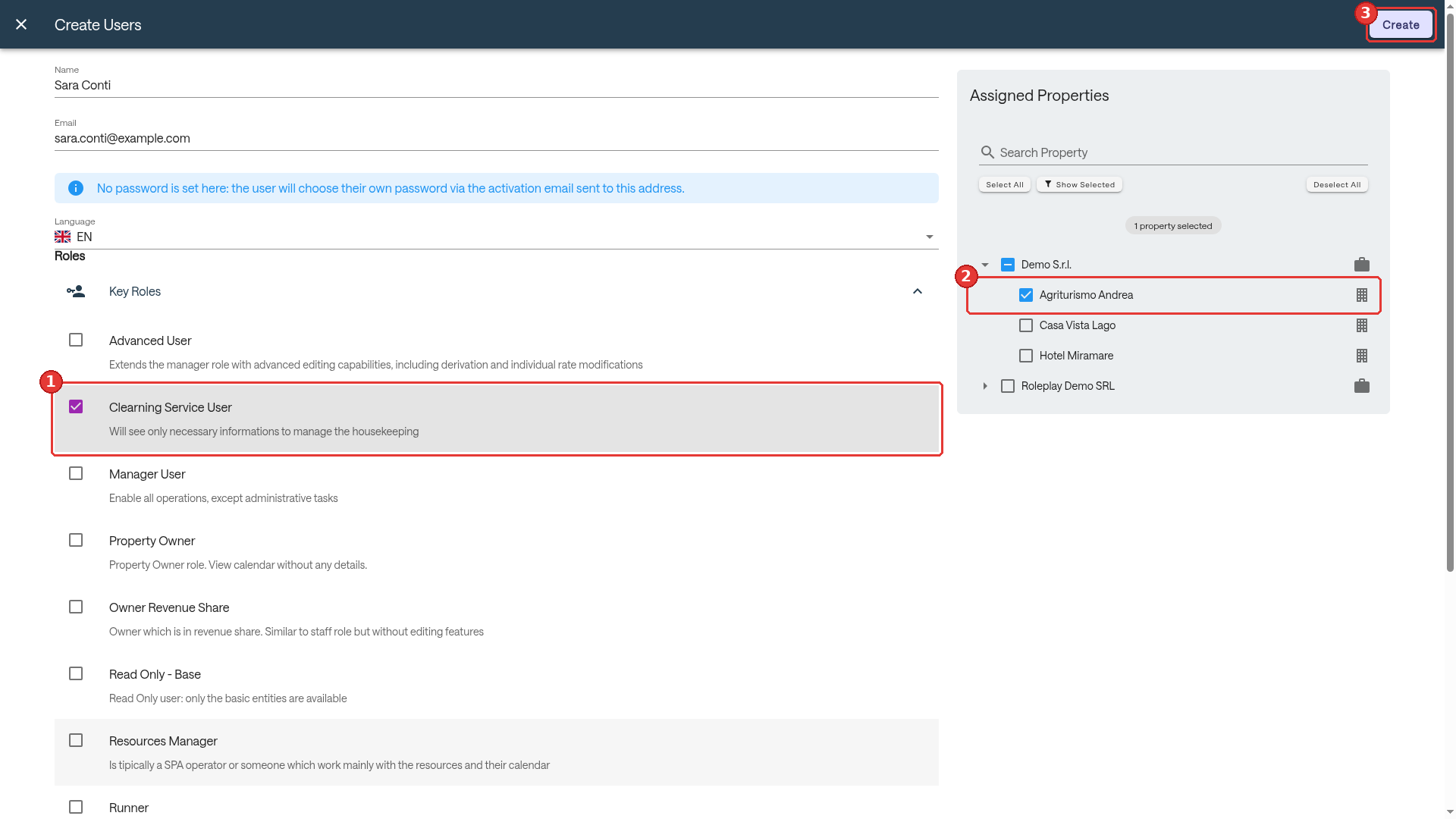
The user will see the cleanings of all properties they have access to, even those assigned to others, provided they do not activate the Assigned to me filter. The Cleaning Service User role also allows marking cleanings as completed: there is no read-only housekeeping role.
When to use Regenerate
When you save a setting (for example, you add a unit category or change the agent), the change applies to new bookings and those that are modified. The cleanings of existing bookings do not update on their own.
To apply the settings immediately to existing bookings as well:
- Indicate in the From field the date to start from (if you leave it blank, it applies to today).
- Press Regenerate.
The regeneration:
- concerns confirmed bookings of the property with check-out from that date onwards;
- deletes and recreates not yet completed cleanings according to the current settings;
- does not touch already completed cleanings.
Manual changes made to individual cleanings (agent, time, notes) are lost and must be re-entered after regeneration.
Updating the costs of already created cleanings
Each cleaning takes the cost indicated in Cleaning Types at the moment it is created. If you change a cost, existing cleanings keep the old one. To apply the new cost:
- Indicate the date in the From field (if you leave it blank, it applies to today).
- Press Update Costs on the setting row.
The cost is updated on all cleanings of that setting from that date onwards, including those already completed.
Viewing cleanings in your calendar (Ical Link)
With Ical Link, you get a link to copy and paste into an external calendar, for example, Google Calendar. Every future cleaning of the property appears as a full-day event, with the cleaning type and the unit. The link does not show the agent, the time, or the number of guests.
Anyone with the link can see the calendar: share it only with those who need to consult it.
Frequently asked questions
5I added a user to housekeeping and now they receive some of the cleanings: why?
Cleanings are assigned based on the Default Agent (check-out cleanings) and Standard Cleanup Agent (standard cleanings) fields of the Housekeeping Settings. If the user is indicated in one of these fields, they receive cleanings of that type for all unit categories associated with that setting. To remove them, remove the user from the agent fields, save, and use Regenerate on the property to reassign the already created cleanings.
I associated a unit category with a housekeeping setting, but the cleanings for existing bookings are not appearing
Saving the setting updates the link, but it does not create cleanings for existing bookings: they will only be created for new bookings or modified ones. To create them immediately, use Regenerate on the property: the system will recreate the cleanings for all confirmed bookings with a check-out date from the date indicated in the From field (if empty, from today). Remember that the regeneration replaces the property's incomplete cleanings, so any manual changes must be re-entered.
Why are there no standard cleanings for short stays?
Standard cleanings never fall on the check-in or check-out day. With a Cleaning frequency of 3 days, a 3-night stay has no standard cleanings, because the 3rd day is the check-out day. It has one starting from 4 nights. If you want more frequent standard cleanings, reduce the frequency and use Regenerate to apply it to existing bookings.
I changed the cleaning cost, but the Housekeeping Report still shows the old amount
The cost is copied to the cleaning task when it is created. To update existing cleanings, specify the date in the From field and click Update Costs on the setting row: the new cost will be applied from that date onwards, including cleanings that have already been completed.
Can a cleaning agency see other agencies in the "Assigned to" list of the Smartpms Cleaner app: can they be hidden?
No. When an agent opens a cleaning task, the Assigned to list shows all users with the Cleaning Service User role who have access to the same property, so the task can be reassigned. The Cleaning Service User role has fixed permissions, and there is no setting or role that hides other agents or agencies. The Assigned to me filter only limits the cleaning tasks shown, not the list of agents.
Related guides
Configuration
Configuration
Configuration
Configuration
Configuration
How it works