Checking Smartness subscriptions: status, amount, renewal, and scheduled cancellation
Where to view active subscriptions for each product from the Smartness platform Administration, including status, number of properties, amount, next billing date, and next renewal date, what Scheduled cancellation means, and how to request more units.
You are in the right place if…8 cases
- “Which Smartness subscriptions do I have active?”
- “When does my SmartPMS subscription renew?”
- “How much do I pay for my subscription per year?”
- “What does Scheduled cancellation mean for my subscription?”
- “My subscription is expiring, what happens?”
- “When will the next subscription invoice arrive?”
- “How do I add more units to my subscription?”
- “Where can I see the invoices for a single subscription?”
In the Smartness platform Administration, you can find all account subscriptions, divided by product. You need them to understand what you are paying for, when the next invoice will be issued, and when each service expires or renews.
A quick summary is in the Active subscriptions box of the Overview. The full detail is in Billing.
Where to find them
- Open the Administration (platform.smartness.com → Administration) and click on Billing in the side menu.
- In the Overview tab, select the billing profile on the left (if you have more than one).
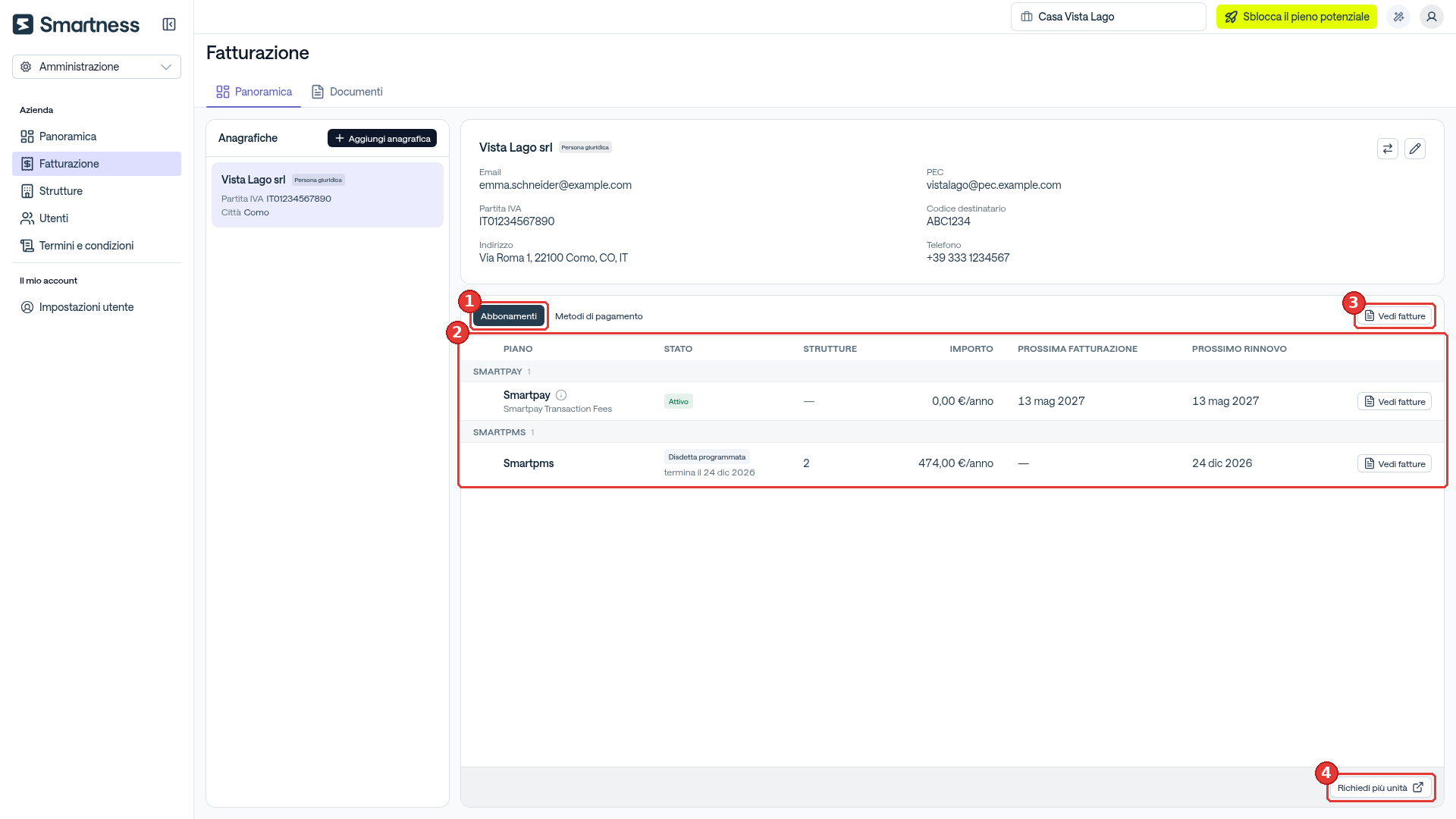
- In the box at the bottom right, keep the Subscriptions tab (1) selected.
How to read the table
The table (2) groups subscriptions by product (e.g., SMARTPAY, SMARTPMS) and shows for each:
- Plan: the name of the plan or service.
- Status: for example Active, or Scheduled cancellation with the date the service ends.
- Properties: how many properties the subscription covers.
- Amount: the cost, for example in €/year.
- Next billing: when the next invoice will be issued.
- Next renewal: when the subscription renews or, with a scheduled cancellation, when it ends.
Scheduled cancellation
The Scheduled cancellation status indicates that the subscription has been cancelled but remains active until the indicated date ("ends on …"). Until that date, you can continue to use the service; afterwards, it is no longer renewed and no new billing is scheduled (the Next billing column is empty).
Invoices and more units
- View invoices (3) at the top opens the profile's documents; the View invoices button on each row shows only the invoices for that subscription.
- Request more units (4), at the bottom, opens the page to request an expansion of the subscription, for example when you add units to your properties.
Frequently asked questions
2I see a Smartpay subscription at €0.00/year: why?
Smartpay does not have a fixed fee: the €0.00/year subscription is used to invoice transaction commissions (Smartpay Transaction Fees). The related invoices appear in the Documents tab under the Smartpay product.
I want to cancel a scheduled cancellation or change my plan: where do I do that?
Contact Smartness support or your sales representative: they will help you modify the subscription.
Related guides
How it works
Configuration
Configuration
Configuration
Configuration