Account properties and requesting more units
Where to view the properties linked to your account from the Smartness platform Administration with the number of units included, and how to request more units when adding them to your property.
You are in the right place if…6 cases
- “How do I add new units to my Smartness subscription?”
- “I bought a new apartment: how do I add it to the subscription?”
- “How many units do I have included in my subscription?”
- “Where can I see the properties linked to my Smartness account?”
- “I have reached the unit limit, how do I request more?”
- “I want to expand my SmartPMS subscription”
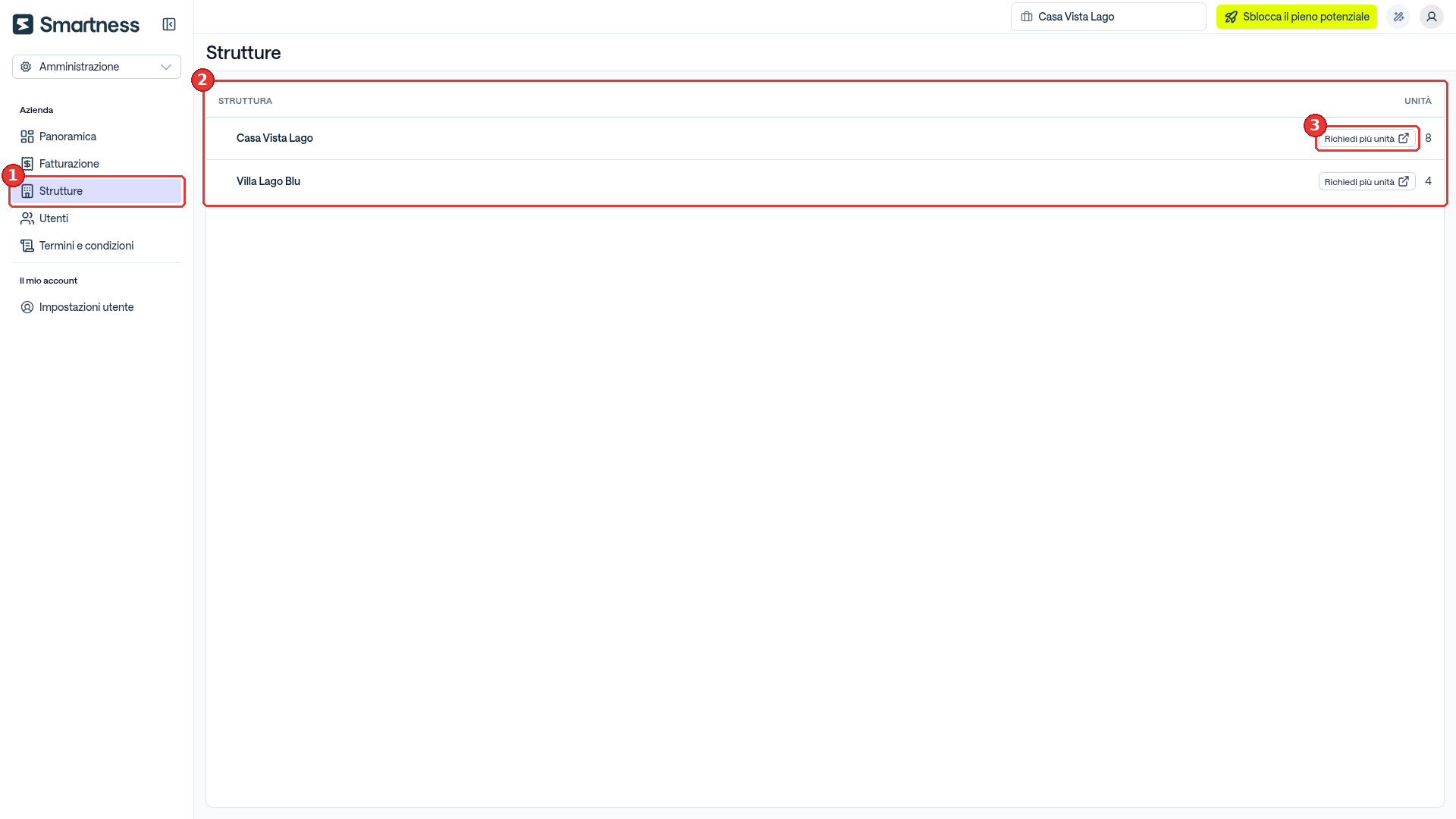
The Properties page in the Administration section lists the properties linked to your Smartness account and, for each one, the number of units (rooms or apartments) included. This is the starting point when your property grows and you need more units in your subscription.
Viewing properties
- Open the Administration (platform.smartness.com → Administration).
- In the side menu, click on Properties (1).
- In the table (2), you will find the name of each property and, in the Units column, how many units it includes.
Requesting more units
- On the property row, click on Request more units (3).
- The page to modify the subscription will open: indicate how many units you need and submit the request.
The same Request more units button is also available in Billing, at the bottom of the subscription box.
The new units are then created and configured in the product where you use them (for example, in SmartPMS).
Related guides
How it works
How it works
Configuration
Configuration
Configuration
Configuration