Adding or changing your Smartness subscription payment method
Where to view and manage the methods used to pay for your subscription (e.g., an IBAN) from the Smartness platform Administration: status, primary method, adding a new method, and removing an old one.
You are in the right place if…6 cases
- “How do I change the IBAN for my Smartness subscription charge?”
- “I want to pay for my subscription with another account”
- “Where do I add a payment method for Smartness?”
- “I have changed banks, how do I update my payment details?”
- “Which payment method does Smartness use to charge me for the subscription?”
- “How do I remove an old payment method?”
The payment methods in the Administration are those used by Smartness to charge your subscription, such as an IBAN account. These should not be confused with Smartpay, which is used to collect payments from your guests.
This section is reserved for the subscription owner and account administrators.
Viewing payment methods
- Open the Administration (platform.smartness.com → Administration) and click on Billing.
- In the Overview tab, select the billing profile on the left.
- In the bottom-right box, click on the Payment methods tab (1).
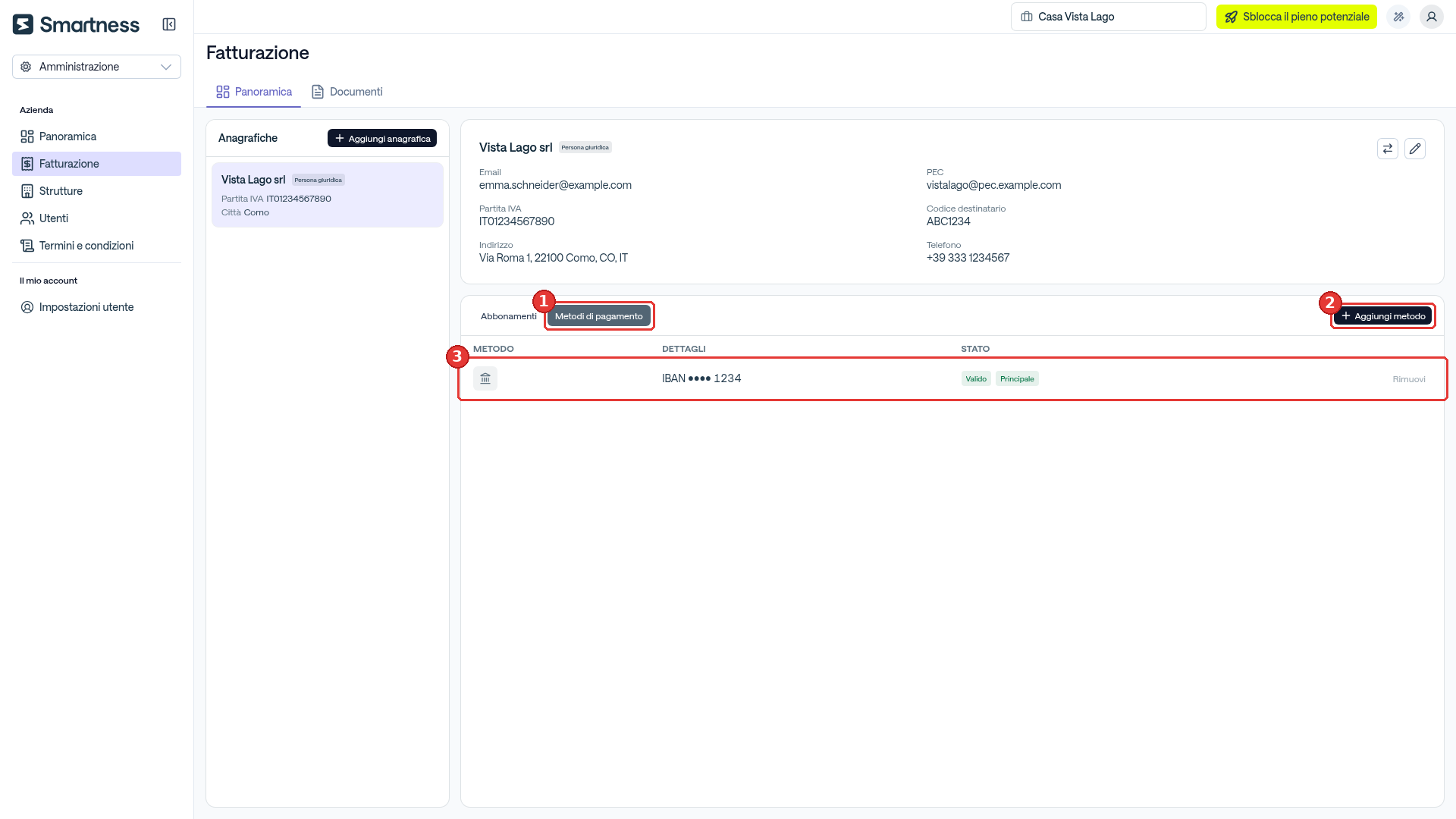
Each row (3) shows the method type (e.g., IBAN with the last four digits), the status (e.g., Valid), and the Primary label for the method used for charges.
Adding or changing a method
- Click on Add method (2) and complete the required details in the window that opens.
- Check that the new method appears in the list with a Valid status.
- If you no longer need the old method, click on Remove on its row.
Before removing the Primary method, ensure you have added and validated another one, so that future charges do not lack a payment method.
Frequently asked questions
2Is the Administration payment method the same account where I receive Smartpay payments?
No. Here you manage how you pay for your Smartness subscription. The account where you receive your guests' payments is configured in the Smartpay account, from the product where you use it (e.g., SmartPMS).
The subscription charge failed: what should I do?
Update your payment method from the Smartness platform Administration: platform.smartness.com → Administration → Billing → Overview tab → Payment methods. Click Add method and ensure the new method is Valid and set as the Primary method.
No further action is required: after the update, the outstanding invoice will be automatically recharged to the new payment method.
Related guides
How it works
Configuration
How it works
Configuration
Configuration