

Example: how to configure an apartment in SmartPMS
Complete example of configuring an apartment for short-term rentals in SmartPMS: creating the property, one room type with a single unit and three rate plans, a Standard Rate, a Non-Refundable rate at -10%, and a Weekly Rate at -15% with a minimum stay of 7 nights.
You are in the right place if…7 cases
- “How do I configure my apartment or vacation rental in SmartPMS?”
- “I have only one apartment: how many room types and units should I create?”
- “How do I create a weekly rate with a minimum stay of 7 nights?”
- “The weekly rate is bookable even for a few nights”
- “The minimum stay of 7 nights disappears from the weekly rate”
- “Example of configuring a vacation rental with multiple rates”
- “Example 2: Apartment Configuration”
In this example, we configure Casa Vista Lago, a three-room apartment for short-term rentals with three rate plans: a standard rate, a non-refundable rate discounted by 10%, and a weekly rate discounted by 15%, bookable only for at least 7 nights. For the meaning of each field, see the guide How to configure a property in SmartPMS.
1. Create the property
- Go to Settings → Property and click Add.
- Fill in Name (Casa Vista Lago), Email, the address from Search address, Country, Phone with prefix, and Company.
- Click Create.
Then set the property type: in the property settings, click Open in PMS Next, open Property type in General Settings, choose Apartment, and click Save property type. Once you have configured the room type, also indicate its accommodation type from Accommodation type of room types. The complete steps are in Set the property type, in the guide How to configure a property in SmartPMS.
2. Configure the room type
An apartment usually has one room type with a single unit.
- Open Settings of the property, then Units and Rates → Room types → Configure.
- Click Edit on the BASE room type and set:
- Name: Three-room apartment with Balcony, Label: TCB
- Base Occupancy 2, Maximum Occupancy 4
- Maximum Adults 4 and Maximum Children 3: when modifying the BASE, these must be corrected manually
- Cleaning price: 50
- Click Edit and confirm with Yes the warning about the occupancy change.
3. Rename the unit
The room type already has its unit, created automatically with the name BASE. Go to Units and Rates → Units → Configure, click the pencil icon, and rename it Casa Vista Lago. There is no need to create other units.
4. Create the Standard Rate
In Units and Rates → Rate plans → Configure click Add and fill in:
- Name: Standard Rate
- Minimum price: 80
- Board: Room only
- Refundable active, Refundable before: 14 days, Cancellation penalty: 30%
- Room types: Three-room apartment with Balcony
Click Create.
5. Create the Non-Refundable Rate
Click Add and fill in:
- Name: Non-Refundable Rate, Minimum price: 70, Board: Room only
- Refundable deactivated
- Room types: Three-room apartment with Balcony
- Derived from: Standard Rate, with Length of stay, Restrictions, and Stop Sell active
- Variation Type: Percentage, Variation Amount: -10
Click Create.
6. Create the Weekly Rate
Click Add and fill in:
- Name: Weekly Rate, Minimum price: 65, Board: Room only
- Refundable active, with the same conditions as the standard one
- Room types: Three-room apartment with Balcony
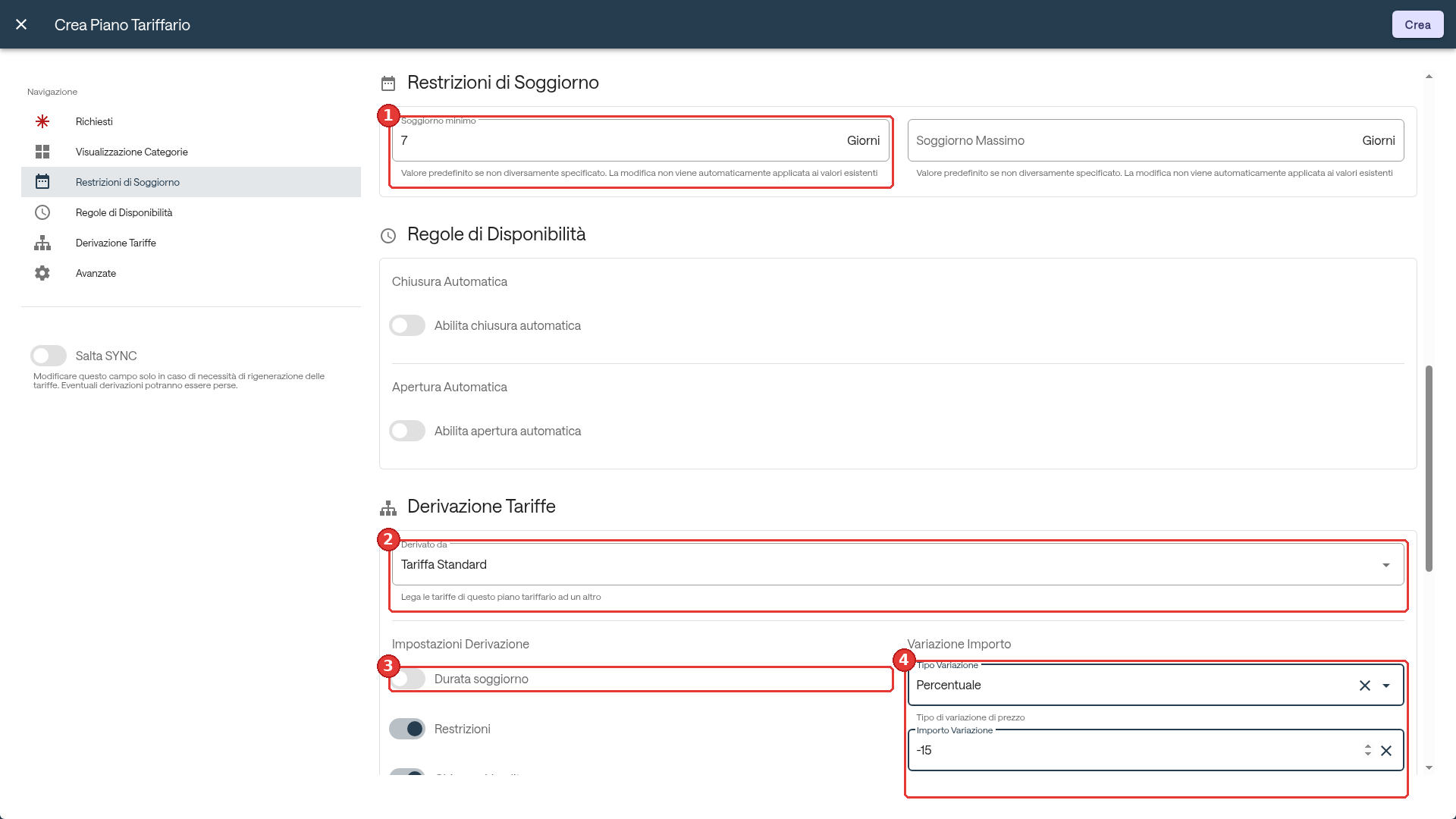
- Minimum stay: 7, in the Stay Restrictions section
- Derived from: Standard Rate
- Length of stay deactivated, Restrictions and Stop Sell active
- Variation Type: Percentage, Variation Amount: -15
Click Create.
Length of stay should be left deactivated: if it were active, the minimum stay of the weekly rate would always be replaced by that of the Standard Rate, and the rate would be bookable even for a single night. With Length of stay deactivated, the Weekly rate does not inherit either the minimum or maximum stay of the Standard rate: you manage them yourself on this rate.
Result
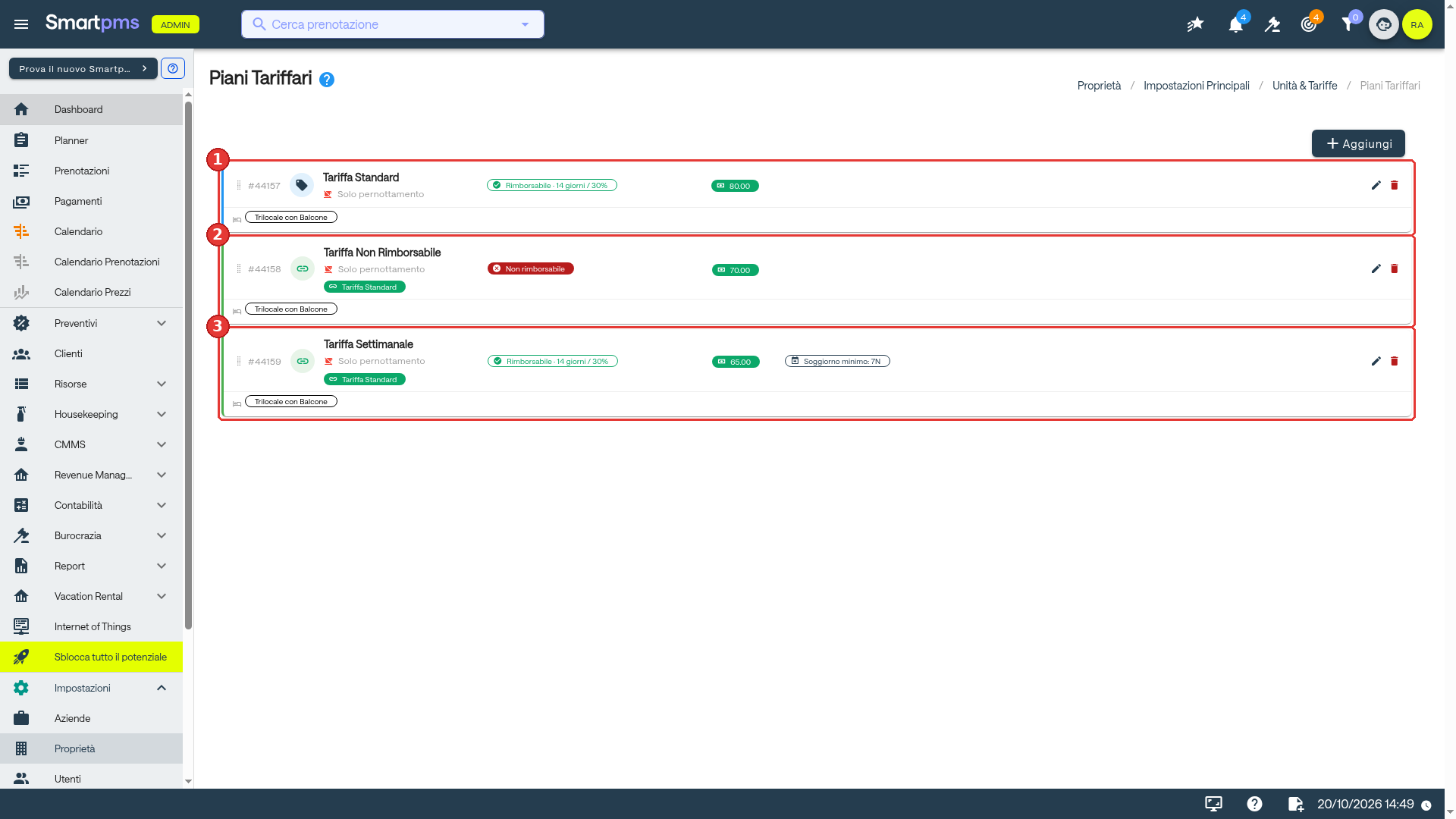
Enter prices only on the Standard Rate: the Non-Refundable and the Weekly rates calculate themselves. The minimum stay of 7 nights is applied to the Weekly Rate the first time a date receives a price; on dates that already had a price, it must be set from the Price Calendar, and from there you can change it for individual periods.
| 1 | Non-Refundable: 150 € × 90% | 135,00 € |
| 2 | Weekly: 150 € × 85% | 127,50 € |
Frequently asked questions
2I already have a derived weekly rate but it is bookable even for a few nights: how do I correct it?
In the Price Calendar, open the chain icon on the Weekly Rate row (or Settings → Derivations) and deactivate Length of stay. Then select the dates on the Weekly row and set the minimum stay to 7. The minimum stay indicated in the rate plan is only valid as a default value for dates receiving a price for the first time. If you use revenue management like Smartpricing, verify that it does not send a different minimum stay on this rate.
Do I need a separate non-refundable plan on Airbnb?
No: on Airbnb, each listing connects to only one rate plan, and the cancellation policy is set on the listing. The SmartPMS Non-Refundable rate is for the Booking Engine, manual bookings, and portals that manage multiple plans, such as Booking.com.
Related guides
How it works
How it works
Configuration
Configuration
Configuration
Configuration