

How to connect BeSafe Rate to SmartPMS
How to connect SmartPMS to BeSafe Rate, the prepaid rate with cancellation insurance: the subscription owner approves access via the partner authorization link, BeSafe Rate and the owner receive the API user credentials, and from Settings → Users you choose the properties visible to BeSafe Rate. In the FAQs: link not working, BeSafe rates not visible, moving bookings to the BeSafe rate.
You are in the right place if…10 cases
- “I want to connect BeSafe Rate to SmartPMS”
- “How do I authorize BeSafe to access my properties?”
- “The BeSafe authorization link does not work”
- “You sent me a code for BeSafe, what should I do with it?”
- “BeSafe is asking me for connection credentials”
- “I don't know if the other properties are connected to BeSafe, where can I check?”
- “BeSafe rates have disappeared from the Booking Engine”
- “How do I move an existing booking to the BeSafe rate?”
- “I want to offer guests a protected rate with cancellation insurance”
- “How do I connect SmartPMS with BeSafe Rate?”
What is BeSafe Rate
BeSafe Rate is an external service that allows you to sell a prepaid rate with included insurance: the guest pays in advance and, if they have to cancel for one of the covered reasons, they are reimbursed by the insurance; you collect the payment immediately and do not lose the revenue from the cancelled booking. Refund procedures are handled by BeSafe.
To function, BeSafe Rate must be able to read your properties and bookings from SmartPMS. The connection is made via partner authorization: you do not need to manually create any user, the subscription owner just needs to approve access.
This guide describes the authorization of the connection. To configure the BeSafe rate and rate plans, follow the instructions from BeSafe Rate.
- Log in to SmartPMS with the subscription owner's account, in the same browser where you will open the link. If you are not logged in, the link will first take you to the login page and then return to the authorization request.
- Open the authorization link: SmartPMS - BeSafe Rate Authorization Link
- On the Authorize BeSafeGroup page, check the request: BeSafe is requesting API access to all your company's properties.
- Click on Approve access. A confirmation that access has been granted will appear.
- A dedicated API user is automatically created: both BeSafe Rate and the subscription owner receive its credentials via email, which BeSafe Rate will use to connect.
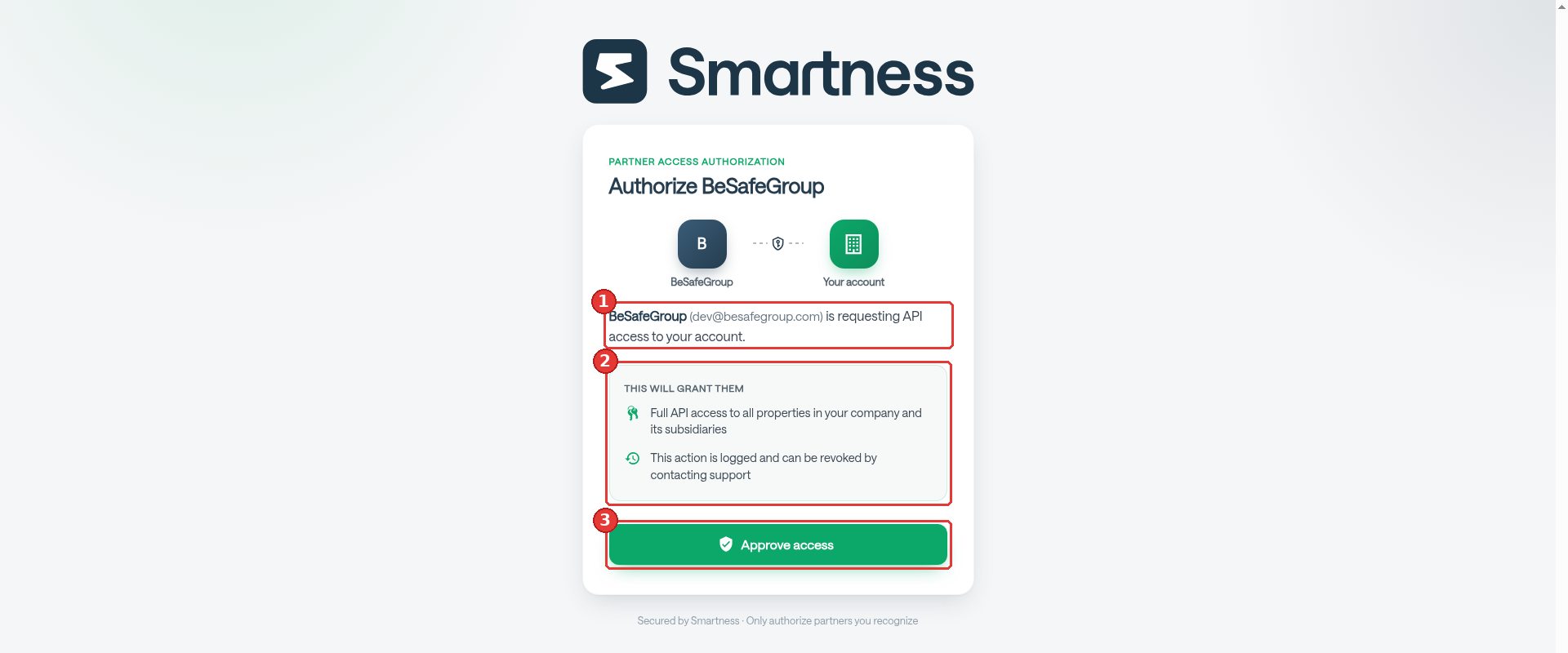
In the image: 1 the access request from BeSafeGroup; 2 what you are granting (API access to all company properties, registered and revocable via support); 3 the Approve access button.
Access to properties: the authorization gives BeSafe Rate access to all properties of your company. To exclude some, or add those created later, modify the API user properties as described in point 2. The granted access can be revoked by contacting support.
2. Choosing the properties visible to BeSafe Rate
BeSafe Rate only sees the properties enabled for the API user created with the authorization.
To exclude one or more properties:
- Go to Settings → Users.
- Locate the BeSafe Rate API user: their email is the one indicated in the credentials received after authorization.
- Click on Actions → Edit.
- In the Assigned Properties panel, deselect the properties that BeSafe Rate should not access and save.
To add a new property in the future:
- Go to Settings → Users and open the BeSafe Rate API user with Actions → Edit.
- Select the new property in Assigned Properties and save. There is no need to repeat the authorization.
- Notify BeSafe Rate that you have added the property, so they can complete the configuration.
Do not modify the API user roles and do not deactivate it: if the user is deactivated, BeSafe Rate will no longer be able to read the data.
Frequently asked questions
1Related guides
Activation
Activation
Configuration
Configuration
Configuration
Configuration